Ethernet-I/P Fieldbus Expansion Unit
PAGE 12
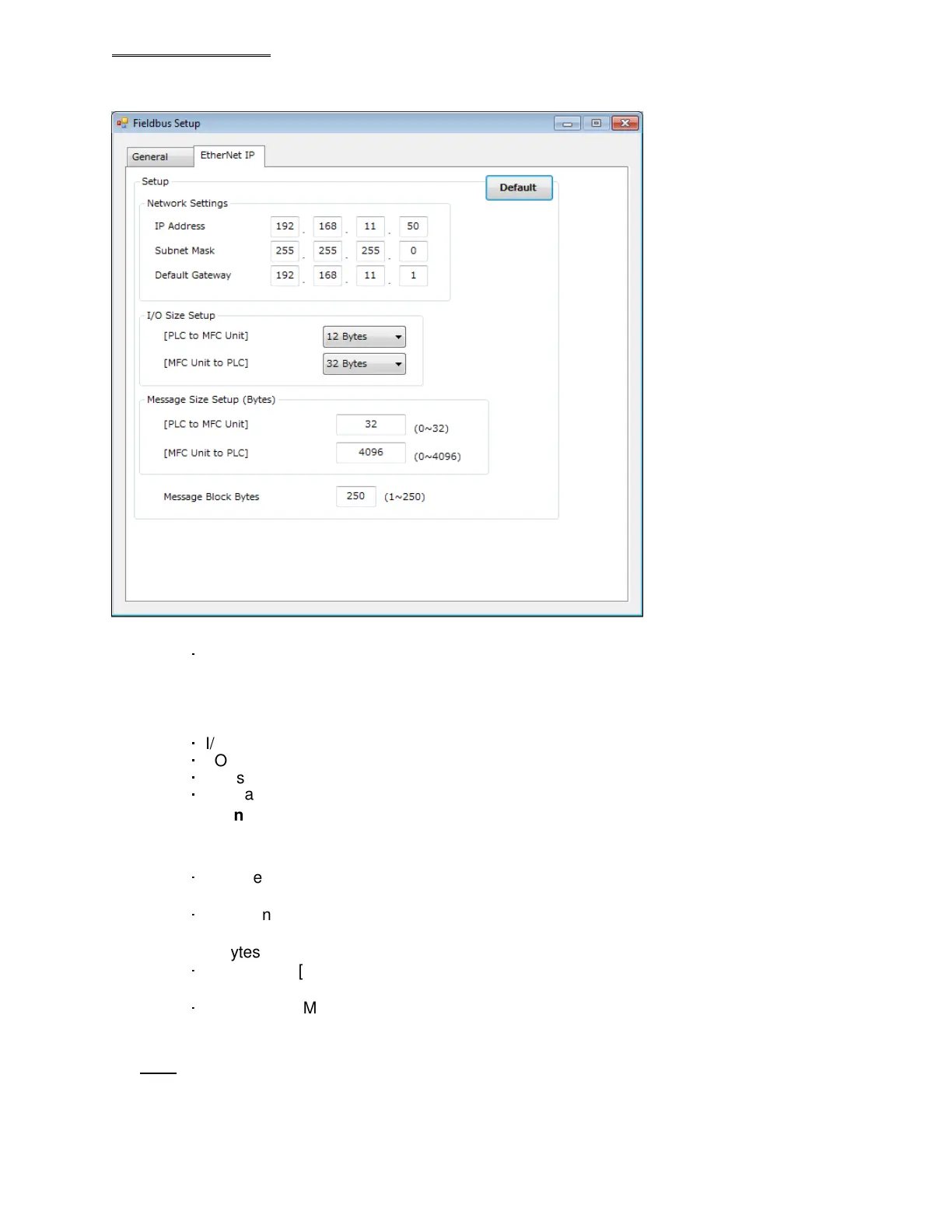
In the Ethernet-I/P screen (of the AFC3000 Software), setting of the Ethernet-I/P interface is performed. The
network settings, the I/O size, and the Explicit message size can be changed.
● Default (the settings are set to the factory settings when this is selected)
・
Network Settings
IP address 192.168.11.50
Subnet Mask 255.255.255.0
Default Gateway 192.168.11.1
・
I/O Setting Data Length (FEC INPUTS) [PLC to MFC Unit]: 12 bytes [96 bits]
・
I/O Setting Data Length (FEC OUTPUTS) [MFC Unit to PLC]: 32 bytes [256 bits]
・
Message Data Length [PLC to MFC Unit]: 32 bytes
・
Message Data Length [MFC Unit to PLC]: 4096 bytes
* The number of message block bytes is fixed at 250 bytes.
●
I/O Size setting
・
Data Length (FEC INPUTS) [PLC to MFC Unit]
Setting range: 2 bytes [16 bits] to 12 bytes [96 bits]
・
Data Length (FEC OUTPUTS) [MFC Unit to PLC]
Setting range: 2 bytes [16 bits] to 32 bytes [256 bits]
●
Message Bytes Size Settings
・
Data Length [PLC to MFC Unit]
Setting range: 0 byte to 32 bytes
・
Data Length [MFC Unit to PLC]
Setting range: 0 byte to 4096 bytes
Note: Power must be cycled if any of this configuration is changed and downloaded to the Master
controller


 To Next Page
 Loading...
