Ethernet-I/P Fieldbus Expansion Unit
PAGE 35
Transferring the Fastening Result data to PLC using the MSG function
For setting up the MESSAGE function, first the AFC3000 system needs to be configured for the data type
that needs to be sent to the PLC. Configuration is done in the AFC3000 Software.
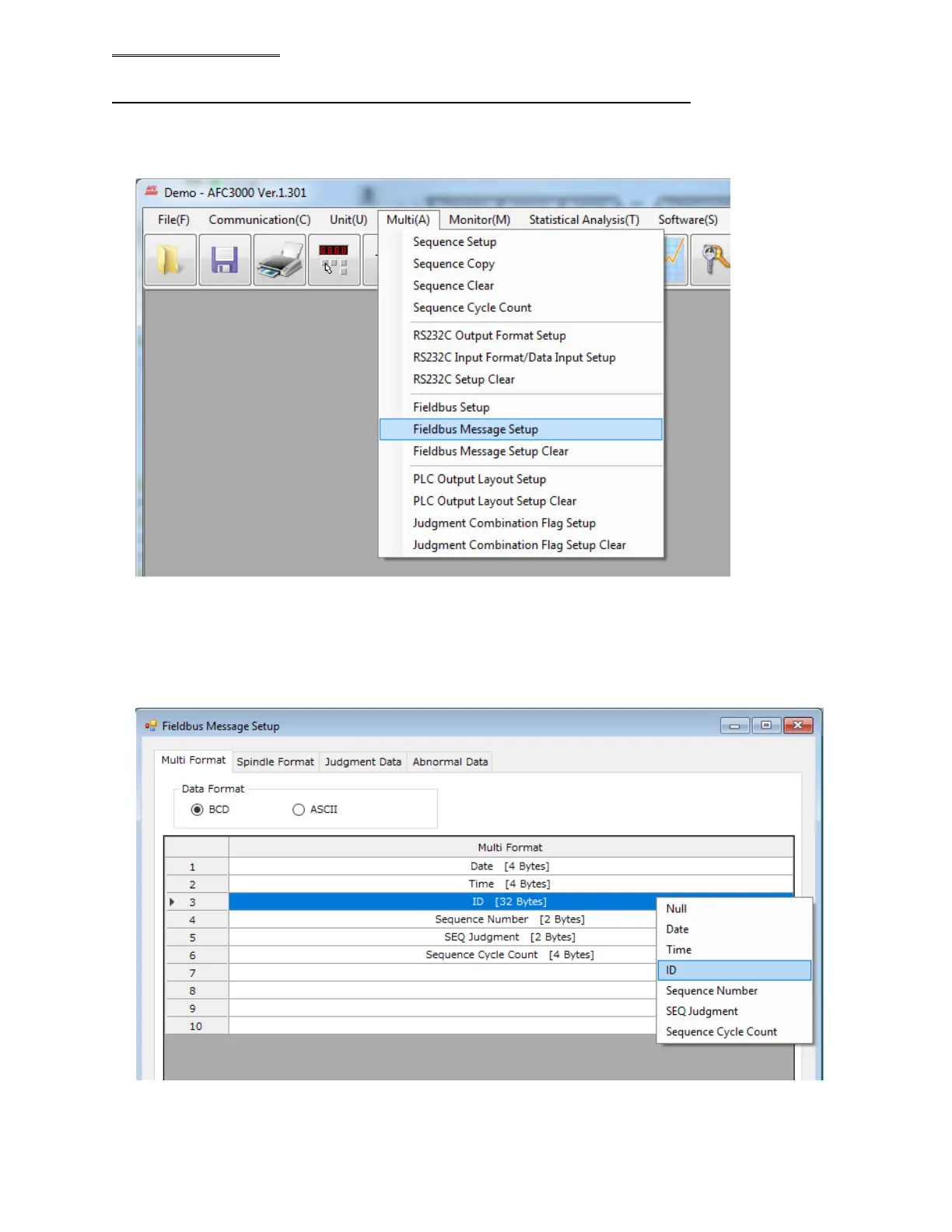
Select “Field Bus Message Setup” from “Multi” pull down menu.
Select the DATA TYPE format (BCD or ASCII).
Data from the Multi and Axis (Spindle) must be configured in each tab of the table below. The Multi
format contains the “Header” data (such as Date, Time, Sequence #, Cycle Count, etc. – aka data that is
for all connected spindles). The Axis format contains the actual spindle fastening data (such as Torque,
Angle, Time, Rate, etc.) Right click on the table and select the item from the pop-up window that you
wish to be transferred to the PLC.
(Example of Multi format selection shown above)
Note: Selecting “Null” deletes the item from the list.



 To Next Page