Chapter One: Setting Up FSMS
86 FedEx Ship Manager
®
Server User Guide, Version 7.6
NOTE:
There may be some differences in the steps required to set permissions for network printers
depending on your operating system. The steps included above are for Windows NT 4.0. If you
have any questions regarding any printer functionality for your operating system, consult the
Windows Help option.
Troubleshooting Your FSMS Application
FSMS provides a tool, Close Monitor, for troubleshooting any problems with your FSMS application.
Close Monitor
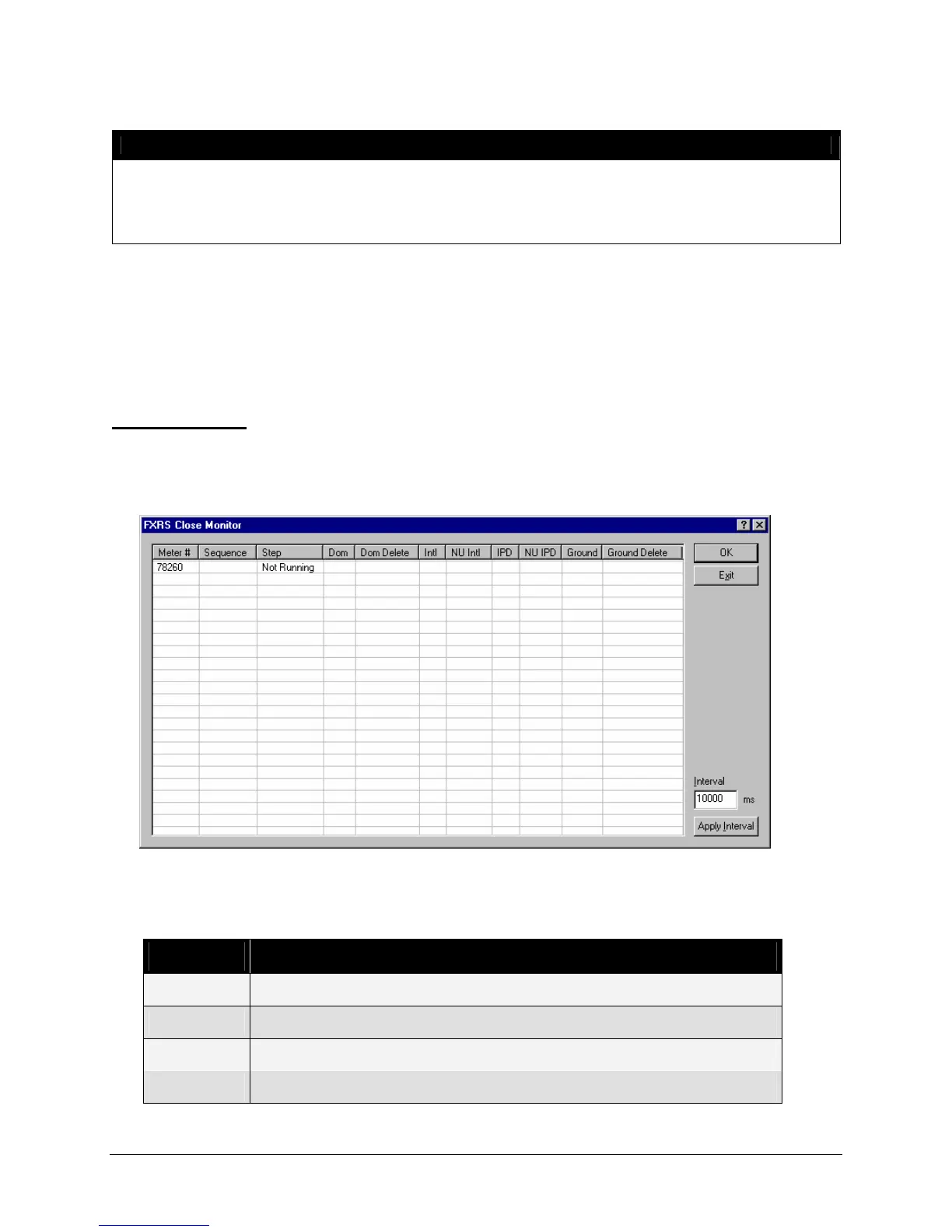
The Close Monitor program is part of FSMS and monitors what step a meter is on during the Close
process. To access the Close Monitor, click the Start menu and select FedEx Ship Manager
Server>Utilities>Close Monitor. The Close Monitor window is displayed:
The Meter # field lists each meter configured on your server. The Step field lists the current step in the
Close process for that meter. Below is a list of each possible step in the Close process.
Step ID Description
-1 Idle
1 Move closing shipments from the ship tables to the ship close tables
2 Rate packages which have not been rated
3 Bundle packages


 To Next Page
 Loading...