Connecting Your Device
www.smartpetfeeder.ca
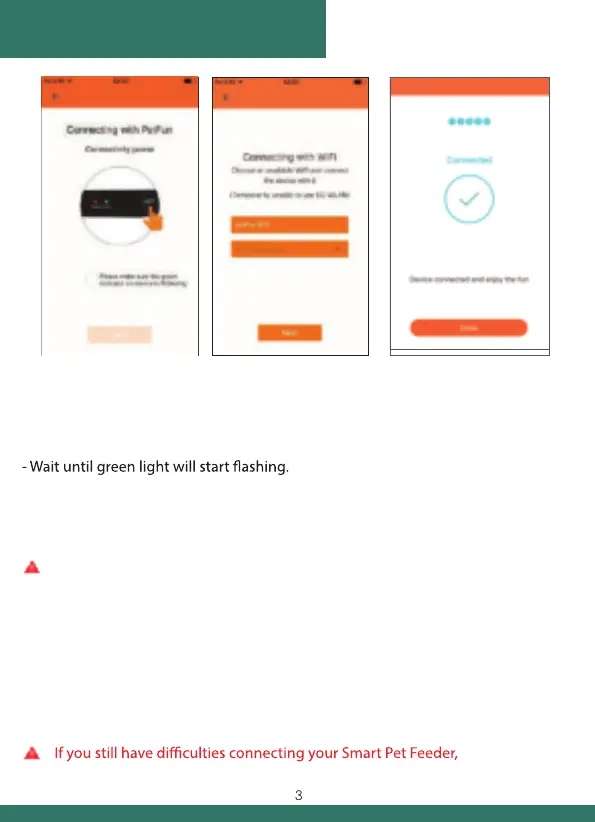
1. Connection preparation
- Plug device into a power outlet. Turn on the power switch
(back bottom of your device). Give your device 5-6 seconds.
- Press and hold “SET” button for 5-6 seconds until you hear “DING-DONG” sound.
2. WiFi connection
If your smartphone is connected to WiFi network, network’s name will
automatically be displayed. Enter your WiFi network password and click “Next”.
3 (a). Point QR code to feeder’s camera (10-20 cm; about a smartphone length).
Wait 3-5 seconds. You will hear “BEEP” sound and smartphone will
automatically bind to feeder.
3 (b). If you haven’t heard “BEEP” sound for a long time, please click “Can’t hear sound”.
Then click on “Use Device Ap Connection” and click “Next”.
Choose WiFi network called PETFUN_XXXXXX. When connected
press “Back” button on your smartphone and click “Next”.
Make sure that your mobile device is connected to your WiFi network.
please visit www.smartpetfeeder.ca for additional help.
3. Enjoy your Smart Pet Feeder


 To Next Page