7
INSTALLATION AND OPERATION
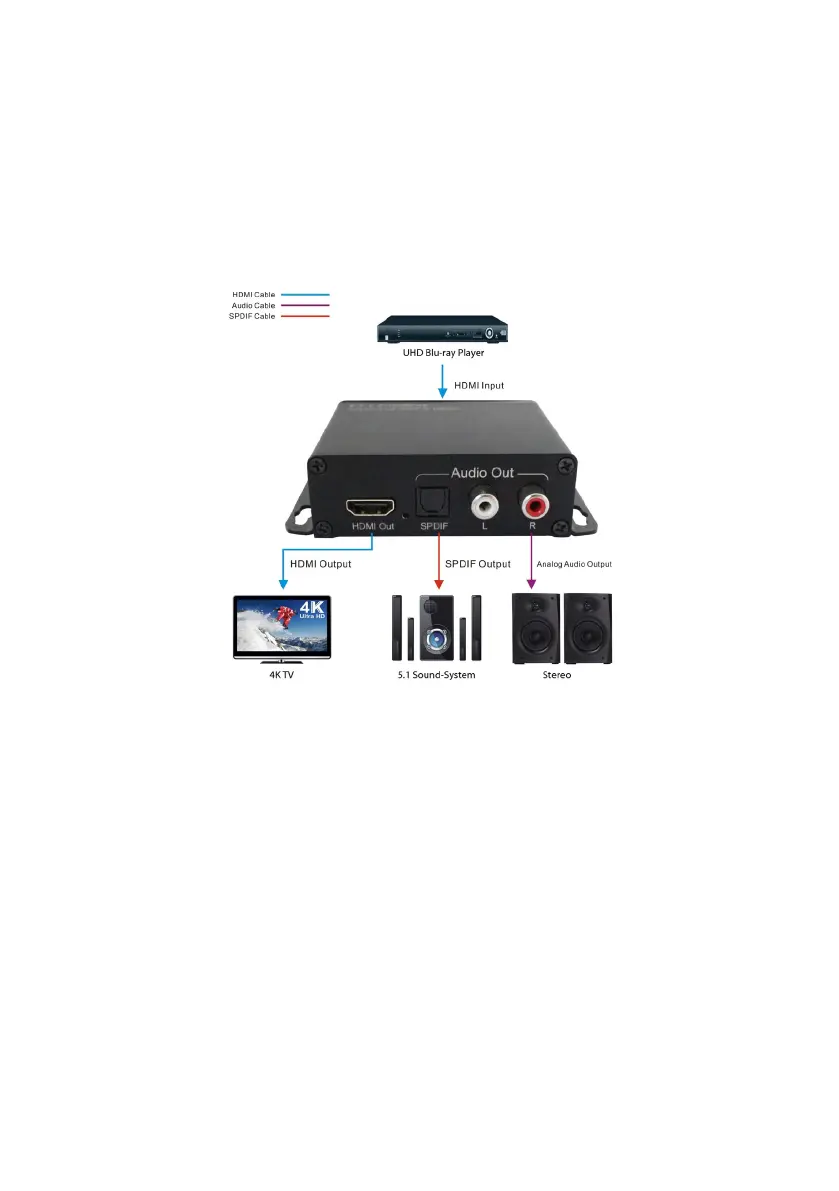
1. Connect the HDMI signal source (e.g., Bluray player) to the HDMI input.
2. Connect the HDMI display (e.g. TV or projector) to the HDMI output.
3. Connect the HDMI audio extractor with a Toslink fiber cable and/or an audio cable with RCA plugs to your audio
device (AV receiver or active speakers)
4. Connect the power supply to the HDMI audio extractor and plug it into an electrical outlet. Both LEDs of the splitter
light up as soon as a signal is present and the output device is switched on.
CONNECTION SCHEME
Caution: Be careful when inserting and unplugging the HDMI cables to prevent the plug contacts
from getting dirty or damaged. Disconnect the power supply from the mains and turn it on only after
connecting. Please also pay attention to a good quality of HDMI cables.
INSTALLATION AND MAINTENANCE
• Please do not cover the housing or build in the unit to avoid overheating.
• Keep away from heat sources, water and moisture.
• Do not place heavy objects on the device or the connection cables.
• Do not open or drill holes in the housing.
• Use only the supplied power supply or ensure identical performance data when replacing.
• Clean only with a soft, dry cloth. Please do not use a sharp detergent or similar.



 To Next Page