4 WWW.FEIT.COM
Retain this manual for future use.
4” Recessed Can Installation
1
Turning Off the Power
2
Choosing a color temperature
before installing
□ Turn the power OFF at the switch and
fusebox or the circuit breaker.
□ Remove the existing trim installed in the
recessed housing.
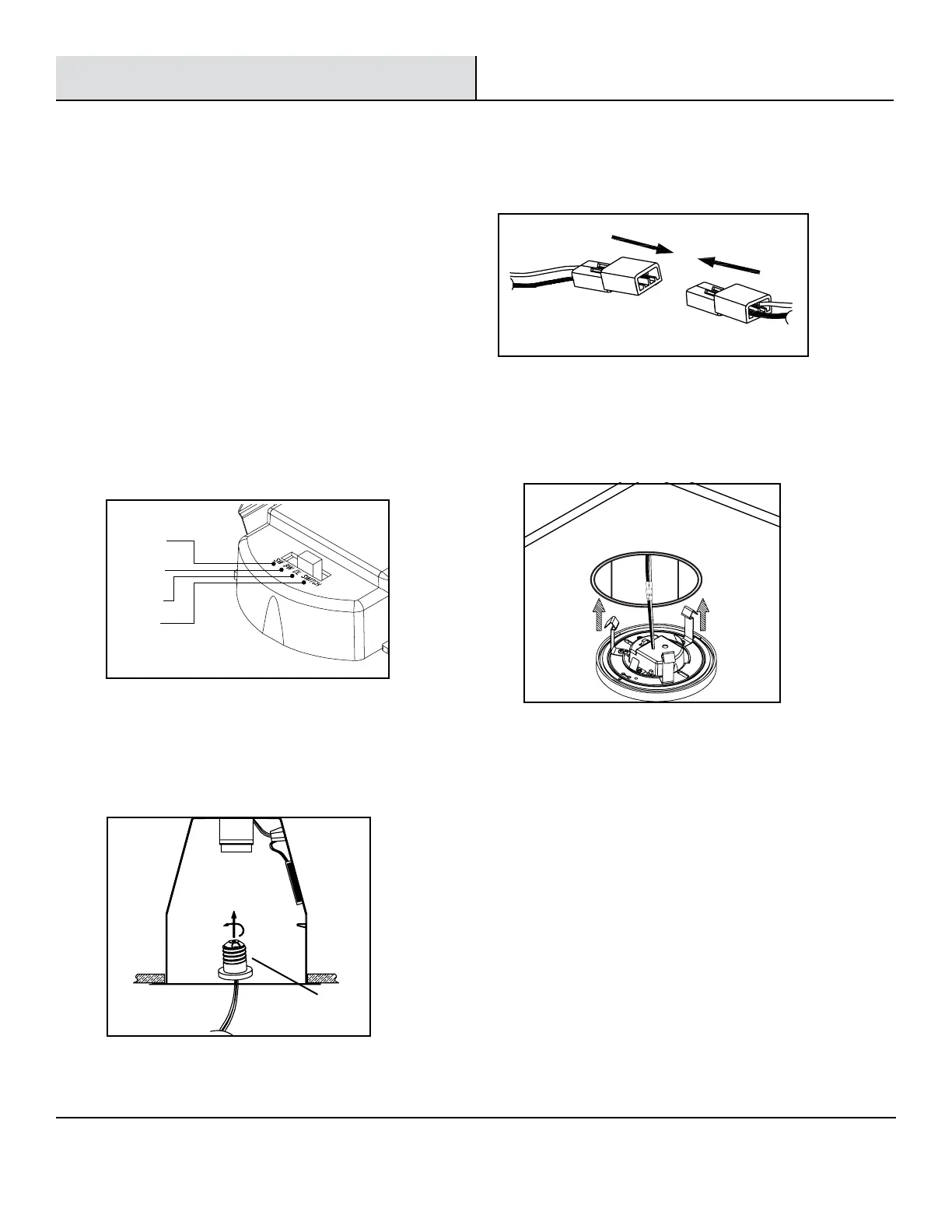
□ Use the slide switch to choose a color
temperature before installing. Soft White
(SW), Bright White (BW), Daylight (DL) or
choose to adjust the color temperature
from the wall switch (SWITCH) (See Fig.1).
□ Install the E26 adapter (DD) into the socket (See Fig. 2).
3
Installing the adapter
□ Connect the two terminals together. (See Fig. 3)
□ Gently push the xture into the recessed housing. (See Fig. 4)
4
Connecting the terminals
5
Installing the xture
Soft White
3000K
Bright White
4000K
Daylight
5000K
Switch*
Fig. 1
Fig. 3
DD
Fig. 2
Connect the orange connectors
Fig. 4



 To Next Page