6 WWW.FEIT.COM
Retain this manual for future use.
J-Box Installation (continued)
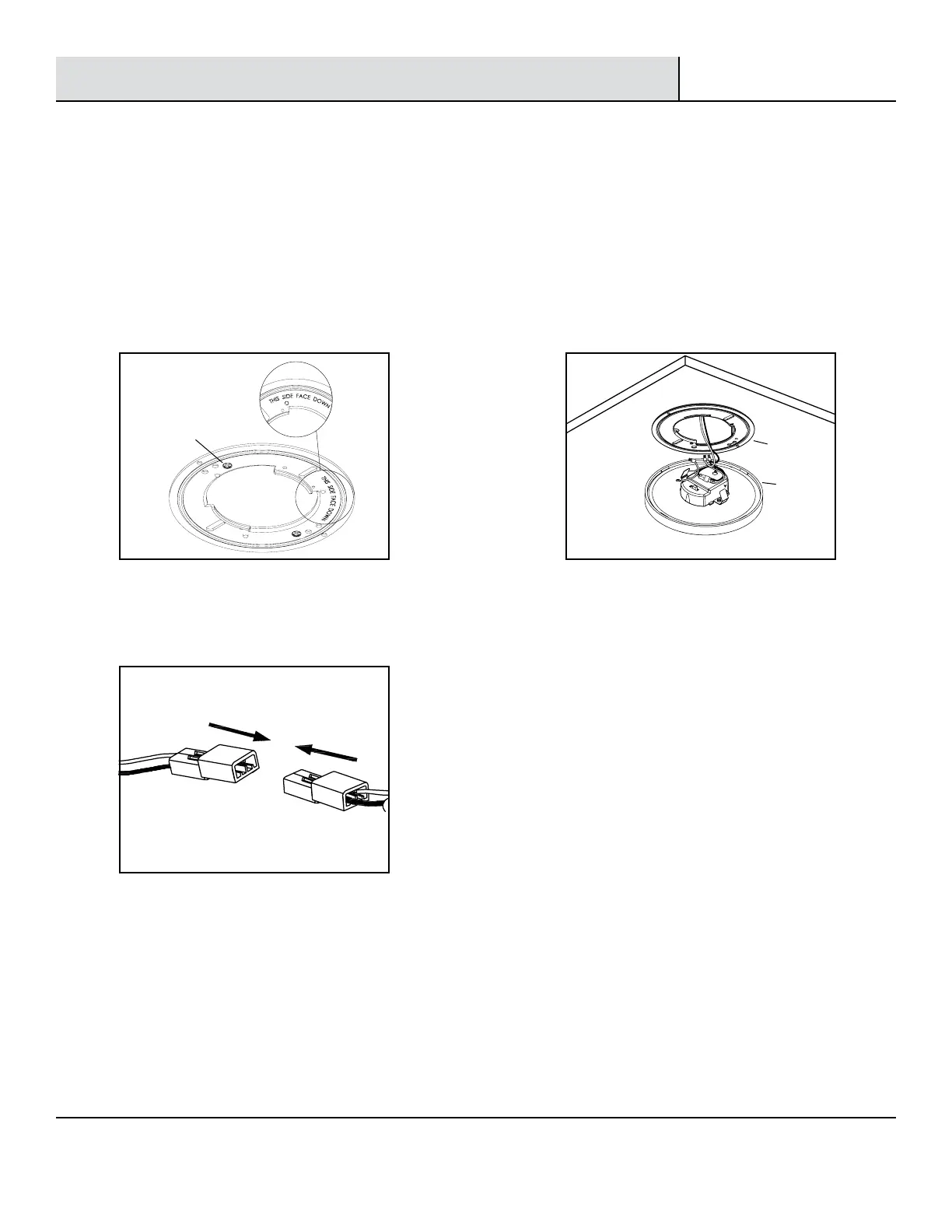
□ Connect the two terminals together. (See Fig. 7).
5
Installing the mounting
bracket to the junction box
6
Connecting the terminals
7
Installing the xture
□ Install the mounting bracket (BB) to the J-box by
inserting the two mounting screws (II) through the slots
in mounting bracket (BB).
□ Make sure the mounting bracket (BB) is installed with
the label facing downwards (See Fig. 6).
Fig. 7
Fig. 8Fig. 6
Connect the orange connectors
□ Secure the xture (AA) to the mounting
bracket (BB) by pressing the xture into the
mounting bracket until the clips on the xture
engage together. Make sure the xture is
rmly locked into place (See Fig. 8).
BB
AA
II



 To Next Page