- 3 -
EN
User manual
Scan the QR code to get the latest user manual or download it
from the ocial website.
https://www.feiyu-tech.com/feiyu-scorp-mini-p/
Download the App
Scan the QR code to download the App, or search for "Feiyu ON"in the App Store or Google
Play.
* Requires iOS 9.0 or above, Android 6.0 or above.
iOS Android
2. Getting started
2.1 Charging
Please fully charge the battery before power on the gimbal for the rst time.
Charging with USB-C cable, supports quick charge.
EN
Quick Start Guide
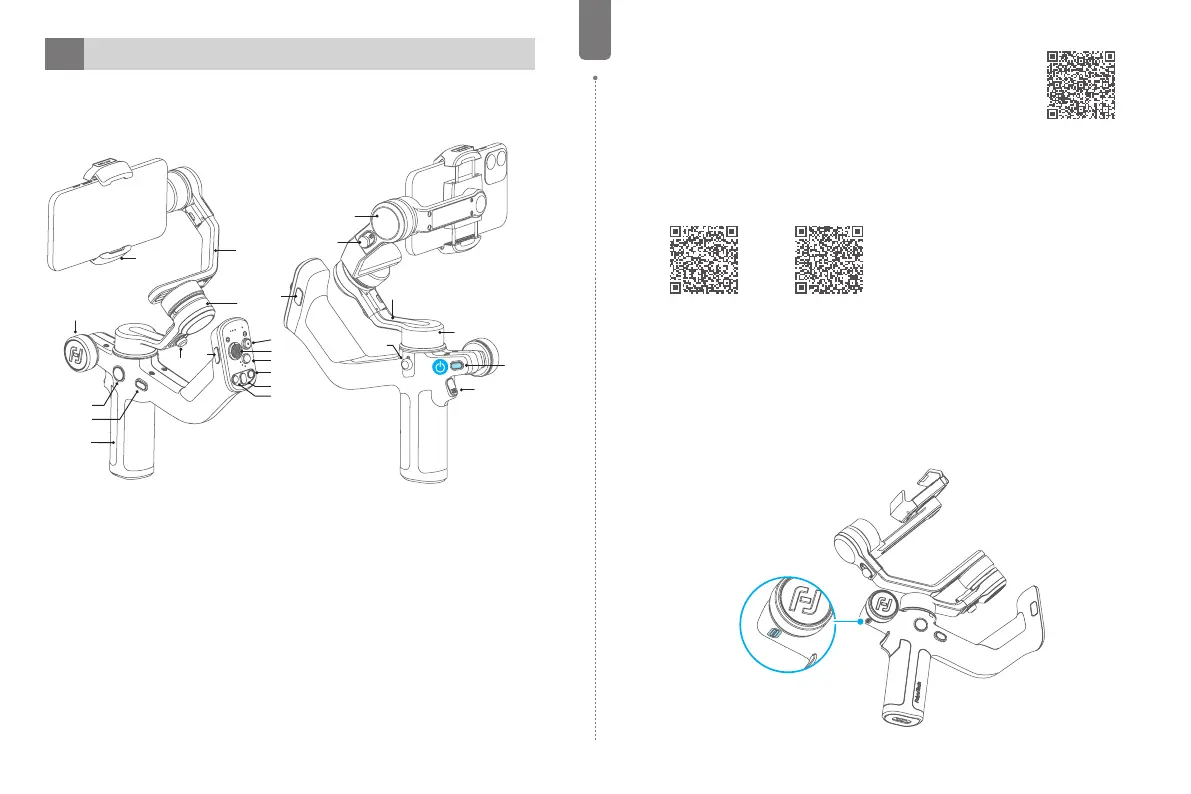
1. Overview
* Not include smartphone.
[4]
[10]
[18]
[21]
[14]
[5]
[16]
[17]
[15]
[6]
[7]
[8]
[9]
[23]
[13]
[3]
[19]
[20]
[11]
[12]
[1]
[22]
[2]
[1] Power button
[2] Trigger button
[3] F2 button
[4] Shutter button
[5] Joystick
[6] Mode button
[7] R button
[8] Auto rotation button
[9] L button
[10] F1 button
[11] Knob function switching
button
[12] FPV button
[13] Handle
[14] Multifunction knob
[15] Smartphone holder
[16] Cross arm
[17] Roll axis
[18] Roll lock
[19] Tilt axis
[20] Tilt lock
[21] Cross arm
[22] Pan axis
[23] Pan lock



 To Next Page