- 4 -
EN
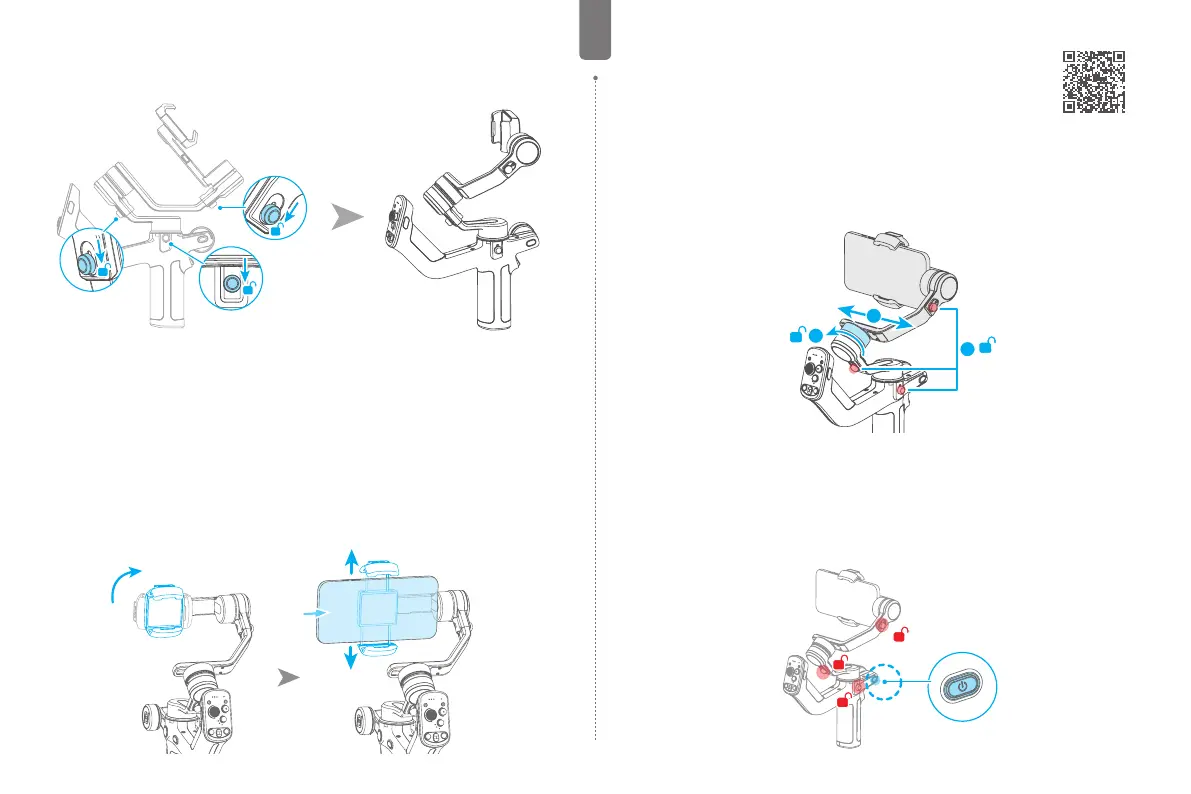
2.2 Adjust the gimbal to gimbal balancing position
The gimbal is folded by default, please unlock all the three axes and adjust the gimbal to
gimbal balancing position, and then lock the three axes.
Gimbal folded position Gimbal balancing position
3. Mounting the Smartphone
Make sure you have completed all the steps which mentioned in “chapter 2. Getting started”
and the gimbal is adjusted to gimbal balancing position. It is recommended to remove the
smartphone case before mounting the smartphone.
Take horizontal mounting as an example:
(1) Power o the gimbal or enter sleep mode rst, then rotate the smartphone holder to make
it vertical to prepare for landscape shooting.
(2) Extend the smartphone holder, and put your smartphone in, keep the smartphone holder
in center.
Note: before switching the mounting direction, the gimbal required to be o or in sleep mode.
4. Gimbal Balancing
Please balance the gimbal before powering it on. Before balance the
gimbal, please power o it or enter sleep mode.
Tutorial Videos
(1) Unlock the three axis locks ① , observe the tilt direction of the mobile phone.
(2) If the phone is tilted to one end, it means that the center of gravity is toward this end,
and the xing knob needs to be loosened ② , and then move the cross arm in the opposite
direction ③ , until the cross arm maintains a horizontal balance.
(3) tighten the xing knob ② .
2
1
3
5. Operation
5.1 Power ON/ OFF
Before power on the gimbal, make sure you have balanced gimbal, and unlocked all the three
axes. If you haven't unlocked all the 3 axes, gimbal will enter sleep mode to protect itself.
Please single tap power button to wake up gimbal after unlocked all the 3 axes.
Long press the power button and release it when you hear the beep sound to power on/ o.



 To Next Page
 Loading...