06
www.feiyu-tech.cn
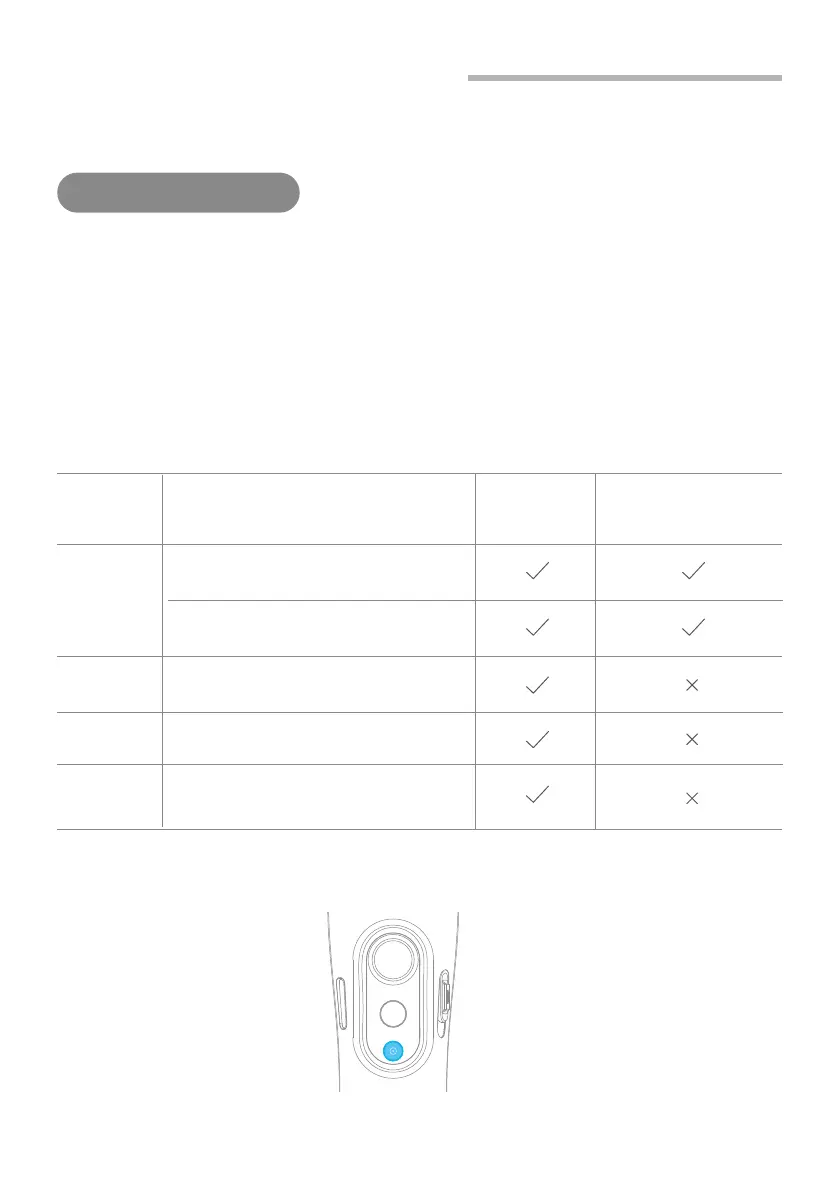
3.4 Shutter Button Operation
The gimbal can control the photography after only Bluetooth is connected
with smartphone.
Bluetooth connection
Connect Smartphone
(1)Power on the gimbal, open smartphone bluetooth.
(2)Choose below Bluetooth connection way:
a. Choose Vimble 2S Bluetooth to connect like FY_Vimble2S_xx.
b. Open Feiyu ON app, logon or register via tips to connect.
(3)After Bluetooth connecting successful, the shutter button is activated.
The green light flashes once while other indicator status (About every 5 seconds flashes once)
Single
click
Double click
Photography
Video
( Click again to end the recording the video )
Switch to photo / video mode
Shutter
Button
Function
Control
the App
Control smartphone
camera
via bluetoothFeiyu ON
Triple click
Switch front and rear camera
Long time
press
Video recording in shooting mode
*
*
We suggest close Feiyu ON App when you control smartphone camera.
( Long press the shutter button again to
end the recording )


 To Next Page