1
2
10
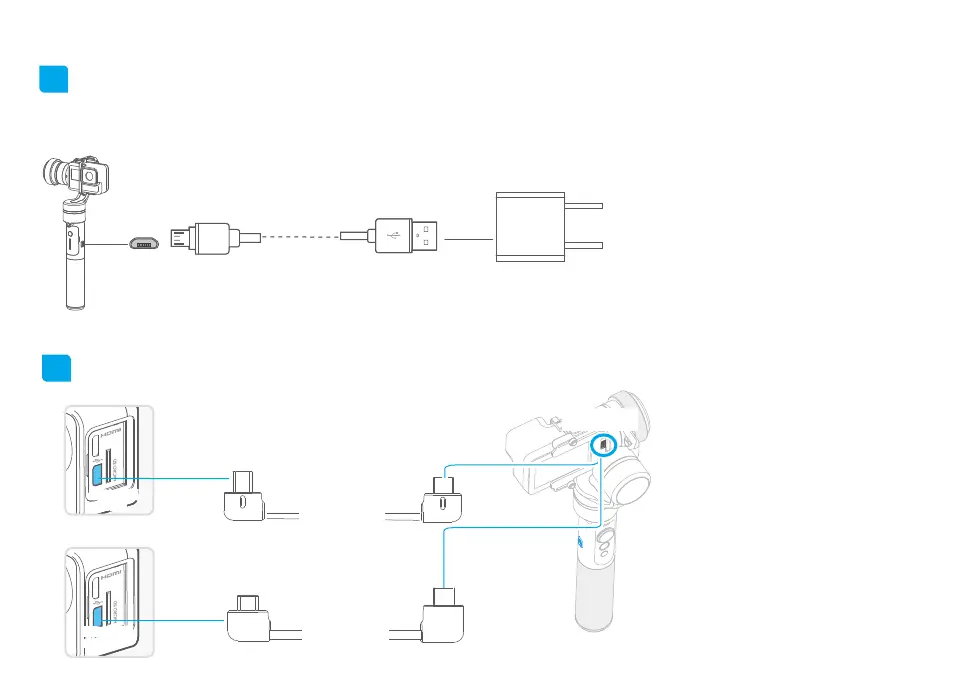
Gimbal charging
5. Charging
Micro USB cable
Option 1: charging with micro USB cable.
equipped by user
* Please make sure the battery was fully charged before you power on the gimbal rst time.
Input5V/1A
Option 2: remove the battery and charge the battery with charger(equipped by user).
Charging for Camera
HERO 4
mini
HERO 4
mini Port
HERO 4
mini
HERO 5
Type C Port
Type C
camera
charging cable
Connect the Hero 5 with the gimbal via
Type-C cable, the Hero 5 can be charged
when gimbal is power on.
By connecting the camera(equipped with Mini-USB
charging port) and G5, the camera can be charged
while G5 is power on.
Mini
camera
charging cable
Mini Port
Type C Port
Micro Port
Micro Port
Camera power-
supply port














 To Next Page