8. Gimbal initialization
1
3
2
Adjusting steps:
You can initialize your gimbal when:
1 when smartphone is not level
2 if not used for a long period of time
3 in case of extreme temperature variations
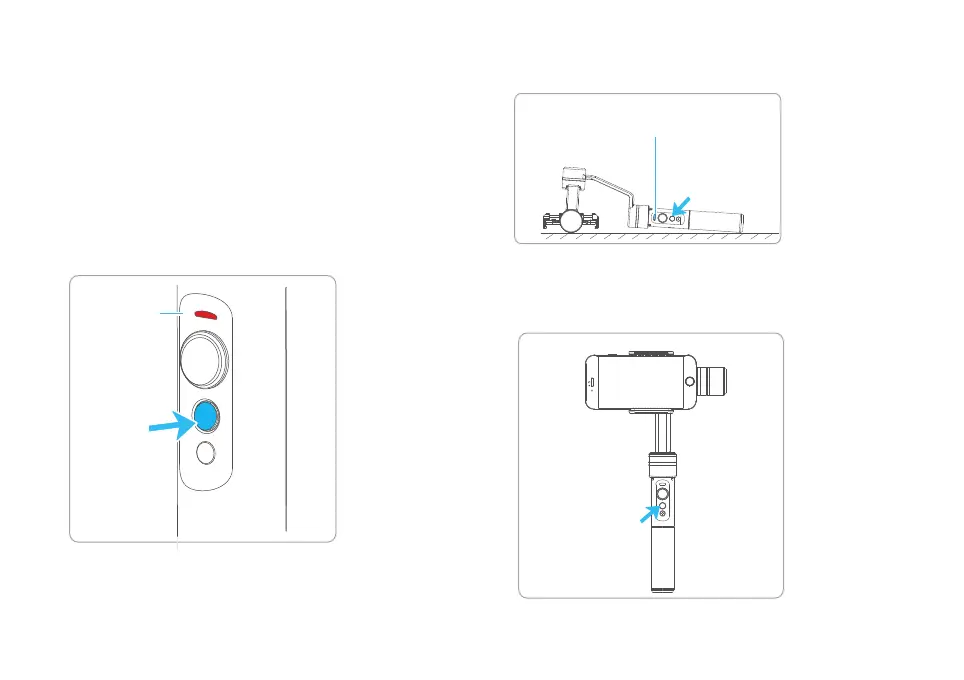
Red light
ashes
press and
hold
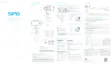
Triple tap
Single tap
Blue light is on
Lay the gimbal on a static at surface and triple tap the
function button. Initialization is successful when the
blue light changes from constant on to ashing 3 times
periodically, otherwise fail.
Click again to wake up the gimbal.
Long press function button and release it
until the red light ashthe gimbal enter
the standby mode,the blue light will ash
3 times periodically.
11














 To Next Page