3
7.2 App Connection
Download the Feiyu ON App
Scan the QR code to download the app, or search for
"Feiyu ON" in the App Store or Google Play.
* Requires iOS 9.0 or above, Android 6.0 or above.
iOSAndroid
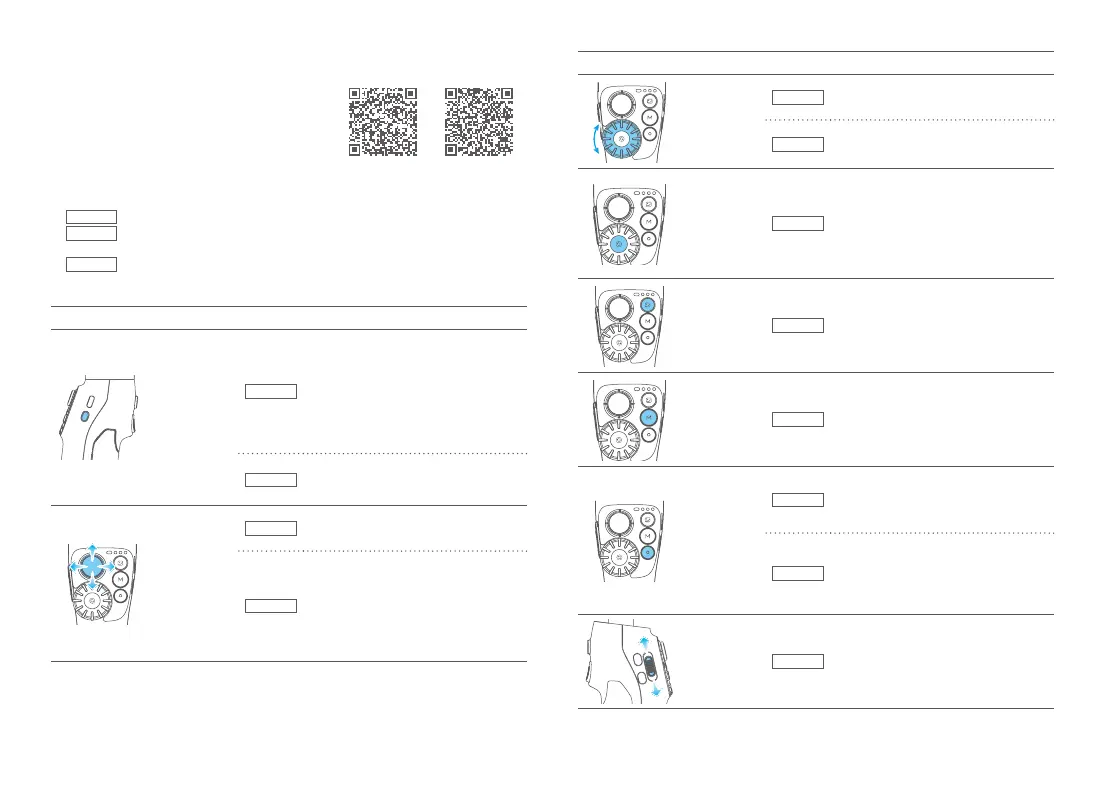
8. Common Operation
①
Basic
: Vimble 3 can achieve those functions after balanced gimbal.
②
Bluetooth
: New available function which achieved after connected smartphone via
Bluetooth with the functions in condition ① still available.
③
APP
: New available function which achieved via Feiyu ON APP with the functions
in condition ① , ② still available.
DiagramButtonConditionFunction
Power
button
Basic
Power o:
·Long press: power on
·Single tap: check battery level (while
charging)
Power on:
·Long press: power o
·Double tap: standby mode (single tap at
standby mode: to wake up the gimbal)
APP
Power on:
Single tap: enter/quit shortcut menu in
APP
Joystick
Basic
Control the movement of the tilt and pan
axes
APP
·Select setting option
·After enter album:
move to left to choose previous photo/
video; move to right to choose next
photo/video; move upward to play/
pause;
move downward to play/pause
DiagramButtonConditionFunction
Dial
Basic
·Rotate: control roll axis to rotate
APP
·Rotate: control zoom(default)/focus
Dial function
switching
button
Basic
Switch the control object of dial:
·Single tap:
Switch to control focus when controlling
zoom;
In other cases, switch to control zoom
·Long press: switch to control roll axis/
zoom
Album
button
APP
Single tap: enter/exit album
Mode
button
Basic
·Single tap: switch among follow mode,
pan follow, all follow mode cyclically
(default to be follow mode)
·Double tap: landscape and portrait
mode switching
Shutter button
Bluetooth
When original camera APP is in photo/
video mode:
·Single tap: take photo, start/stop
recording
APP
·Press halfway: focus
·Single tap: take photo, start/stop
recording
·Long press: Switch between photo/
video
Zoom
button
Bluetooth
Slide up and down to adjust focus.
·Slide up (T direction): zoom in
·Slide down(W direction): zoom out














 To Next Page