1312
Major jams can be cleared as follows:
1. Unplug the grinder.
2. Remove the burrs as instructed in the “Removing and Replacing
Burrs” section of this manual.
3. Clear coffee from the grinds chamber and discard.
4.
coffee beans and clean burrs as instructed in the “Cleaning” section
of this manual.
5. Reinstall burrs. Run grinder without coffee for 5 seconds to check
that it operates as expected. The grinder should spin quietly and at
this process and carefully inspect to ensure that all coffee particles
help.fellowproducts.com.
REMOVING AND REPLACING
THE GRINDING BURRS
1. Unplug your grinder and empty it of coffee.
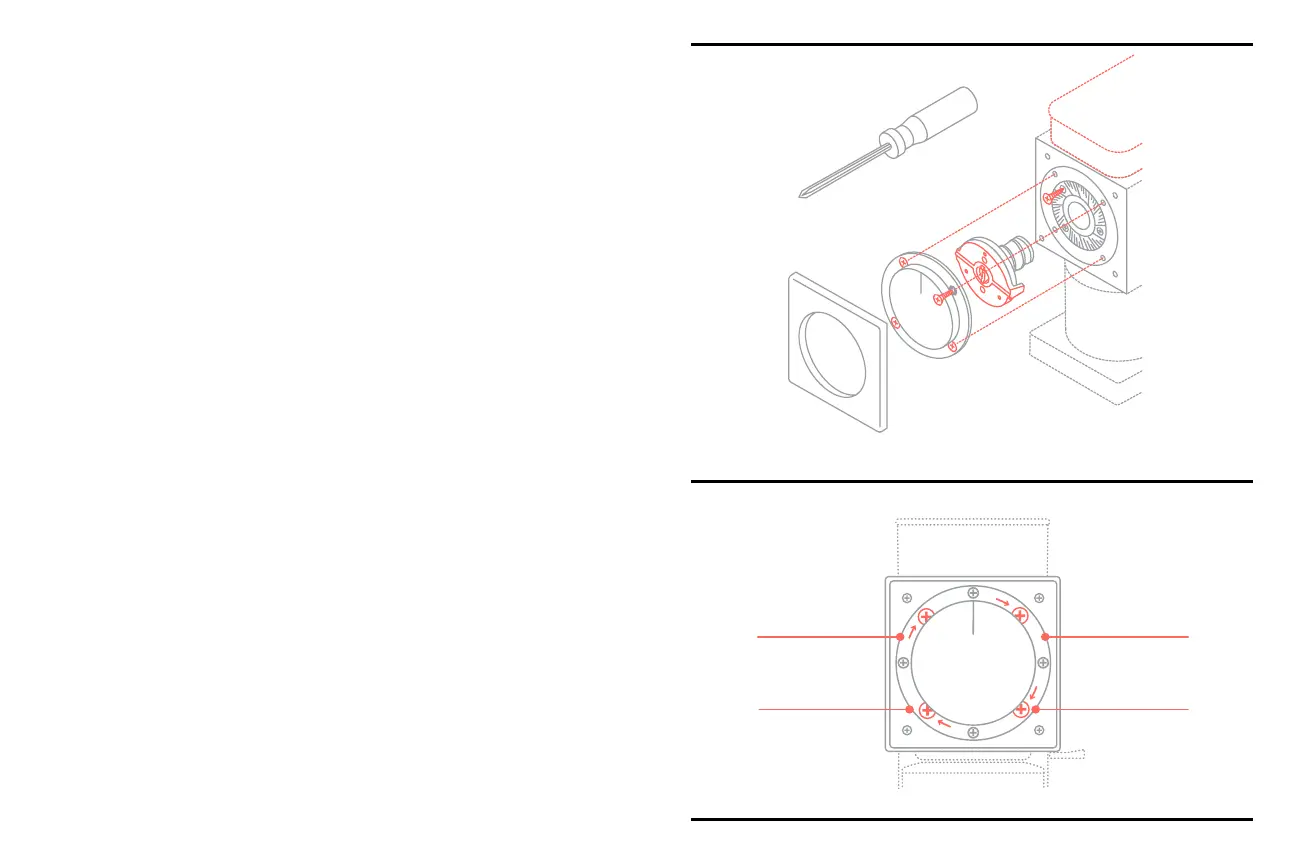
2. Start by removing the faceplate of the grinder. The faceplate simply
snaps on and off. Pull gently on the faceplate for it to snap off. See
Diagram B for reference.
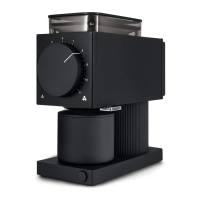
3.
that have arrows pointing to them. See
Diagram C for reference.
4. Pull on grind dial to remove the grinds dial assembly.
5.
Diagram B:
Exploded View
Diagram C


 To Next Page