EasyManua.ls Logo

Fellowes DS-12Ci - Basic Set up and Shredding Operation; Jam Proof System Operation*; Caster Installation

Fellowes DS-12Ci
5 pages
Print Icon
To Next Page IconTo Next Page
To Previous Page IconTo Previous Page
Loading...
AUTO
AUTO
AUTO
A
U
T
O
A
U
T
O
1
2
A
U
TO
A
U
TO
1
2
AUTO
AUTO
A
U
TO
A
U
T
O
12
AU
T
O
A
U
T
O
1
2
A
U
TO
A
U
T
O
1
2
2
Press
(
)
ON to
a
ctivate
(
blue
)
P
APER OR CD
/
CARD
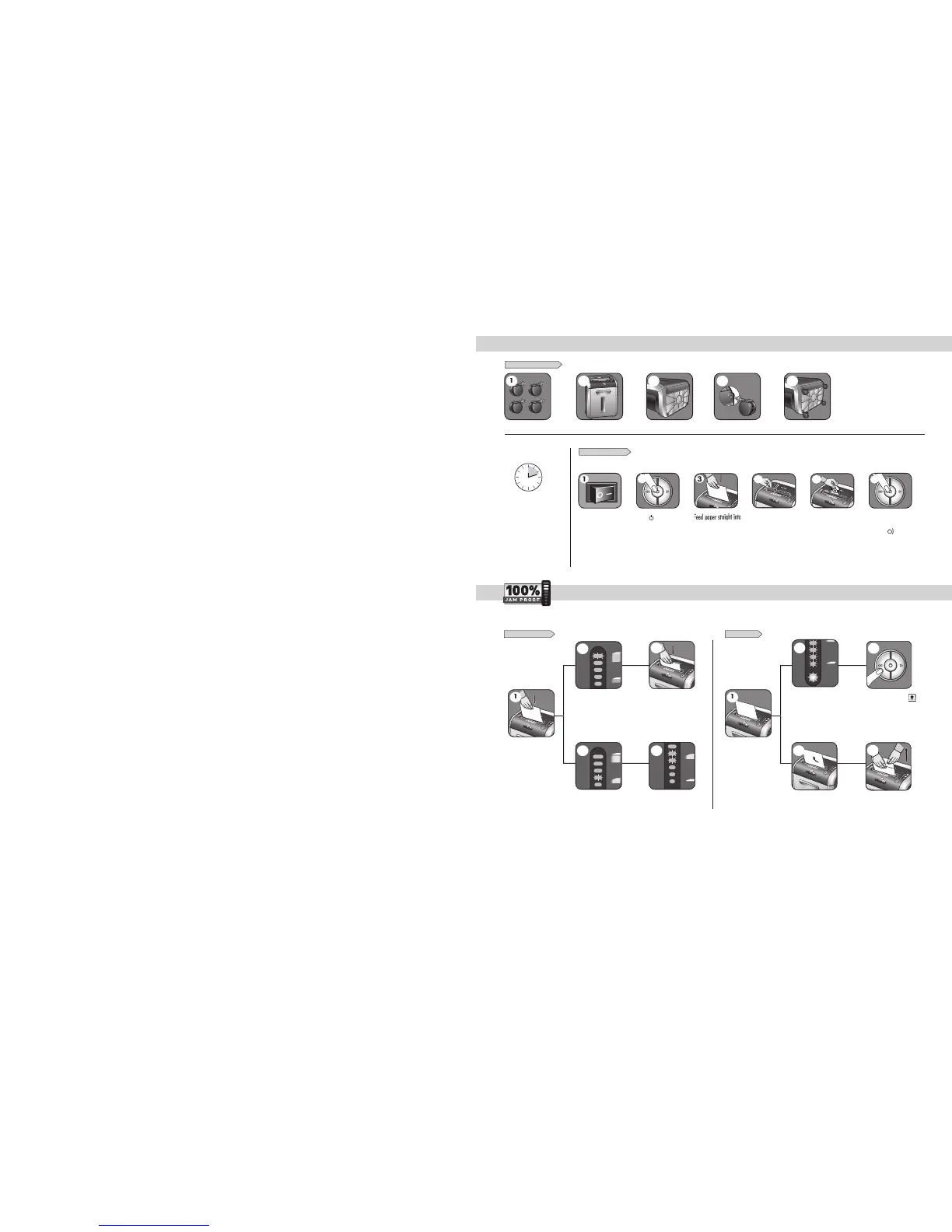
BASIC SET UP AND SHREDDING OPERATION
1
To shred CDs rotate
C
D fla
p
into
p
lac
e
4
Eliminates frustrating jams by preventing overloads and powering through misfed paper.
Feed into
p
a
p
er entr
y
a
n
d
r
e
l
ease
If
p
a
p
er is misfed and
s
tops shreddin
g
, all
indicator li
g
hts will
i
ll
uminate an
d
s
h
re
dd
er
will pause
f
or 3-6
s
econ
ds
S
hredder will take
f
ewer sheets,
but i
f
indicator is below yellow,
you can a
dd
more s
h
eets wit
h
out
f
ear of jamming
2
Increase the number o
f
sheets
being
f
ed up to the top yellow light
to maximize your pro
d
uctivit
y
I
f
there is too much paper
f
or
th
e s
h
re
dd
er to power t
h
roug
h
,
it will reverse the paper out
f
or
easy removal
R
e
d
uce paper quantity to an
a
cceptable amount and re
f
eed into
p
aper en
t
ry
I
f too man
y
sheets, indicator will
li
g
ht up to red and shredder will
not take
p
a
p
er
R
e
m
o
v
e
se
v
e
r
a
l
s
h
ee
t
s
u
ntil th
e
i
n
d
i
ca
t
o
r i
s
be
l
o
w r
ed
a
n
d
th
e
shredder will take the
p
a
p
e
r
Automatic correctin
g
action
w
ill power throu
g
h the misfed
p
aper, so shreddin
g
can
continue (
d
o not a
dd
more
p
aper during
f
lashing
)
SET-UP AND TESTIN
G
M
ISFED PAPER
2
A
U
T
O
A
U
T
O
1
2
3
A
U
TO
A
U
T
O
12
3
1
3
p
a
p
er entr
y
and releas
e
1
P
lug in and put
d
isconnect
p
ower
switch in ON (I)
p
osition
C
ontinuous o
p
eration
:
1
2
-minute maximum
N
O
TE
:
Shredder runs briefl
y
after each
p
ass to clear entr
y
.
Continuous o
p
eration be
y
ond
12-minutes will tri
gg
er
2
0-minute cool down
p
eriod
.
H
old CD/card at edge,
feed into CD/Card fla
p
e
ntr
y
and release
5
W
h
e
n fini
s
h
ed
shreddin
g
set
t
o
O
FF
(
)
6
A
U
T
O
A
U
T
O
12
2
J
AM PR
OO
F
S
Y
S
TEM
O
PERATI
O
N
*
*100% Jam Proof when used in accordance with user manual
AUTO
2
3
CA
S
TER IN
S
TALLATI
O
N
A
U
T
O
1 2 3
A
UT
O
1
A
U
T
O
A
U
T
O
1 2 3
A
U
T
O
2
A
U
T
O
1 2 3
A
U
T
O
3
A
U
T
O
1 2 3
A
U
T
O
4
A
U
T
O
1 2 3
A
U
T
O
5
If
Remove Paper icon ( ) is
ill
uminate
d
, press reverse an
d
r
emove
p
a
p
er
3

Related product manuals