
 Need help?
Do you have a question about the Fellowes POWERSHRED DS-2 and is the answer not in the manual?
Contact information, troubleshooting, and general questions for assistance.
Lists materials the shredder can and cannot process.
Specifies the cross-cut size of shredded paper.
Details sheet, card, and paper width limits for optimal performance.
Essential precautions for safe operation, including keeping clear of openings and avoiding flammable products.
Instructions for using the disconnect power switch for immediate shutdown in emergencies.
Guidelines on proper power connection, avoiding oil/aerosols, and fire hazards like sound chip cards.
Step-by-step guide for continuous shredding, including auto-on and cool-down periods.
Explains the safety feature that stops shredding when hands touch the paper opening.
Details the importance of oiling cross-cut shredders for performance and longevity.
Instructions on how to properly oil the shredder for peak performance.
Steps to clear a paper jam using the reverse function.
Explanation of the overheat indicator and the need for cool-down.
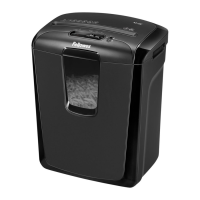
The Fellowes Powershred DS-2 is a cross-cut paper shredder designed for home and office environments, offering a blend of security, convenience, and safety features. Its primary function is to shred paper, credit cards, CDs/DVDs, staples, and small paper clips into small, unreadable particles, ensuring the secure disposal of sensitive information.
The shredder operates with a simple control switch that allows users to select between "Auto-On" (green), "Reverse" (R), and "Off" (0) settings. In "Auto-On" mode, the shredder automatically starts when paper is inserted into the entry. The "Reverse" function is crucial for clearing paper jams, while "Off" completely powers down the unit. A dedicated "Disconnect Power Switch" (H) provides an additional layer of safety, allowing for immediate shutdown in emergencies.
A key safety feature is the integrated SafeSense® Technology (B). This system automatically stops the shredder immediately when hands touch the paper opening, preventing accidental injury. The SafeSense® indicator illuminates when active and working properly, providing visual confirmation of its operational status. An override switch (J) is also present, likely for specific operational needs or troubleshooting, though its exact function isn't detailed in the provided excerpt.
The shredder is designed for continuous operation for up to 4 minutes, after which it will trigger a 20-minute cool-down period to prevent overheating. An "Overheat Indicator" (3, red) illuminates when the shredder has exceeded its maximum operating temperature, signaling the need for a cool-down period before further use.
The manual emphasizes several critical safety instructions:
The Fellowes Powershred DS-2 is a robust and user-friendly shredder designed with safety and efficiency in mind for personal and small office document destruction.
 General
| Brand | Fellowes |
|---|---|
| Model | POWERSHRED DS-2 |
| Category | Paper Shredder |
| Language | English |






 To Next Page
