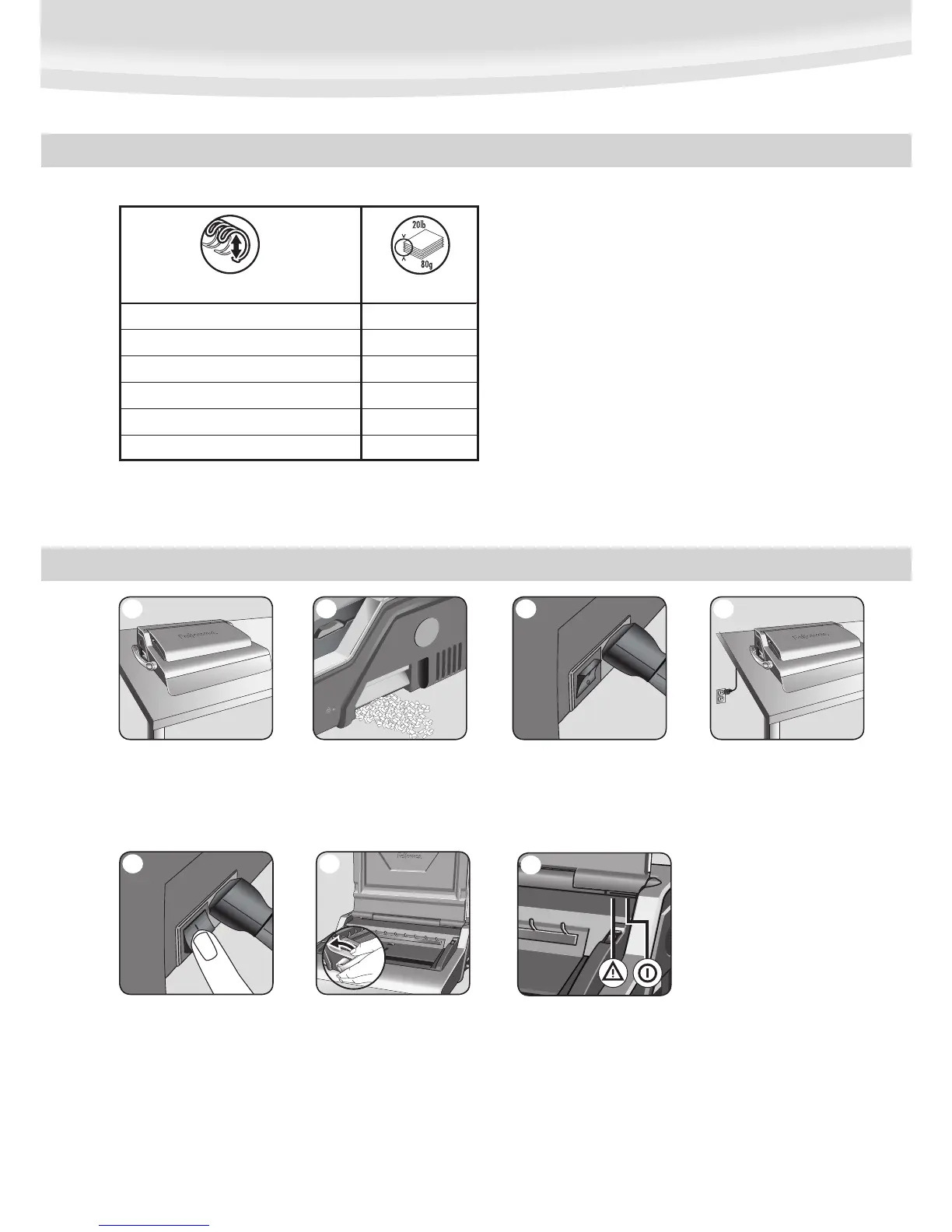
mm inch number of sheets
6mm
1
/4” 2-35
8mm
5
/16” 36-50
10mm
3
/8” 51-61
11mm
7
/16” 61-80
12mm
1
/2” 81-100
14mm
9
/16” 100-130
WIRE COMB DIAMETER & DOCUMENT SIZES
3
Need Help?
Customer Service…. www.fellowes.com
Let our experts help you with a solution.
Always call Fellowes before contacting your
place of purchase.
SET UP
1. Ensure the machine is on a
stable surface.
1
2. Check waste tray is empty and cor-
rectly fitted. The tray can be accessed
from the left and right sides. The tray
has a ‘burst feature’ that operates
when the chip tray is ‘over-full’.
2
3. The machine is supplied with loose
power leads. Select the correct lead
for appropriate power supply.
3
4. Plug the lead into grounded
socket outlet.
4
5. Switch the machine on (located
at the rear of the machine).
5
6. Ensure the wire closing lever is
pushed backwards.




 To Next Page