Will shred: Paper, credit cards, staples and paper clips
Will not shred: Adhesive labels, continuous form paper,
transparencies, newspaper, cardboard, CD/DVDs, laminates,
file folders, X-rays or plastic other than noted above
Paper shred size: Micro-Cut, 2mm x 12mm
Maximum Sheets per pass:
LX201 - 12*, LX211 - 15*, LX221 - 20*
Maximum Paper entry width: 230mm
Plug in and put disconnect power
switch in ON (I) position
* A4 (70g), paper at 220V-240V, 50/60 Hz, 2.5 Amps (LX201), 3.0 Amps (LX211), 3.8 Amps (LX221); heavier paper, humidity or other than rated voltage may
reduce capacity. Maximum recommended daily usage rates: 1000 sheets per day, 25 credit cards. Fellowes SafeSense
®
shredders are designed to be
operated in home and office environments ranging between 50 – 80 degrees Fahrenheit (10 – 26 degrees Celsius) and 40 – 80% relative humidity.
WARNING! IMPORTANT SAFETY INSTRUCTIONS – Read before using!
CAPABILITIES
BASIC SHREDDING OPERATION
Align paper/card to center of paper
entry. Feed straight into paper entry
and release.
2
PAPER OR CARD
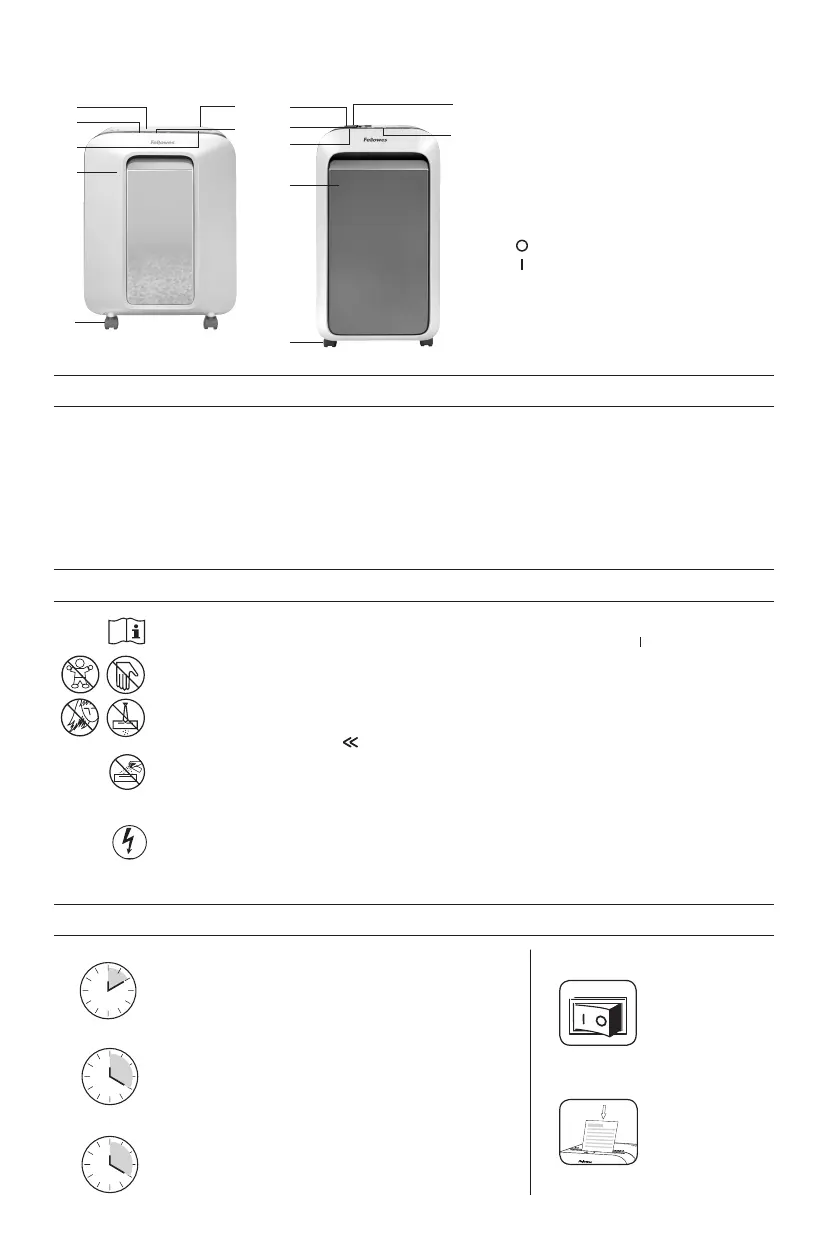
A. SafeSense
®
Technology
B. Paper entry
C. See safety instructions
D. Pullout bin
E. Casters
F. Disconnect power switch
1. OFF
2. ON
G. Control Panel and LEDs
1
ENGLISH
• Operation,maintenance,andservicerequirements
are covered in the instruction manual. Read the entire
instruction manual before operating shredders.
• Keepawayfromchildrenandpets.Keephandsaway
from paper entry. Always set to off or unplug when
not in use.
• Keepforeignobjects–gloves,jewelry,clothing,hair,
etc.–awayfromshredderopenings.Ifobjectenters
top opening, switch to Reverse ( ) to back out
object.
• DONOTuseaerosolproducts,petroleumbasedor
aerosol lubricants on or near shredder. DO NOT USE
“CANNED AIR” OR “AIR DUSTERS” ON SHREDDER.
Vapors from propellants and petroleum based
lubricantsmaycombustcausingseriousinjury.
• Donotuseifdamagedordefective.Donot
disassemble shredder. Do not place near or over heat
source or water.
• ThisshredderhasaDisconnectPowerSwitch
(F) that must be in the ON ( ) position to operate
shredder. In case of emergency, move switch to
OFF (O) position. This action will stop shredder
immediately.
• Avoidtouchingexposedcuttingbladesunder
shredder head.
• Shreddermustbepluggedintoaproperly
grounded wall outlet or socket of the voltage
and amperage designated on the label. The
grounded outlet or socket must be installed near
theequipmentandeasilyaccessible.Energy
converters, transformers, or extension cords should
not be used with this product.
• FIREHAZARD–DoNOTshredgreetingcardswith
sound chips or batteries.
• Forindooruseonly.
• Unplugshredderbeforecleaningorservicing.
2
LX221
F.
A.
B.
D.
E.
C.
G.
LX201/LX211
F.
G.
A.
B.
D.
E.
C.
LX201
Continuous operation. Up to 10-minutes maximum.
NOTE: Shredder runs briefly after each pass to clear entry.
Continuous operation beyond 10-minutes will trigger
15-minute cool down period.
LX211
Continuous operation. Up to 20-minutes maximum.
NOTE: Shredder runs briefly after each pass to clear entry.
Continuous operation beyond 20-minutes will trigger
15-minute cool down period.
LX221
Continuous operation. Up to 20-minutes maximum.
NOTE: Shredder runs briefly after each pass to clear entry.
Continuous operation beyond 20-minutes will trigger
15-minute cool down period.




 To Next Page