EasyManua.ls Logo

Fellowes Pulsar E 300 - Binding Process; Before You Bind; Steps to Bind

Fellowes Pulsar E 300
5 pages
Print Icon
To Next Page IconTo Next Page
To Previous Page IconTo Previous Page
Loading...
ENGLISH
BEFORE
YOU
BIND
1.
Check
the
green
power
neon
is
on.
2.
Select
the
correct
comb
diameter
using
the
comb
storage
troy.
3.
Insert
the
plastic
comb
into
the
opening
mechanism.
4.
Pull
comb·opening
lever
forward
to
open
the
comb.
5.
Test
punch
scrap
sheets
to
check
edge
guide
setting.
STEPS
TO
BIND
2
Max
IS
(80gsm)
3.
load
punched
sheets
directly
onto
the
opened
comb.
Starting
with
the
front
of
the
document.
4.
When
all
punched
sheets
are
loaded
onto
the
comb,
push
the
com
b
lever
backwards
to
close
the
comb
and
remove
the
bound
document.
1.
Punch
front
and
bock
covers
first.
2.
Punch
sheets
in
small
botches
that
do
not
overload
the
machine
or
the
user.
4
http://www.monomachines.com
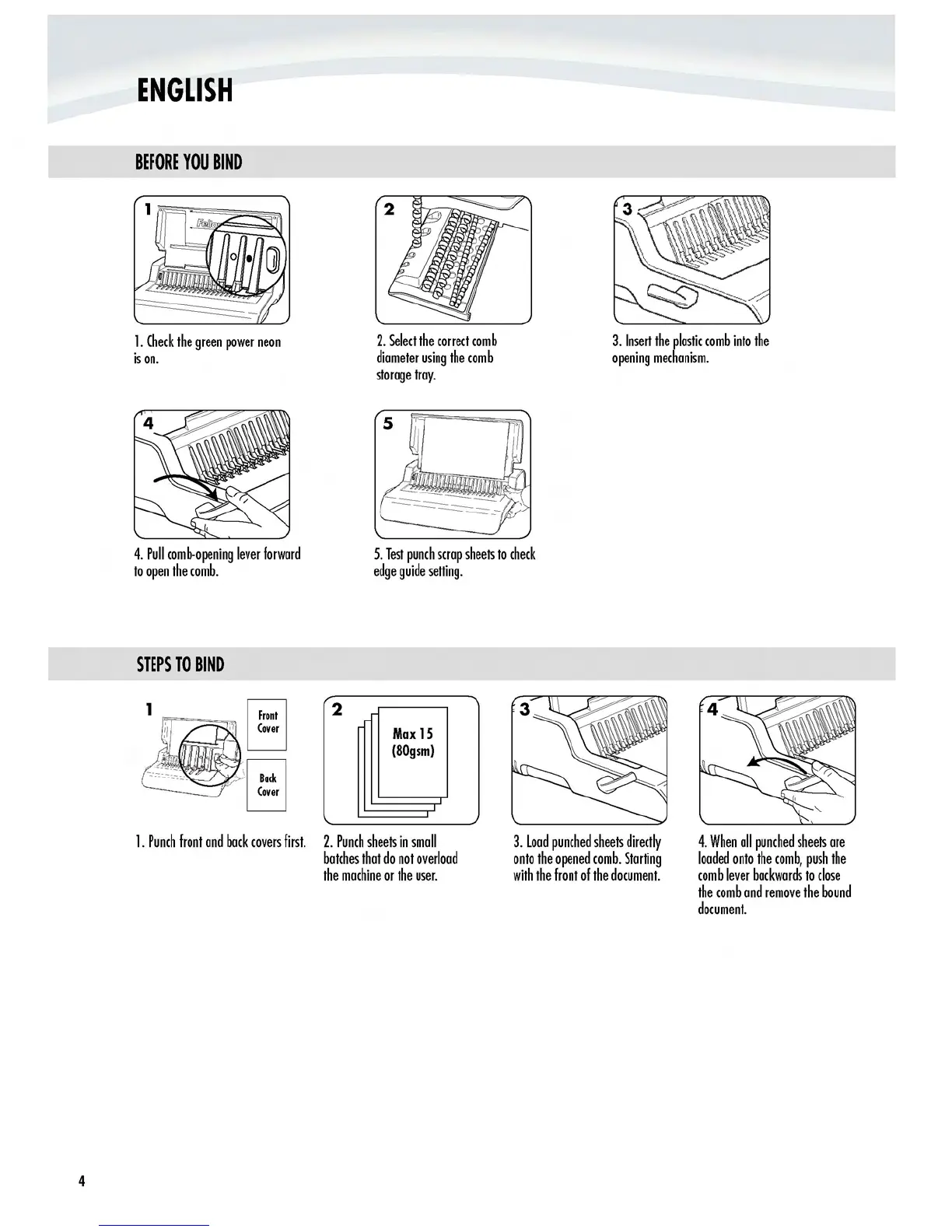
ENGLISH
BEFORE
YOU
BIND
1.
Check
the
green
power
neon
is
on.
4.
Pull
comb-opening
lever
forward
to
open
the
comb.
STEPS
10
BIND
2.
Select
the
correct
comb
diameter
using
the
comb
storage
troy.
5.
Test
punch
scrap
sheets
to
check
edge
guide
setting.
3.
Insert
the
plastic
comb
into
the
opening
mechanism.
2
Max
IS
(80gsm)
4
1.
Punch
front
and
bock
covers
first.
2.
Punch
sheets
in
small
botches
that
do
not
overload
the
machine
or
the
user.
3.
load
punched
sheets
directly
onto
the
opened
comb.
Starting
with
the
front
of
the
document.
4.
When
all
punched
sheets
are
loaded
onto
the
comb,
push
the
com
b
lever
backwards
to
close
the
comb
and
remove
the
bound
document.

Other manuals for Fellowes Pulsar E 300

Related product manuals