EasyManua.ls Logo

Fellowes Quasar E 500 - Important Safety Instructions; When Punching Safety; General Machine Safety

Fellowes Quasar E 500
6 pages
Print Icon
To Next Page IconTo Next Page
To Previous Page IconTo Previous Page
Loading...
Comb----,
/CF
L--
__
Waste
tray
L----Comb
storage
and
Document
measure
~,,~~
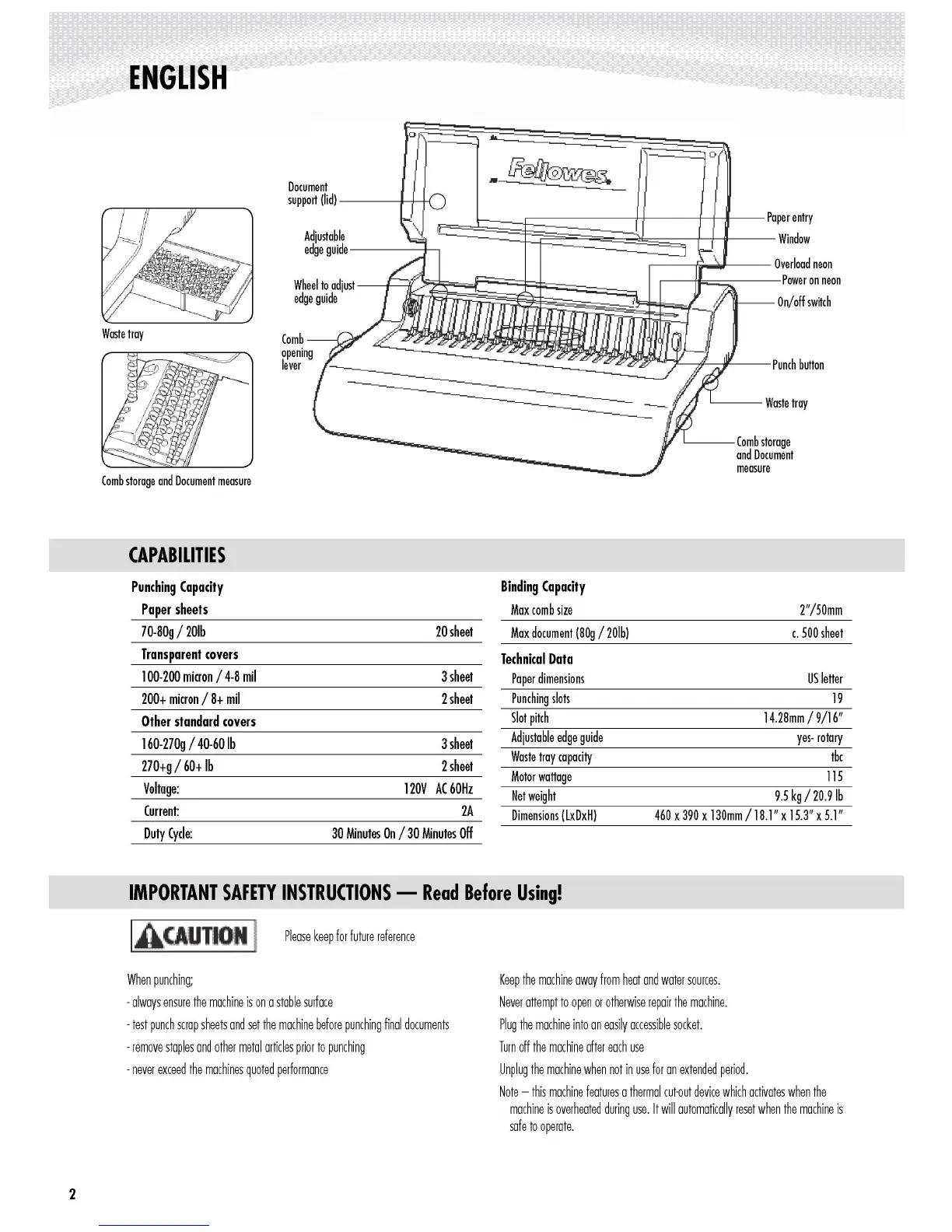
ENGLISH
Waste
tray
Comb
storage
and
Document
measure
CAPABILITIES
Punching
Capacity
Paper
sheets
70-BOg
/
20lb
Transparent
covers
100-
200
micron
/4-B
mil
200+
micron
/
B+
mil
Other
standard
covers
160-270g
/40-60
Ib
270+g
/
60+
Ib
Voltage:
Current:
Duty
Cycle:
IMPORTANT
SAFETY
INSTRUCTIONS
-
Read
Before
Using!
IA(AUTlOI I
Please
keep
for
future
reference
When
punching;
-
always
ensure
the
machine
is
on
a
stable
surface
-
test
punch
scrap
sheets
and
set
the
machine
before
punching
final
documents
-
remove
staples
and
other
metal
articles
prior
to
punching
-
never
exceed
the
machines
quoted
performance
Q
..
-~--J0
Document
support
(lid)
---
-+-J-+-{
~
:::::~~~f~§~~~~~~~8t
=~paperentry
Adjustable
Window
edge
guide----f------,
,----
~
.......
~--
Overload
neon
Wheel
to
adjust
-
--t----{(~~mmij~~m~~~~~~f~~_;~~
=-----power
on
neon
edge
guide
~
On/off
switch
opening
lever
20
sheet
3
sheet
2
sheet
3
sheet
2
sheet
120V
AC
60Hz
2A
30
Minutes
On
/30
Minutes
Off
Binding
Capacity
Max
com
b
size
Max
document
(BOg
/20Ib)
Technical
Data
Paper
dimensions
Punching
slots
Slot
pitch
Adjustable
edge
guide
Waste
tray
capacity
Motor
wattage
Net
weight
Dimensions
(LxDxH)
Keep
the
machine
away
from
heat
and
water
sources.
Never
attempt
to
open
or
otherwise
repair
the
machine.
Plug
the
machine
into
an
easily
accessible
socket.
Turn
off
the
machine
after
each
use
Unplug
the
machine
when
not
in
use
for
an
extended
period.
Note
-
this
machine
features
a
thermal
cut-out
device
which
activates
when
the
machine
is
overheated
during
use.
It
will
automatically
reset
when
the
machine
is
safe
to
operate.
2"/50mm
c.
500
sheet
US
letter
19
14.2Bmm
/
9/16"
yes-
rotary
tbc
115
9.5
kg/20.9Ib
460
x
390
x
130mm
/
lB.l"
x
15.3"
x
5.1"
2
http://www.monomachines.com
ENGLISH
Q
..
L--
__
Waste
tray
o
L----Comb
storage
and
Document
measure
~
::::::~~~f~§~~~~~~~8t=~paperentrY
Adjustable
Window
edge
guide----f-----,
,-------f"'
......
l----
Overload
neon
Wheel
to
adjust
---t-F-J,1;m1Jijm~m~~~~~~f~~-;~~=-----power
on
neon
edge
guide
~
On/off
switch
~~~~~~~~~~I~~~~~~d~L_punch
button
Document
support
(lid)
----+-J-+-{
Comb----,/CF
opening
lever
Waste
tray
Comb
storage
and
Document
measure
CAPABILITIES
Punching
Capacity
Paper
sheets
Binding
Capacity
Max
com
b
size
2"/50mm
70-80g
/
20lb
20
sheet
Max
document
(80g
/20Ib)
c.
500
sheet
Transparent
covers
100-
200
micron
/4-8
mil
3
sheet
Technical
Data
Paper
dimensions
US
letter
200+
micron
/
8+
mil
2
sheet
Punching
slots
19
Other
standard
covers
160-270g
/40-60
Ib
270+g
/
60+
Ib
Voltage:
Current:
3
sheet
2
sheet
120V
AC
60Hz
2A
Slot
pitch
Adjustable
edge
guide
Waste
tray
capacity
Motor
wattage
Net
weight
Dimensions
(LxDxH)
14.28mm
/
9/16"
yes-
rotary
tbc
115
9.5
kg/20.9Ib
460
x
390
x
130mm
/
18.1"
x
15.3"
x
5.1"
Duty
Cycle:
30
Minutes
On
/30
Minutes
Off
Please
keep
for
future
reference
IMPORTANT
SAFETY
INSTRUCTIONS
-
Read
Before
Using!
IACAUTIO
I
When
punching;
-
always
ensure
the
machine
is
on
a
stable
surface
-
test
punch
scrap
sheets
and
set
the
machine
before
punching
final
documents
-
remove
staples
and
other
metal
articles
prior
to
punching
-
never
exceed
the
machines
quoted
performance
Keep
the
machine
away
from
heat
and
water
sources.
Never
attempt
to
open
or
otherwise
repair
the
machine.
Plug
the
machine
into
an
easily
accessible
socket.
Turn
off
the
machine
after
each
use
Unplug
the
machine
when
not
in
use
for
an
extended
period.
Note
-
this
machine
features
a
thermal
cut-out
device
which
activates
when
the
machine
is
overheated
during
use.
It
will
automatically
reset
when
the
machine
is
safe
to
operate.
2

Other manuals for Fellowes Quasar E 500

Related product manuals