Need help?
Do you have a question about the Fender 90 and is the answer not in the manual?
Amplifier delivers 90 watts of power at 4 Ohms for a full-bodied tone.
Features two distinct channels, each with independent tone controls for versatile sound shaping.
Provides harmonically rich distortion for enhanced lead guitar sounds.
Allows remote on-off switching of channels and drive selection via footswitch.
Includes spring reverb for adding classic ambiance to the sound.
Details Input 1/2, Volume, Treble, Mid, and Bass for the normal channel.
Covers Drive Channel Indicator, Drive gain, Channel Select, and Drive Volume.
Explains the More Drive button and the Treble, Mid, Bass controls for the drive channel.
Details the Reverb control and the jack for the remote footswitch.
Describes Pre Out (preamp send) and Pwr In (effects return/power amp input) jacks.
Red jewel light that illuminates when the amplifier is receiving power.
Turns the amplifier's AC power ON and OFF.
IEC grounding type supply cord for connection to a grounded AC receptacle.
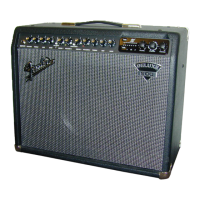
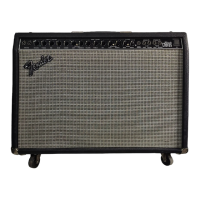
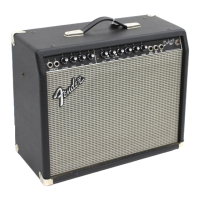
The Fender Deluxe 90 Amplifier is a powerful and versatile musical instrument designed for guitarists seeking a wide range of tones, from sparkling clean to harmonically rich distortion. Engineered by the same team responsible for classic Fender amps like the Tone-Master, Princeton Chorus, and Hot Rod Series, the Deluxe 90 offers robust performance and dependable sound quality for various musical styles.
At its core, the Deluxe 90 is a 90-watt solid-state guitar amplifier featuring two independent channels, each with its own tone controls, allowing for precise sound shaping. The amplifier is designed to be a finely tuned musical instrument, emphasizing careful attention to detail in its construction and sound delivery.
The Normal (Clean) Channel provides pristine, clear tones, ideal for rhythm guitar, jazz, or any style requiring an uncolored sound. This channel includes dedicated controls for Volume, Treble, Mid, and Bass, enabling comprehensive adjustment of the clean tone's frequency response.
The Drive (Distortion) Channel is where the Deluxe 90 truly shines for guitarists seeking more aggressive sounds. This channel offers everything from a subtle crunch to heavy overdrive. It features its own set of controls, including Drive, Volume, Treble, Mid, and Bass, allowing for independent shaping of the distorted tone. A key feature of the drive channel is the "More Drive" function, which, when activated, significantly increases the preamp gain, producing a harmonically rich distortion ideal for enhanced leads and heavier rock styles.
The amplifier also incorporates a Spring Reverb unit, adding depth and ambiance to both the normal and drive channels. This classic effect helps create a fuller, more spacious sound, enhancing the overall musical experience.
For remote control and live performance flexibility, the Deluxe 90 includes a Footswitch Jack. The included 2-button footswitch allows for convenient on-off switching between the normal and drive channels, as well as toggling the "More Drive" feature within the drive channel. This remote control capability ensures seamless transitions during performances, freeing the guitarist to focus on playing.
The rear panel of the amplifier offers additional connectivity options. A PRE OUT jack provides an unbalanced output signal from the preamp, which can be used in various setups. This includes driving effects units in an effects loop, connecting to additional amplifiers in a multi-amp configuration, or sending a signal to a mixing console for recording or live sound reinforcement. Conversely, a PWR IN jack serves as an unbalanced return for effects units or as a direct power amp input, offering flexibility for integrating external signal processors or using the Deluxe 90 as a standalone power amplifier.
Operating the Deluxe 90 is straightforward, designed for ease of use while offering extensive tonal control.
To begin using your Deluxe 90, simply plug your guitar into the appropriate input, ensure the power cord is securely connected to a grounded outlet, and turn on the power switch. Start with the volume controls at a low setting and gradually increase them to your desired level. Experiment with the tone controls on both channels and the reverb to discover the wide array of sounds available. Utilize the footswitch for quick channel and drive mode changes during practice or performance.
The Fender Deluxe 90 is built for durability and long-lasting performance, but proper care and occasional troubleshooting can help maintain its condition and functionality.
The amplifier is covered in genuine Tolex, a durable material known for its longevity and good looks. To clean the Tolex covering, use a sponge dampened with a light soapy water solution. It is essential to avoid spilling liquids on the operating surfaces, grill, volume and tone controls, switches, and speakers. Always UNPLUG THE POWER CORD BEFORE CLEANING and ensure the unit is COMPLETELY DRY BEFORE PLUGGING IT IN again to prevent damage or electrical hazards.
If the Deluxe 90 does not function as expected, a systematic troubleshooting approach can often resolve common issues:
If, after performing these checks, the amplifier still does not perform correctly, it is recommended to consult your nearest authorized Fender Service Center for professional assistance. The Deluxe 90 contains no user-serviceable parts inside, and all servicing should be referred to qualified personnel only to prevent damage, fire, or shock hazards. The unit must always be earth grounded for safety.
 General
| Type | Solid State |
|---|---|
| Output Power | 90W |
| EQ | 3-Band EQ |
| Effects | Reverb |
| Channels | 2 (Normal and Bright) |

 To Next Page