26
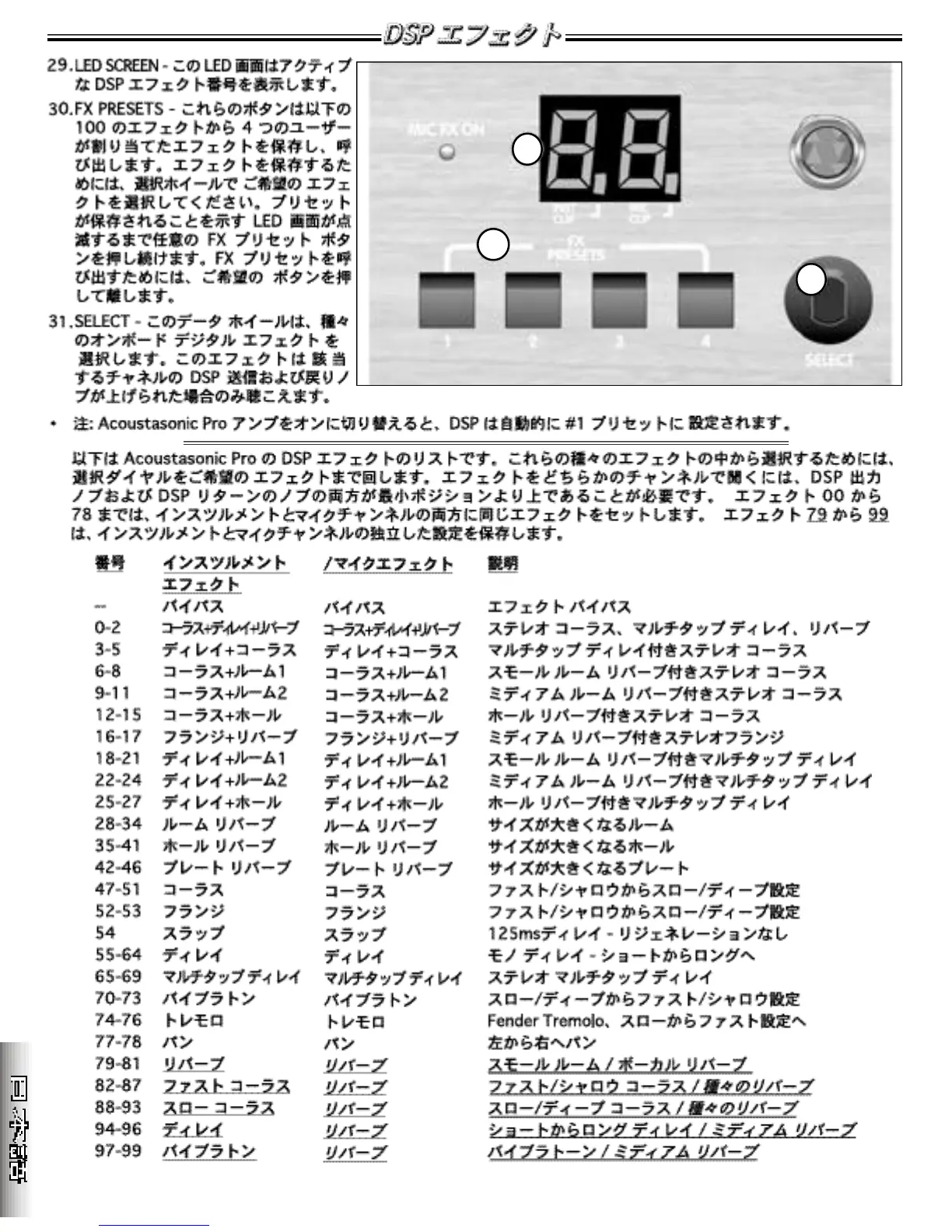
38.LED SCREEN - This LED screen dis-
plays the active DSP effect number.
3 9 .F X PRESETS - These buttons save
and recall four user-assigned eff e c t s
f rom the 100 effects listed below. To
save an effect, choose a favorite
e ffect with the select wheel. Pre s s
and hold any desired FX preset button
until the LED screen blinks indicating
that your preset has been saved. To
recall a FX preset simply press and
release the desired button.
4 0 .SELECT - This data wheel selects
among the various on-board digital
e ffects. These effects will only be
h e a rd if the DSP send and re t u rn
knobs on the respective channels
a re turned up.
• NOTE: When switching ON your Acoustasonic Pro amplifier, the DSP automatically defaults to the #1 preset.
Below is a listing of the Acoustasonic Pro ’s DSP effects. To choose among these various effects simply rotate the
select dial to the desired effect. Both the DSP send and DSP re t u rn knobs must be above their minimum positions in
o r der for any effect to be heard. Effects 00 thru 78 have the same effect set on both the instrument and mic chan-
nels. Effects 7 9 t h ru 9 9 have independent settings for the instrument and mic channels.






 To Next Page