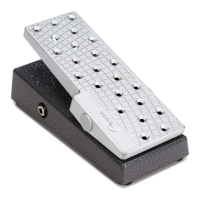
The Fender EXP-1 Expression Pedal (P/N 2301050000) is a versatile accessory designed for use with Fender Mustang™ III-IV-V amplifiers and the Mustang Floor. This owner's manual provides comprehensive instructions for its setup, calibration, and configuration, enabling users to unlock a wide range of control over their amplifier's sound.
Function Description
The EXP-1 pedal operates in two primary modes: Volume behavior mode and Expression behavior mode. Users can switch between these modes by pressing down hard on the toe end of the pedal. Red and green LEDs on the EXP-1 indicate the current mode, providing immediate visual feedback.
-
Volume Behavior Mode: In this mode, the EXP-1 controls the master volume of the amplifier. It can also be set to "OFF" if volume control via the pedal is not desired. The "Heel Volume" and "Toe Volume" settings allow users to define the minimum (heel down) and maximum (toe down) master volume levels, respectively, ranging from 0% to 100%. These volume settings are stored globally and apply to all presets, ensuring consistent volume control across different sounds.
-
Expression Behavior Mode: This mode offers extensive control over most effect and amp parameters on the Mustang amplifier. It's particularly useful for dynamically adjusting parameters such as the frequency of a Wah effect or the rate/time of modulation or delay effects. The pedal can be configured to control parameters within various categories, including "Off," "Amp," "Stomp," "Mod," "Delay," "Reverb," and "Volume." The specific parameters available for control will depend on the selected category and the effect module active in the current preset.
Usage Features
The EXP-1 pedal is designed for intuitive and dynamic control during live performance and practice.
- Mode Switching: A firm press on the toe end of the pedal allows for quick toggling between Volume and Expression modes, adapting to immediate performance needs.
- Parameter Control: In Expression mode, users can assign the pedal to control a specific parameter (e.g., "LEVEL" for a stompbox effect). The "Heel Setting" and "Toe Setting" define the parameter's value when the pedal is in the fully down (heel) and fully up (toe) positions, respectively. These settings are variable and depend on the selected effect category and module.
- Expression Mode Behavior (Capture/Live):
- Live: When "Live" is selected, the pedal's current position immediately overrides any stored preset setting for the assigned expression pedal parameter. This provides real-time, continuous control.
- Capture: When "Capture" is selected, the pedal is initially disabled when a preset is first loaded. It becomes active only after the user moves the pedal, preventing sudden parameter changes upon preset selection.
- Bypass Effect: Users can configure the EXP-1 to bypass the currently selected effect in the Expression Mode Behavior menu when switching the pedal to Volume mode. This is achieved by checking a dedicated box in the settings. Unchecking the box keeps the effect active.
- Reset Parameter to Preset Value: An option allows the Expression Mode Parameter to revert to its stored preset value when switching to Volume mode. If this option is unchecked, the parameter will retain its last set position when switching modes.
- Experimentation: The Expression mode is highly beneficial for experimenting with "mystery" parameters. Users can adjust parameters with their foot while playing, allowing for uninterrupted listening to the changes and facilitating creative sound design.
Technical Specifications
- Part Number: 2301050000
- Compatibility: Fender Mustang™ III-IV-V amplifiers and Mustang Floor.
- Connectivity: Plugs into the "4 BUTTON" FOOTSWITCH jack on the back of the Mustang amplifier using the included cable.
- Indicators: Red and green LEDs indicate the current pedal mode (Volume or Expression).
Maintenance Features
While the manual doesn't detail traditional "maintenance" in terms of cleaning or repair, it outlines crucial setup and configuration steps that ensure the pedal functions optimally. These can be considered "operational maintenance" for consistent performance.
- Software and Firmware Updates:
- Fender FUSE Software: Users must download and install the latest version of Fender FUSE software, available free of charge from fuse.fender.com. This software is essential for configuring the EXP-1 settings.
- Fender FUSE Owner's Manual: The current owner's manual for Fender FUSE should also be downloaded for reference.
- Amplifier Firmware: The firmware on the Mustang III/IV/V amplifier must be updated. The manual refers to page 2 for step-by-step instructions for this process.
- System Requirements for Fender FUSE:
- PC: Windows 7, Vista, or XP.
- Mac: Intel® processors running OSX 10.5 (Leopard) or above.
- Calibration:
- Procedure: Calibration is a critical step performed when connecting the EXP-1 to a Mustang amplifier for the first time or when changing EXP-1 pedals or plugging it into a different amplifier.
- Steps:
- Plug the EXP-1 pedal into the "4 BUTTON" FOOTSWITCH jack.
- Turn the amplifier OFF.
- Press and hold the UTIL button on the amplifier, then turn the amplifier ON. Continue holding the UTIL button until it is no longer illuminated.
- Purpose: Calibration synchronizes the pedal's range of movement with the amplifier's parameter ranges, ensuring accurate and responsive control.
- Configuration of EXP-1 Settings:
- Accessing Settings:
- Connect the EXP-1 to the amplifier.
- Connect the amplifier to a computer via USB cable.
- Open the Fender FUSE application.
- Navigate to "Main Menu > Utilities > Expression Pedal..." in Fender FUSE.
- Saving Settings: After configuring the EXP-1 settings, users must save the current preset to store these settings with it. This ensures that the pedal behaves as desired each time that preset is loaded.
- Visual Feedback in FUSE: A small expression pedal icon appears in Fender FUSE next to the currently selected amp or effect in the Expression Mode Behavior menu. This icon can be dragged and dropped onto different effect modules or clicked to open the Expression Pedal Settings window, providing a convenient way to access and adjust settings.
The Fender EXP-1 Expression Pedal, when properly calibrated and configured through the Fender FUSE software, significantly enhances the playability and sonic versatility of Mustang amplifiers, offering guitarists precise and dynamic control over their sound.

 Need help?
 General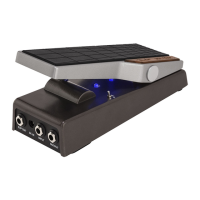



 To Next Page