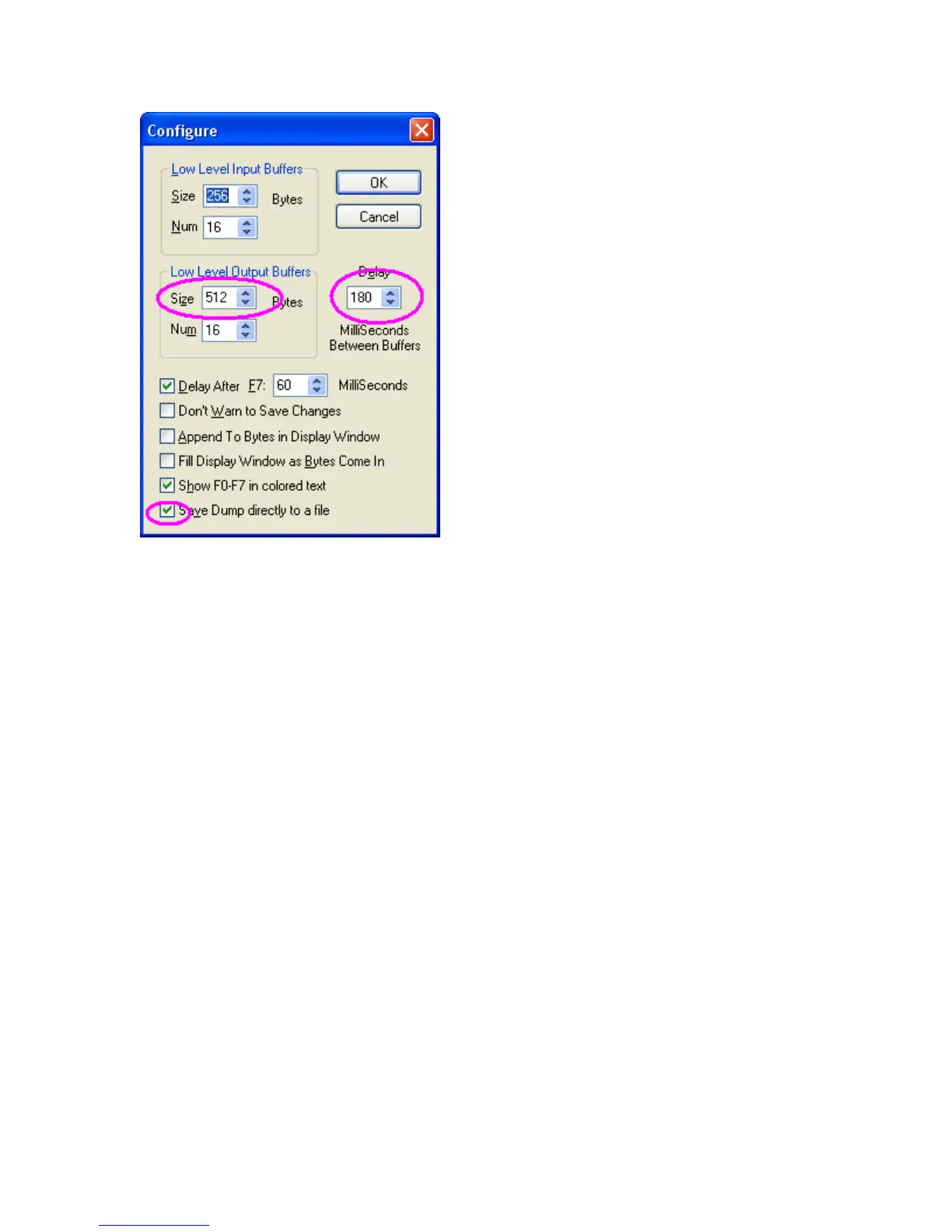
Figure 6 Sysex / Configure window, change the circled settings
Changing the delay number from the default of 60ms to 180ms helps the PC meter out the MIDI data at a
slow enough pace to not overwhelm the small buffers inside the PC. Checking the “Save Dump directly to
a file” box causes MIDI-OX to automatically ask for a filename. The above settings have worked well on
test PCs, although your PC may be different.
Selecting MIDI-OX IN/OUT
In section 1 we covered the issue of setting Windows XP to redirect the MIDI file to the G-DEC. MIDI-
OX has a similar mechanism and needs to be told where to direct MIDI traffic. Figure 7 shows an initial
MIDI device window from MIDI-OX. Select “Options / MIDI Devices…”. Initially MIDI_OX will have
no entries in the port mapping window.
Go to the MIDI Output window and select the device name through which you will be transmitting data to
the G-DEC. This selection should then appear in the “Port Mapping” window.
Go to the MIDI Input window and select the device with which you will use to receive G-DEC messages.
The selection should appear in the “Port MAP objects” window. See Figure 8 for an example.







 To Next Page