Pag 17
Minicentral MDS Digital
Minicentral MDS Digital
During the download process the Central Unit LEDs must light up (indicating data reception) and
an increasing counter should appear in the program window (indicating sending).
If this does not happen, check parameters and begin the process over again from the start.
NONO
NONO
NO
TETE
TETE
TE
::
::
:
99
99
9
It is also possible to download via FXL network using terminal Ref. 2338 to allIt is also possible to download via FXL network using terminal Ref. 2338 to all
It is also possible to download via FXL network using terminal Ref. 2338 to allIt is also possible to download via FXL network using terminal Ref. 2338 to all
It is also possible to download via FXL network using terminal Ref. 2338 to all
the central units on the network, one by one, indicating the central unit number inthe central units on the network, one by one, indicating the central unit number in
the central units on the network, one by one, indicating the central unit number inthe central units on the network, one by one, indicating the central unit number in
the central units on the network, one by one, indicating the central unit number in
each case.each case.
each case.each case.
each case.
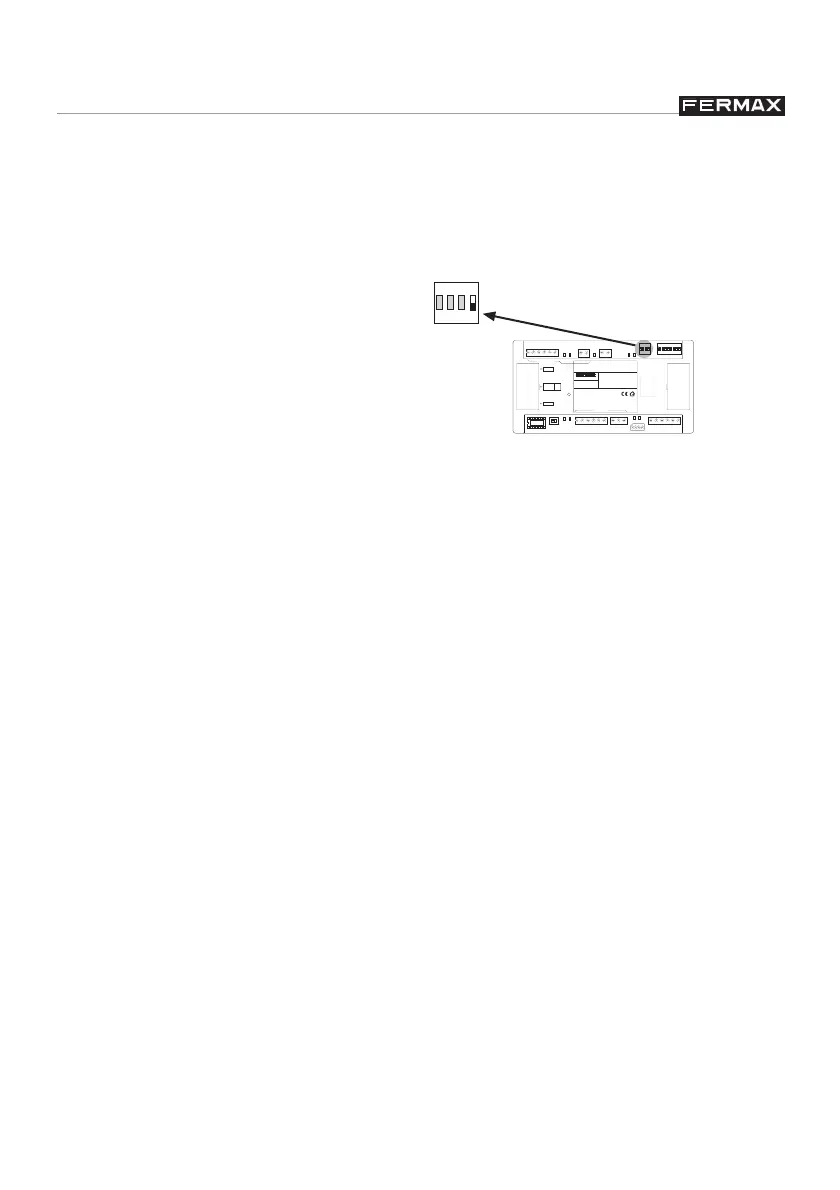
6. Once download is complete:
Turn SW1 microswitch number 4 to
OFF position.
The central unit should trigger an auto-reset, commencing diagnosis and system startup
immediately .
1 2 3 4 5 6 7 81 2 3 4
ON DIP
ON
+ - Sa Sb 2 6 CT V M A B G A B G
M V
6 2 Sb Sa - +
- +
TD
TPSWITCHERS
P0
OFF
TEST P.
RP
ON
FUSE
FUSIBLE
POWER
0.5A
DECODERS
TEST D.
RD
FXL PC
TX
UNIDAD CENTRAL MDS
MDS CENTRAL UNIT
PANEL 0
MADE IN SPAIN
REF. 2405
RX
12Vdc
RST X Y
FXL
#CENTRALCONFIG
CN11
1 2 3 4
ON DIP
SW1








 To Next Page