Need help?
Do you have a question about the Ferroli ROMEO W and is the answer not in the manual?
Guide to setting the correct day and time on the remote control using the DAY and A/V keys.
Instructions for customizing the factory-set automatic heating program with time bands and temperature levels.
Details on selecting OFF, Summer, or Winter modes, including automatic and manual heating operations.
Procedure for adjusting heating circuit and domestic hot water temperatures using the remote control.
How to activate and program the Holiday Function to save energy when away from home.
Setting the compensation curve for controlling heating temperature based on outdoor conditions.
Adjusting the parallel offset for the sliding temperature compensation curve.
Instructions for enabling or disabling domestic hot water programming and setting modes.
Configuring the pre-heating function to ensure desired room temperature at the start of a time band.
Adjusting the number of daily time bands available in the heating program.
Setting the minimum heating circuit water temperature.
Managing the operating mode for the electrical device used for filling the water circuit.
Selecting the temperature unit (°C or °F) for the remote control display.
Adjusting the room temperature reading displayed by the remote control.
Programming phone contact input for switching off heating or setting a fixed room temperature.
Accessing information on boiler status and remote control software version.
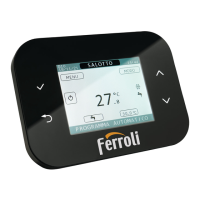
This document describes a remote control device designed to manage heating and domestic hot water systems, offering a range of functions for optimal comfort and energy efficiency. The device features a clear display and intuitive controls, allowing users to configure various settings, monitor system status, and diagnose potential faults.
The remote control primarily serves as an interface for managing your heating system. It supports multiple operation modes, including OFF mode, which switches off heating while maintaining a 5°C frost protection; Summer mode, which disables heating but continues domestic hot water production; and Winter mode, which reactivates the heating system. In Automatic operation (Winter mode), the device follows a pre-programmed weekly schedule with six daily time bands, each allowing for a specific temperature level. Users can temporarily override the preset temperature in automatic mode using the adjustment keys. For consistent heating, Manual operation (Winter mode) allows setting a fixed room temperature.
The device also enables Heating system - domestic hot water temperature adjustment. Users can adjust the heating circuit water temperature and the domestic hot water temperature independently.
A key feature is the Holiday Function, which allows users to switch off the heating system (and domestic hot water for boilers with storage tanks) for a specified period, from 1 hour to 45 days. This function helps save energy while away, automatically reactivating the programmed operating mode upon its conclusion. During the holiday period, frost protection remains active.
The remote control supports Sliding Temperature - Compensation curve functionality when an optional external probe is installed. This feature adjusts the heating system temperature based on outdoor weather conditions, ensuring maximum comfort and energy efficiency. The compensation curve can be set from 1 to 10, and a parallel offset can be applied to fine-tune the temperature response. Setting the compensation curve to 0 disables this function.
Enabling domestic hot water programming allows users to set a weekly automatic program for domestic hot water, choosing between COMFORT (maintaining storage cylinder temperature) and ECO (no domestic hot water production) levels.
The Pre-Heating Function anticipates the start time of the heating system to ensure the desired room temperature is reached at the beginning of a programmed time band. This self-teaching process adapts over time to determine the optimal pre-heating duration. Alternatively, a fixed pre-heating ramp of 3°C per hour can be set.
Users can adjust the Maximum number of daily time bands for the heating program, reducing them from six to a minimum of two if needed. The Minimum heating temperature for the heating circuit water can also be set in 1°C steps.
The Filling the heating circuit function manages the electrical device for filling the water circuit, offering options for disabling, manual, or automatic circuit filling. In manual mode, the device signals low pressure, and users can activate a solenoid valve to restore nominal pressure.
The Temperature unit selection allows users to choose between Celsius (°C) and Fahrenheit (°F) for temperature display. Additionally, the device offers a Correcting the room temperature reading function, enabling fine-tuning of the displayed room temperature by -2°C to +2°C in 0.1°C steps.
For advanced control, the Phone contact input allows the remote control to switch off the heating system or set a preset fixed room temperature when an external contact is closed.
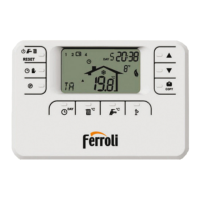
The remote control is designed for ease of use, with a clear display and dedicated keys for various functions.
Setting the time and day of the week is the initial setup step, using the A/V keys to adjust values.
Setting the automatic weekly program involves configuring six daily time bands for temperature levels. The factory-set program provides a baseline, which can be modified by selecting specific time bands and adjusting their start times and temperature levels. The COPY key allows users to duplicate programs across different days.
Operation mode selection is straightforward, with dedicated keys to switch between OFF, Summer, and Winter modes.
Heating system - domestic hot water temperature adjustment is performed using the A/V keys to change temperature values.
Activating and programming the Holiday function involves pressing the dedicated key and using the A/V keys to set the duration.
Adjusting the Sliding Temperature - Compensation curve and its parallel offset requires holding down a specific key for 3 seconds to enter the parameter editing menu, then using the A/V keys to make adjustments.
Enabling domestic hot water programming follows a similar process, accessing the parameter menu and setting the relevant parameter.
Selecting or deselecting the Pre-Heating function, adjusting the Maximum number of daily time bands, setting the Minimum heating temperature, configuring the Filling the heating circuit function, and choosing the Temperature unit are all performed through the parameter editing menu, using the A/V keys for selection and adjustment.
Correcting the room temperature reading is also done via the parameter editing menu.
The Information menu provides real-time data on boiler status, including water temperatures, burner output, fan current, domestic hot water flow rate, system pressure, and software version. This menu is accessed by repeatedly pressing a specific key.
The remote control includes several features to assist with maintenance and fault diagnosis.
Power failures are handled by storing operating mode, calendar, and clock data for at least 5 hours, provided the device was powered for at least 1 hour prior to the outage. If data is lost, users will need to re-enter the day, hour, and minutes.
Fault Diagnosis is a crucial feature. The remote control continuously monitors boiler status and displays an alarm icon with a specific error code if a fault is detected. Faults causing boiler lock-out (marked with "A") can be reset by pressing the RESET button. Temporary shutdowns (marked with "F") automatically reset when the issue is resolved.
The device also detects a Room temperature sensor fault, displaying error code E92 and a symbol, and switching off the heating system.
An External temperature probe fault (error code E93) in Sliding Temperature operation will fix the control temperature to the "heating temperature control" value. Users can reconnect/replace the sensor or disable sliding temperature control to resolve this.
The Restoring default settings function allows users to reset all remote control parameters to their factory default values, except for time and day settings. This is useful for troubleshooting or reconfiguring the system. It requires holding down the A keys simultaneously for 10 seconds.
 General
| Compatibility | Ferroli boilers |
|---|---|
| Display | LCD |
| Power Supply | 2 x AAA batteries |
| Range | Up to 30 meters |
| Functions | programming |


 To Next Page