8
user’s manual
OOR by Ferrum
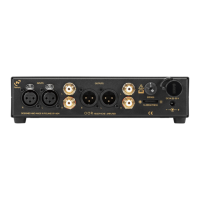
Make sure the signal cables (optionally you can also connect an amplifier, active speakers, etc.) are
connected to the OOR before turning it on.
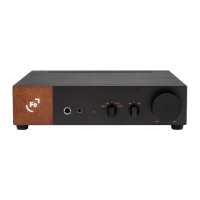
Set the Gain knob to the first position (-dB) and the Volume knob to about 25%.
Turn on the OOR using the input selector - select either the RCA or XLR input.
Now while listening to music, gently raise the volume using the Volume knob. If the volume is unsatisfactorily
low at about 75% o, move the Volume knob back to 25% and the Gain knob to the second position (0).
Repeat the procedure - gently raise the volume to about 75%.
If the volume is still noticeably low, move the Volume knob back to 25% and the Gain knob to the 3rd position
(+dB). The idea is to set the optimum volume level with the Gain knob in such a way that you get the widest
possible range from the Volume knob. Our recommendation is to find a Gain knob setting such that the
optimum volume level is as close to 50% of the Volume knob as possible.
6. GETTING STARTED
6.1. Using OOR For The First Time
The bypass function is disabled at the factory. To activate it you have to switch the rotary switch from
position 0 to position 1 - the most convenient way to do it is with a flat screwdriver.
The bypass function disables the built-in potentiometer in OOR. As a result, the signal given at the input of
OOR will be transmitted to the headphones or RCA or XLR outputs with all its power. This is useful when it is
more convenient for the user to control the volume from the sound source.
Please use the Bypass function with caution! A sudden jump in headphone volume may damage your
hearing and the headphones or speakers!
It is best to reduce the input signal at the source to a minimum before the Bypass function is activated.
Note: Ferrum refuses every liability for damage to equipment due to using Bypass function.
6.2. Bypass Function
The potentiometer built into the OOR aects the volume of not only the headphones, but also the RCA and
XLR outputs. We recommend disconnecting headphones from the OOR if they are not used for a longer
period of time, and especially if you want to control volume on RCA or XLR outputs (when an amplifier or
active speakers are connected). This practice can prevent excessive wear or damage to your headphones.
6.3. Using OOR With Amplifiers Or Active Speakers


 To Next Page