Advanced Function Settings
Limited height setting:Press" "and" "key for 5 seconds till heard a bee sound ,
limited height setting success.
(minimum limited height<96,maximum limited height>97).
Cancel the function, run to the limit height, press" "and" "again for 5 seconds,
hear the buzzer sound, limited height Cancel.
Lock and unlock:Press" "and " S " key for 5 seconds , Screen display "LOC" ,
system locked up,Press" "and " S " key for 5 seconds, screen display "LOC"
turn to number ,system unlocked.
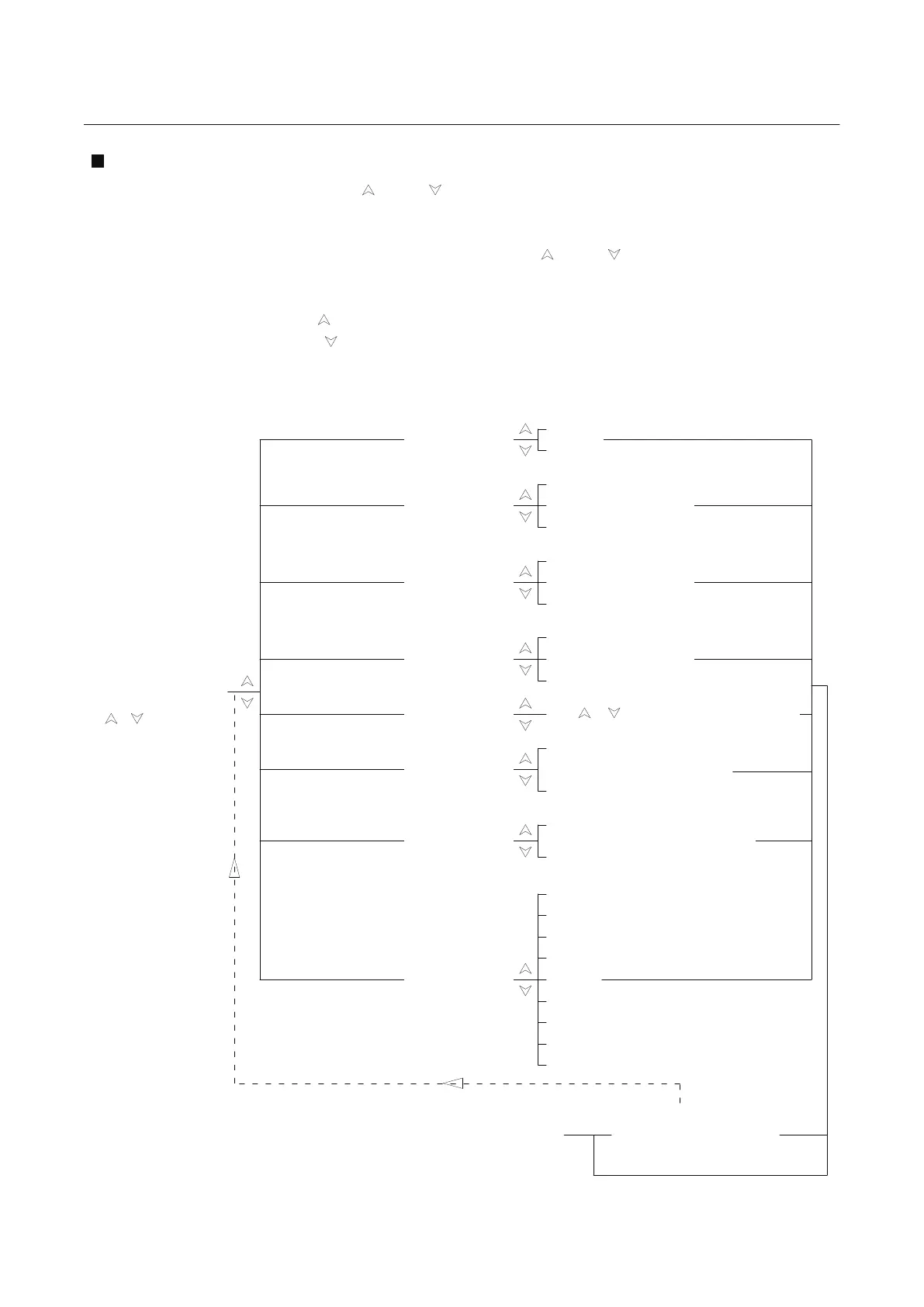
Set up multiple functions
Press "m3" to return
Menu "s - *" interface
Metric and Inch exchange
S-1
Click “M4” Key
0
1
2
3
4
5
6
7
8
Use or adjust the basement height
Long pressing desk running,
hands off desk stop running
0
1
8
0 Metric
1 Inch
S-2
S-3
S-4
S-5
S-6
S-8
0 shut down
1 The most insensitive
8 The most sensitive
0 shut down
1 The most insensitive
8 The most sensitive
0
Click desk running, second
click to stop running
1
S-7
Basement height
DIRECTIONS FOR USE
Press M4 key till hear
the second "di" sound
(around 10s).
use or key to choose
Click “M4” Key
Click “M4” Key
Click “M4” Key
Click “M4” Key
Click “M4” Key
Click “M4” Key
Click “M4” Key
Reservation function
Press M4 to return to the
numerical display interface
Set up successfully
up anti collison sensitivity
(Current detection)
down anti collison
sensitivity(Current detection)
Reservation function
Memory key operation
Overheat protection
Turn on(Continuous operation
for two minutes, error HOT)
1
0 shut down
10


 To Next Page