UCONNECT RADIOS
For detailed information about your Uconnect radio,
refer to your Uconnect Owner’s Manual Supplement.
IPOD/USB/MEDIA PLAYER CONTROL — IF
EQUIPPED
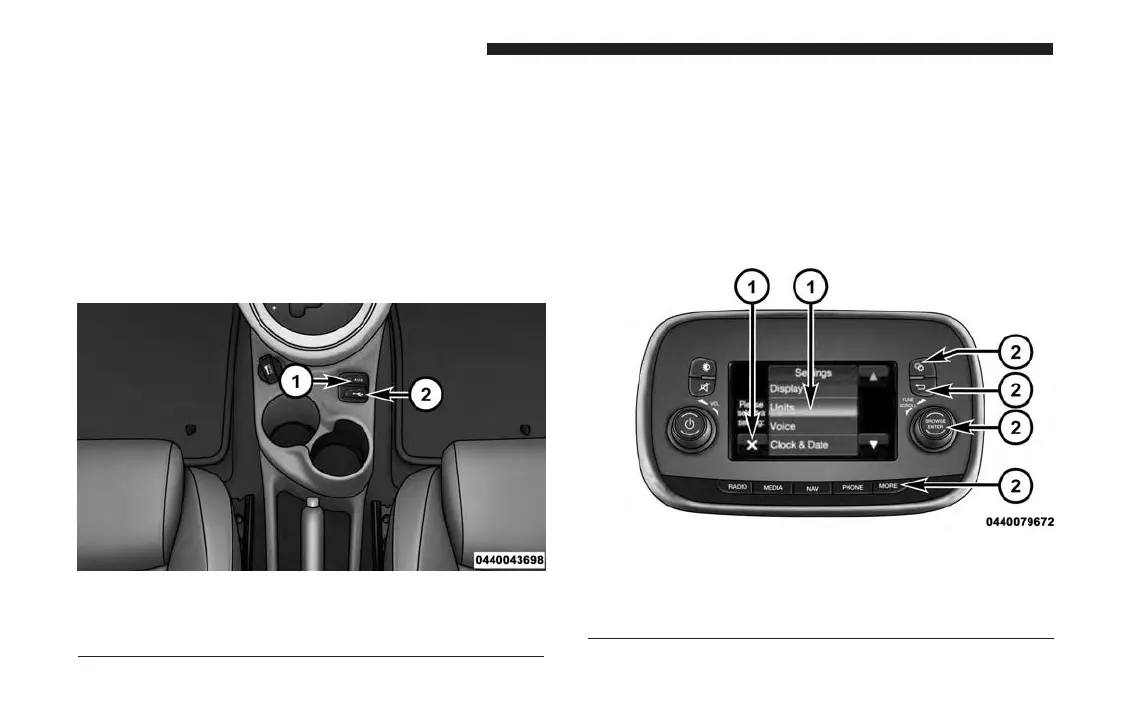
This feature allows an iPod or external USB device to be
plugged into the USB or AUX port, located in the center
console.
UCONNECT SETTINGS
The Uconnect system uses a combination of buttons on
the touchscreen and buttons on the faceplate located on
the center of the instrument panel that allow you to
access and change the customer programmable fea-
tures. Many features can vary by vehicle.
USB/AUX Port
1 — Auxiliary Cable Jack
2 — USB Connector
Uconnect 5.0/5.0 NAV Buttons On The Touchscreen
And Buttons On The Faceplate
1 — Uconnect Buttons On The Touchscreen
2 — Uconnect Buttons On The Faceplate
144 UNDERSTANDING YOUR INSTRUMENT PANEL


 To Next Page