Need help?
Do you have a question about the FIBARO FGFS-101-ZW5 and is the answer not in the manual?
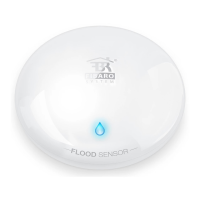
Detects water presence.
Monitors ambient temperature.
Provides audible and visual alerts.
Detects device tilt or movement.
Open the device by twisting the casing.
Remove the device's outer casing.
Launch the FIBARO application and navigate to Settings.
Select the 'Add device' option within Settings.
Proceed by pressing the 'Next' button in the wizard.
Triple-click the device button to initiate adding to the system.
Triple-click the device button to wake it up for configuration.
Hold button for 10-15 seconds until LED blinks violet.
Release the button, and press it again to check network range.
Press the button to leave the testing mode.
Close the device by twisting the cover back on.
 General
| Type | Flood Sensor |
|---|---|
| Connectivity | Z-Wave |
| Power Supply | Battery |
| Battery Type | CR123A |
| Weight | 100 g |
| Water Detection | Yes |
| Tamper Detection | Yes |
| Battery Life | Up to 2 years |
| Z-Wave Frequency | 868.42 MHz (EU) |
| Operating Temperature | 0°C to 40°C |

 To Next Page