Need help?
Do you have a question about the Fiio BTA30 and is the answer not in the manual?
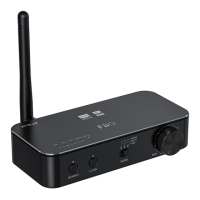
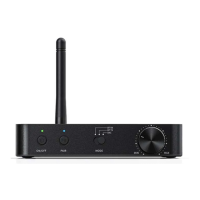
The button used to turn the device on and off.
Light indicating the device's power status.
Indicates Bluetooth connection status, codec, and sampling rate.
Button for initiating Bluetooth pairing or pausing playback.
Switch for selecting receiving, transmitting, or DAC mode.
Rotary knob for adjusting the audio volume.
Analog audio output port.
Digital audio output port.
Port for coaxial digital audio input and output.
Port for optical digital audio input.
Port for connecting an external antenna.
USB port for power supply and data transmission.
Details on supported Bluetooth codecs and their corresponding indicator lights.
Instructions for turning the device on and off.
Instructions for pairing, clearing pairing, and force pairing.
Guidance on connecting to two Bluetooth devices simultaneously.
Explains audio input/output for Bluetooth receiving, transmitting, and DAC modes.
Details priority order for audio inputs and outputs in different modes.
Important advice on charging, environment, volume, and error handling.
List of included accessories and resources for learning more.
Guidelines for responsible product and battery disposal.
The FiiO BTA30 is a versatile Hi-Res Bluetooth Receiver and Transmitter, designed to enhance your audio experience by providing seamless wireless connectivity and high-quality sound. This device acts as a bridge between your audio sources and output devices, offering multiple modes of operation to suit various listening and transmitting needs.
The BTA30 primarily functions as a Bluetooth receiver (RX), a Bluetooth transmitter (TX), and a Digital-to-Analog Converter (DAC).
In Bluetooth Receiving (RX) mode, the BTA30 allows you to stream audio wirelessly from your Bluetooth-enabled devices (such as smartphones, tablets, or computers) to your existing audio system. Once paired with your source device, the BTA30 outputs the audio through its line out, coaxial output, or optical output ports, enabling you to enjoy high-quality wireless audio on your speakers, headphones, or amplifier. This mode supports various codecs including SBC, AAC, aptX, aptX HD, and LDAC, ensuring compatibility with a wide range of devices and delivering superior sound fidelity. The device provides visual indications for the active codec and sampling rate via its indicator light C, with different colors corresponding to different codecs and sampling rates (e.g., Blue for SBC, Cyan for AAC, Purple for aptX, Yellow for aptX HD, White for LDAC). For sampling rates, Purple light indicates ≤48kHz, and Yellow light indicates >48kHz.
In Bluetooth Transmitting (TX) mode, the BTA30 transforms your non-Bluetooth audio sources into Bluetooth-enabled ones. You can connect your audio source (e.g., a TV, CD player, or computer) to the BTA30 via its USB input, coaxial input, or optical input. The BTA30 then transmits the audio wirelessly to Bluetooth receiving devices like Bluetooth headphones or speakers (such as FiiO BTR5 or BTR3K). This mode also supports a range of codecs, including SBC, aptX, aptX HD, aptX LL, and LDAC, allowing you to choose the best codec for your listening preferences and device capabilities. Similar to RX mode, indicator light C provides visual feedback on the active codec and sampling rate.
As a Digital-to-Analog Converter (DAC), the BTA30 can significantly upgrade the sound quality of your digital audio sources. When connected to a computer via its USB port, the BTA30 acts as an external sound card, processing digital audio signals and outputting them through its line out, coaxial output, or optical output. This bypasses the often inferior DACs built into computers, resulting in clearer, more detailed sound. Additionally, the BTA30 can decode audio signals input through its coaxial or optical ports, outputting the analog audio through the line out port. In USB DAC mode, the indicator light C shines White constantly, and for DSD, it shines Green constantly.
The BTA30 is designed for ease of use with intuitive controls and versatile connectivity options.
To ensure the longevity and optimal performance of your FiiO BTA30, adhere to the following maintenance guidelines:
The BTA30 comes with essential accessories including a Type C USB cable, a quick start guide, a warranty card, and foot pads, ensuring you have everything needed to get started and maintain your device. For further information and support, FiiO provides resources on their website, including product details and customer support services. The device also complies with WEEE Directive for product disposal, emphasizing responsible recycling at the end of its serviceable life.
 General
| Purpose | Home |
|---|---|
| Bluetooth | Yes |
| Product color | Black |
| Bluetooth version | 5.0 |
| USB ports quantity | 1 |
 Weight and Dimensions
| Depth | 55 mm |
|---|---|
| Width | 120 mm |
| Height | 23.5 mm |

 To Next Page