Notes:
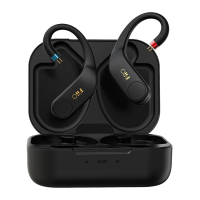
1) When the charging case is opened, the earhooks will power on and enter the
pairing/reconnecting state, which means they can be searched for and connected to.
2) After taking the 2 earhooks out of the charging case and then putting them back,
they will enter the charging state. The corresponding indicator light of the charging
case indicates the charging state of each earkook.
3) When opening the case, the middle indicator light will indicate the remaining
power of the charging case.
Power on
1) When opening the charging case, the UTWS5 will turn on automatically. (The one
never been connected will auto-enter pairing state when powering on for the first
time.)
2) If the UTWS5 is outside the charging case (off state), hold the multifunction button
for about 1s to turn it on. After being turned on, it can automatically reconnect to the
last-connected device.
Power off
If the UTWS5 is outside the case (on state), hold the multifunction button for about 5s
to turn it off. Or to turn it off in the Settings menu of the FiiO Control APP.
Pairing mode
1) If the UTWS5 is inside the charging case, it can enter pairing state by pressing the
multifunction button on the case for about 3s after opening the case.
2) If the UTWS5 is outside the case, it can enter pairing state by corresponding
operation in the Settings menu of the FiiO Control APP.
(Note: When the charging case is opened over 3 minutes, the UTWS5 will no longer
respond to any commands of the multifunction button of the case. So please keep the
UTWS5 in the case and operate it within valid time.)
Factory data reset/Bluetooth pairing
Charging port of the charging case


 To Next Page