EasyManua.ls Logo

Filisia Cosmo User Manual

Filisia Cosmo
5 pages
To Next Page IconTo Next Page
Page #1 background imageLoading...
Page #1 background image
!
About
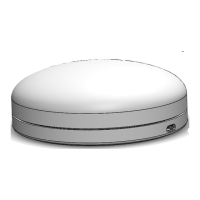
Cosmo is a unique, customisable bluetooth switch that!
(a) works with the Cosmo iOS app to give access to numerous
training and learning activities.
(b) provides single or multiple switch access to devices such as
laptops, mobile phones and tablets running that are Bluetooth LE
compatible and run iOS, OS X, Windows, and Android, Linux
operating systems.
Usage within the EU
This product can be used across EU member states.
FCC Warning
This device complies with part 15 of the FCC Rules. Operation is
subject to the following two conditions: (1) This device may not
cause harmful interference, and (2) this device must accept any
interference received, including interference that may cause
undesired operation.
FCC Note 1
This equipment has been tested and found to comply with the
limits for a Class B digital device, pursuant to part 15 of the FCC
Rules. These limits are designed to provide reasonable protection
against harmful interference in a residential installation. This
equipment generates, uses, and can radiate radio frequency
energy and, if not installed and used in accordance with the
Cosmo Tech Specs and User Manual p.1
Cosmo Manual
Filisia Interfaces
71-75 Shelton Street
London, WC2H 9JQ
+44 (0)20 8133 4220
hello@filisia.com
www.filisia.com
Charging port
Cosmo Switch
Power Button
Mounting system
screw holes
Label & serial number
Question and Answer IconNeed help?

Do you have a question about the Filisia Cosmo and is the answer not in the manual?

Filisia Cosmo Specifications

General IconGeneral
BrandFilisia
ModelCosmo
CategoryMedical Equipment
LanguageEnglish

Summary

About Cosmo Switch

Cosmo Functionality

Describes Cosmo's customisable Bluetooth switch capabilities for training and learning, and device access.

Regulatory Information

FCC Warning and Compliance

Details FCC compliance rules, conditions for operation, and potential interference.

FCC Note 1

States equipment tested and found compliant with Class B digital device limits per FCC Rules.

FCC Note 2

Warns that unapproved modifications void user authority to operate equipment.

Technical Specifications

Device Specifications

Lists key technical attributes including switch type, connection, activation, colour, dimensions, and compatibility.

Battery and Charging

Details battery type, life, charging instructions, and recommended charger specifications.

Setup and Usage

Setup for Cosmo App

Guides users on setting up and connecting the Cosmo switch with the Cosmo iOS app.

Setup as Bluetooth Controller

Instructs on setting up the Cosmo switch as a Bluetooth controller for devices.

Advanced Features and Information

Sleep Mode Operation

Explains how the Cosmo switch enters sleep mode and how to wake it.

Additional Information

Provides details on mounting options, warranty, and contact information for Filisia.

HID Character Mapping

Colour/HID Character Table

Maps colours and patterns to specific HID character values for Bluetooth controller use.