7
Filter Replacement
❸
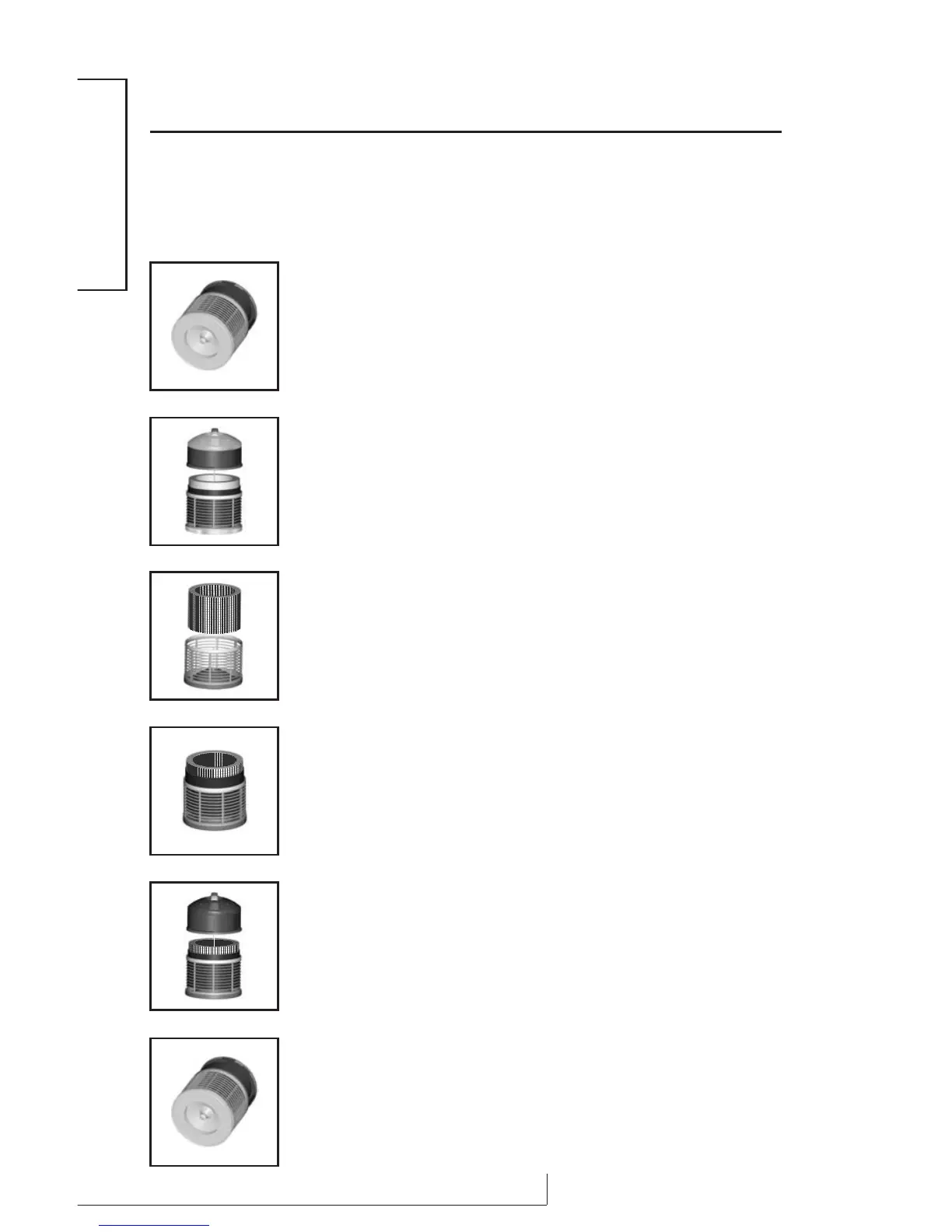
Remove the Medi-Filter
®
Cartridge and Enviropure
®
Charcoal
Filter. If only replacing the Enviropure
®
Charcoal Filter,
remove the old charcoal filter from the Medi-Filter
®
Cartridge
and discard it.
Note: The charcoal filter is fastened with velcro.
❹
Place the new Enviropure
®
Charcoal Filter around the outside of
the Medi-Filter
®
Cartridge and fasten with the velcro. If also
replacing the Medi-Filter
®
Cartridge, fasten the new Enviropure
®
Charcoal Filter to the new Medi-Filter
®
Cartridge. Return the
filters to the unit.
❺
Replace the top motor assembly.
❻
Place the unit on its side to secure the retaining nut on the
bottom of the unit. Return the unit to its upright position to
resume use.
❶
After unplugging the Defender
®
, place the unit on its side and
remove the retaining nut on the bottom of the unit by
turning counterclockwise.
❷
Return the unit to its upright position and lift off the top motor
assembly.
Prompt filter replacement will prevent any potential damage to your Defender
®
that may result from its continued operation with a clogged filter condition.
To Replace your Filter(s):
ENGLISH


 To Next Page