Prompt filter replacement will prevent any potential damage to your Defender
®
that may
result from its continued operation with a clogged filter condition. Inspect your filter for
darkening of color which may cause noise or rattling due to filter being clogged.
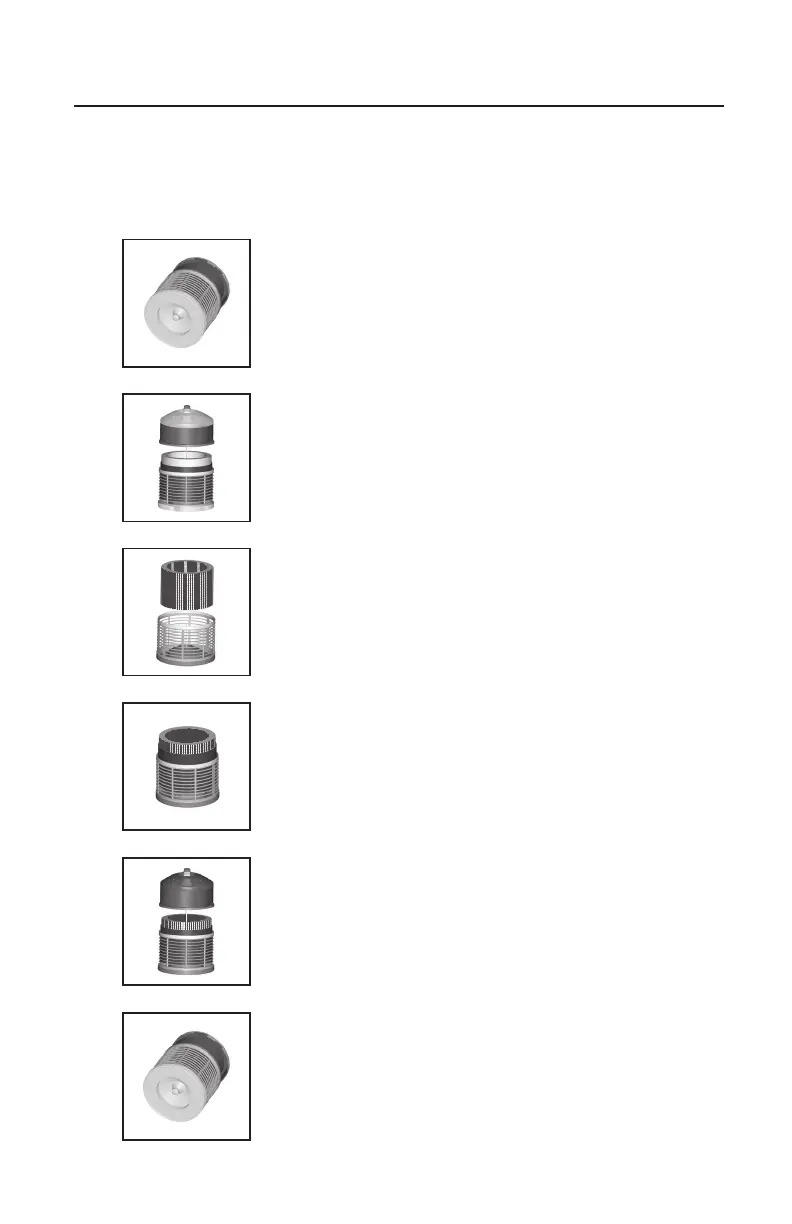
To Replace your Filter(s):
1. After unplugging the Defender
®
, place the unit
on its side and remove the retaining nut on the
bottom of the unit by turning counterclockwise.
2. Return the unit to its upright position and lift off
the top motor assembly.
3. Remove the Medi-Filter
®
Cartridge and
Enviropure
®
Charcoal Filter. If only replacing
the Enviropure
®
Charcoal Filter, remove the old
charcoal filter from the Medi-Filter
®
Cartridge
and discard it.
Note: The charcoal filter is fastened with velcro.
4. Place the new Enviropure
®
Charcoal Filter
around the outside of the Medi-Filter
®
Cartridge
and fasten with the velcro. If also replacing
the Medi-Filter
®
Cartridge, fasten the new
Enviropure
®
Charcoal Filter to the new Medi-
Filter
®
Cartridge. Return the filters to the unit.
5. Replace the top motor assembly.
6. Place the unit on its side to secure the retaining
nut on the bottom of the unit. Return the unit to
its upright position to resume use.
5
Filter Replacement


 To Next Page