Ρυθμίσεις της Κάμερας - Record
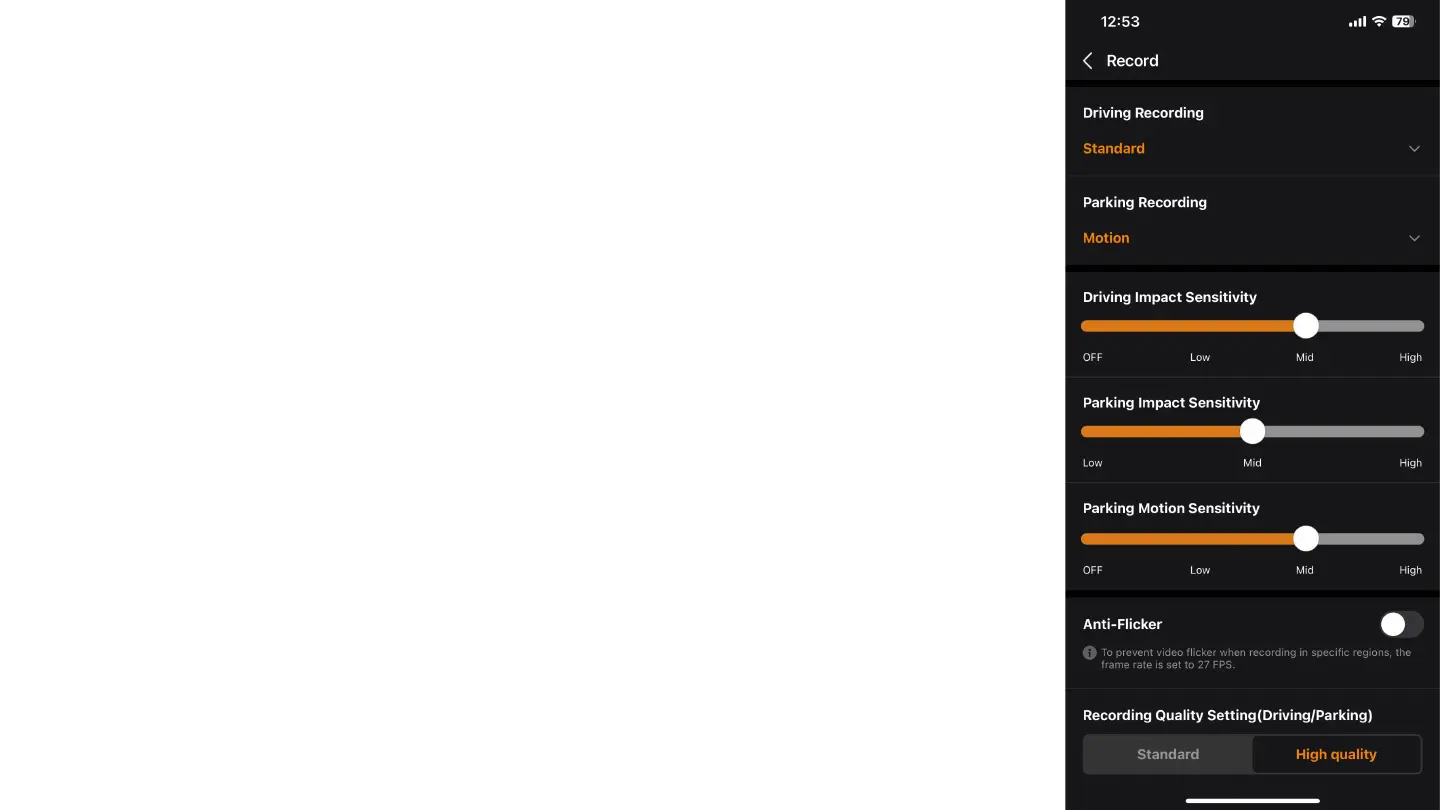
Στην καρτέλα "Record", μπορείτε να ρυθμίσετε τις παρακάτω επιλογές:
Driving Recording: Choose the recording mode for driving. Options are "Standard" or "High".
Parking Recording: Choose the recording mode for when the car is parked. Options are "Motion", "Power
Saving", or "OFF".
Motion: The camera records continuously while the car is parked and provides separate video clips starting
10 seconds before an event.
Power Saving: The camera remains off and only activates upon an impact detected by the sensor or an
alarm trigger.
Driving Impact Sensitivity: Adjust the sensitivity level for detecting impacts while driving. Options are "OFF",
"Low", "Mid", and "High".
Parking Impact Sensitivity: Adjust the sensitivity level for detecting impacts while parked. Options are "Low",
"Mid", and "High".
Parking Motion Sensitivity: Adjust the sensitivity level for detecting motion while parked. Options are "OFF",
"Low", "Mid", and "High".
Anti-Flicker: It is recommended to keep this setting off to avoid video flicker when recording in specific
regions.
Recording Quality Setting (Driving/Parking): Choose between "Standard" and "High quality" for recording
quality.


 To Next Page
 Loading...