98
HOW TO USE: PLAYING MUSIC
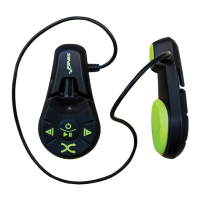
A. ON/OFF
• To turn Duo ON: Press and hold the center button
for 3 seconds The solid GREEN light indicates that
playback will begin in 10 seconds
• To turn Duo OFF: Press and hold the center button
for 3 seconds. The blinking GREEN light indicates
that the device is turning off
B. PLAY/PAUSE
• To PLAY music: Single press the center button
• Songs will play in the order in which they were
uploaded from your computer
• While playing music, the GREEN light blinks once
every 3 seconds
• To PAUSE music: Single press the center button
• While paused, the GREEN light blinks twice every 3
seconds
C. ADVANCE/VOLUME DOWN
• To ADVANCE: Single press the button to play next
song(s)
• To VOLUME DOWN: Press and hold the button to
decrease volume
• The GREEN light will blink while decreasing volume,
until button is released and desired volume is
reached
D. REPLAY/BACKWARD/VOLUME UP
• To REPLAY the current song: Single press the button
• To go BACKWARD: Double press the button to play
previous song(s)
• To VOLUME UP: Press and hold the button to increase
volume
• The GREEN light will blink while increasing volume, until
button is released and desired volume is reached
E. RANDOM PLAY
• To turn Random Play ON: Press and hold the button. The
solid GREEN light will appear for 1 second to indicate
Random Play mode is ON
• To turn Random Play OFF: Press and hold the button.
The blinking GREEN light indicates Random Play mode
is OFF


 To Next Page