EasyManua.ls Logo

FINIS tempo trainer pro - User Manual

FINIS tempo trainer pro
16 pages
Print Icon
To Next Page IconTo Next Page
Loading...
Tempo Trainer Pro
Instructions & Training Tips
Support information, workout suggestions,
and drills can be found at FINISinc.com

Other manuals for FINIS tempo trainer pro

Question and Answer IconNeed help?

Do you have a question about the FINIS tempo trainer pro and is the answer not in the manual?

Summary

Tempo Trainer Pro: Introduction and Layout

Device Layout

Explains the physical components of the Tempo Trainer Pro device, including buttons and display.

Product Overview

Defines the Tempo Trainer Pro as an electronic training device for improving pace and tempo with audible beeps.

Wearing the Tempo Trainer Pro

Details how and where the Tempo Trainer Pro can be worn or attached for various training activities.

Tempo Trainer Pro: Operation and Modes

Basic Operation

Instructions for turning the unit on/off, setting modes, and conserving battery life.

Using the Three Modes

Details for Mode 1, Mode 2, and Mode 3, focusing on their specific functions and audible feedback.

Switching Between Modes

Instructions on how to cycle through the three operational modes of the device using button presses.

Synching a Mode

Explains how to re-start the current interval setting for the Tempo Trainer Pro for precise timing.

Tempo Trainer Pro: Training Applications

Training Suggestions

Introduces how to use the Tempo Trainer Pro for optimizing swim performance by finding ideal stroke rate and DPS.

Stroke Rate Swim Set Example

Provides an example workout for improving stroke rate by adjusting effort levels across rounds.

Setting the Tempo Trainer Pro for Pacing

Explains how to use Mode 2 for setting and achieving goal pacing during swimming workouts.

Pacing Swim Set Example

Offers a workout example for achieving goal pacing, focusing on split times and descending times.

Tempo Trainer Pro: Reference and Maintenance

Replacing the Battery

Step-by-step guide on how to safely replace the device's CR1620 3V battery.

Stroke Rate Charts

Details stroke rate ranges for elite swimmers in various events, referencing Chart 1.

Conversion Table

A conversion chart (Chart 2) between Mode 3 (stroke rate) and Mode 1 (timed beep) settings.

Care and Safety Information

Care Instructions

Instructions for cleaning and storing the Tempo Trainer Pro to maintain its condition.

Safety Precautions

Important safety warnings, including choking hazards and consulting physicians before use.

Summary

Tempo Trainer Pro: Introduction and Layout

Device Layout

Explains the physical components of the Tempo Trainer Pro device, including buttons and display.

Product Overview

Defines the Tempo Trainer Pro as an electronic training device for improving pace and tempo with audible beeps.

Wearing the Tempo Trainer Pro

Details how and where the Tempo Trainer Pro can be worn or attached for various training activities.

Tempo Trainer Pro: Operation and Modes

Basic Operation

Instructions for turning the unit on/off, setting modes, and conserving battery life.

Using the Three Modes

Details for Mode 1, Mode 2, and Mode 3, focusing on their specific functions and audible feedback.

Switching Between Modes

Instructions on how to cycle through the three operational modes of the device using button presses.

Synching a Mode

Explains how to re-start the current interval setting for the Tempo Trainer Pro for precise timing.

Tempo Trainer Pro: Training Applications

Training Suggestions

Introduces how to use the Tempo Trainer Pro for optimizing swim performance by finding ideal stroke rate and DPS.

Stroke Rate Swim Set Example

Provides an example workout for improving stroke rate by adjusting effort levels across rounds.

Setting the Tempo Trainer Pro for Pacing

Explains how to use Mode 2 for setting and achieving goal pacing during swimming workouts.

Pacing Swim Set Example

Offers a workout example for achieving goal pacing, focusing on split times and descending times.

Tempo Trainer Pro: Reference and Maintenance

Replacing the Battery

Step-by-step guide on how to safely replace the device's CR1620 3V battery.

Stroke Rate Charts

Details stroke rate ranges for elite swimmers in various events, referencing Chart 1.

Conversion Table

A conversion chart (Chart 2) between Mode 3 (stroke rate) and Mode 1 (timed beep) settings.

Care and Safety Information

Care Instructions

Instructions for cleaning and storing the Tempo Trainer Pro to maintain its condition.

Safety Precautions

Important safety warnings, including choking hazards and consulting physicians before use.

Overview

The Finis Tempo Trainer Pro is an electronic training device designed to help athletes, particularly swimmers, develop a consistent pace and tempo. It transmits an audible beep at a set interval, allowing users to monitor and adjust their stroke rate, pace times for laps, distance, or intervals. The device is floatable, reducing the risk of loss in water.

Device Layout and Operation:

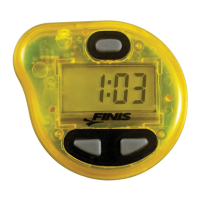
The Tempo Trainer Pro features an LCD display and three buttons: Button [A], Button [B], and Button [C]. It also has a back clip attachment for versatile wearing options.

  • Turning On: Press and hold Button [B] for one second.
  • Turning Off: Hold down both Button [B] and Button [C] simultaneously.
  • Scrolling Settings Up: Press Button [B]. Holding Button [B] down will make the time scroll faster.
  • Scrolling Settings Down: Press Button [C]. Holding Button [C] down will make the time scroll faster.
  • Switching Modes: Hold down Button [A].
  • Automatic Shut-off: To conserve battery life, the device automatically shuts down after three hours of continuous operation without any button activity.

Wearing the Device:

The Tempo Trainer Pro can be worn in several ways:

  • Underneath a swim cap or goggle strap.
  • Attached to a bicycle helmet, baseball cap, or active wear for cross-training.
  • The clip attachment is specifically for clipping the device to hats or clothing and should not be used while swimming.

Operating Modes:

The Tempo Trainer Pro offers three distinct modes, each serving a specific training purpose:

  • Mode 1 (Stroke Rate or Tempo):

    • Function: Primarily for monitoring and setting stroke rate or tempo.
    • Beep Interval: Beeps every XX:XX seconds.
    • Time Range: 00:20 (0.2 seconds) to 99:99 (99.99 seconds), scrolling by hundredths of a second.
    • Audible Beep: Gives a SINGLE audible beep.
    • Display: The colon [:] in the middle of the display does not flash.
  • Mode 2 (Pace Times):

    • Function: Primarily for monitoring and setting pace times for laps, distance, or intervals.
    • Beep Interval: Beeps every XX minutes and XX seconds.
    • Time Range: 00:01 (1 second) to 9:59 (9 minutes, 59 seconds), scrolling by seconds.
    • Audible Beep: Gives a TRIPLE audible beep.
    • Display: The colon [:] in the middle of the display flashes.
  • Mode 3 (Strokes Per Minute):

    • Function: Similar to Mode 1, but the setting is in "strokes per minute."
    • Beep Interval: Beeps in strokes/strides per minute.
    • Interval Range: 10 to 300. Values 10-120 scroll by single integers, and values 120-300 scroll by units of 5.
    • Audible Beep: Gives a SINGLE audible beep.
    • Display: The colon will not be displayed.
    • Example: Setting Mode 3 to "75" will cause the device to beep 75 times per minute (every 0.80 seconds).

Switching Between Modes:

  1. When the device is initially turned ON, the LCD will display the current mode and then beep at the pre-set interval.
  2. To switch between modes, press and hold Button [A] for 2 seconds.
  3. After 2 seconds, the device will display the next mode number.
  4. Release Button [A], and the LCD will show the setting for the selected mode.
  5. The modes cycle through in the order: Mode 1, Mode 2, Mode 3. To go from Mode 2 to Mode 1, you must first cycle to Mode 3 and then back to Mode 1.

Synching a Mode:

Synching a mode means restarting the current interval setting at which the Tempo Trainer Pro beeps. This is useful for aligning the device with a pace clock or watch during a workout.

  • How to Synch: Press and release Button [A] at any time.
  • Effect: Upon release, the unit will automatically give the appropriate beep (single beep in Modes 1 and 3, triple beep in Mode 2). The device will then proceed to beep at the set interval of the current mode.
  • Example: If Mode 2 is set to 00:14 (14 seconds), pressing and releasing Button [A] will cause a triple beep, and the 14-second interval will reset and start again from that moment.

Battery Replacement:

The Tempo Trainer Pro uses a CR1620 3V Lithium button cell battery. The housing is ultrasonically sealed for waterproofness, so only the battery compartment should be opened.

  1. Power Off: Ensure the device is powered OFF before replacing the battery to prevent malfunction.
  2. Open Compartment: Use a small coin to twist the battery compartment counter-clockwise to open it.
  3. Replace Battery: Wedge out the old battery and replace it with a new CR1620 3V Lithium button cell battery.
  4. Close Compartment: Replace the lid and twist clockwise to securely close it, ensuring water does not get inside.
  5. Caution: Do not overtighten, and be careful not to damage the o-ring seal around the battery compartment.

Training Suggestions:

The manual provides training suggestions, particularly for swimmers, to optimize Distance-per-Stroke (DPS) and stroke rate.

  • Getting Started:

    • Start by experimenting with extreme settings in Mode 1 (e.g., 0.40 seconds for high turnover, 0.80 seconds for slower, longer strokes).
    • Gradually adjust the interval by hundredths of a second (e.g., 0.42, 0.78, 0.44, 0.76) to find the ideal combination of stroke rate and DPS that maximizes efficiency and speed.
  • Stroke Rate Swim Set Example (5 rounds of 4 x 50s):

    1. Round 1: Set Tempo Trainer Pro (Mode 1 or 3) to ideal stroke rate. Swim 4 x 50s at 80% effort. Note average time per 50.
    2. Round 2: Keep same setting, increase effort to 85%. Improve average time from Round 1.
    3. Round 3: Keep same setting, increase effort to 90%. Improve average time from Round 2.
    4. Round 4: Keep same setting, increase effort to 95%. Improve average time from Round 3.
    5. Round 5: Keep same setting, increase effort to 100%. Improve average time from Round 4.
    • Tip: Since stroke rate is constant, improvement comes from increased DPS, harder kicking, or better push-offs and turns.
  • Pacing Swim Set Example (6 x 100s on a short-rest interval):

    1. Set Tempo Trainer Pro (Mode 2) to your ideal pacing setting per 25 (e.g., 0:17 for a 1:08 per 100 goal pace). The device will triple beep every 17 seconds.
    2. Before each 100, press Button [A] to synch the device to your send-off. A triple beep will signal to start your swim immediately.
    3. Descend your time on each of the 100s, getting faster from 1-6.
    • Tip: At every 25, listen to determine if you are ahead or behind your goal pace.

Stroke Rate Charts:

The manual includes conversion charts to assist swimmers and coaches in setting stroke rates.

  • Chart 1 (Page 13): Provides the range of stroke rates for elite male and female swimmers in various competitive events, based on data from the Olympic Games (Atlanta '96) and World Championships (Perth '98). It lists Mode 3 settings (Strokes/Min) and corresponding Mode 1 settings (Sec/Stroke) for events from 50 Free to 200 Fly.
  • Chart 2 (Pages 14-16): A conversion table between Mode 3 (stroke rate) and Mode 1 (timed beep). A "cycle" is defined as one complete revolution of both the left and right arm. This chart allows users to convert between strokes per minute and seconds per cycle or seconds per stroke.

Care and Caution:

  • Care: Rinse the Tempo Trainer Pro in fresh water after use, wipe it clean, and store it indoors in a dry environment.
  • Caution:
    • Keep out of reach of children as certain parts may create choking hazards.
    • All users assume the risk associated with its use; the manufacturer and seller assume no liability for injury.
    • Consult a physician before starting any new exercise program.

Support Information:

  • Web: FINISinc.com/support
  • Phone: 888-333-4647

The Finis Tempo Trainer Pro is a versatile tool for athletes aiming to refine their technique, improve pacing, and achieve consistent performance in swimming and other activities requiring precise timing.

FINIS tempo trainer pro Specifications

General IconGeneral
BrandFINIS
Modeltempo trainer pro
CategoryPersonal Care Products
LanguageEnglish

Related product manuals