Referencing
Symbol Function Description
JOG Select manual mode.
FEED RATE Select a feed rate value > 0%.
REF Select referencing.
CYCLE
START
Start referencing. Wait until referencing is completed. Each axis reaching
the reference point is seen on the machine display.
Manual operation
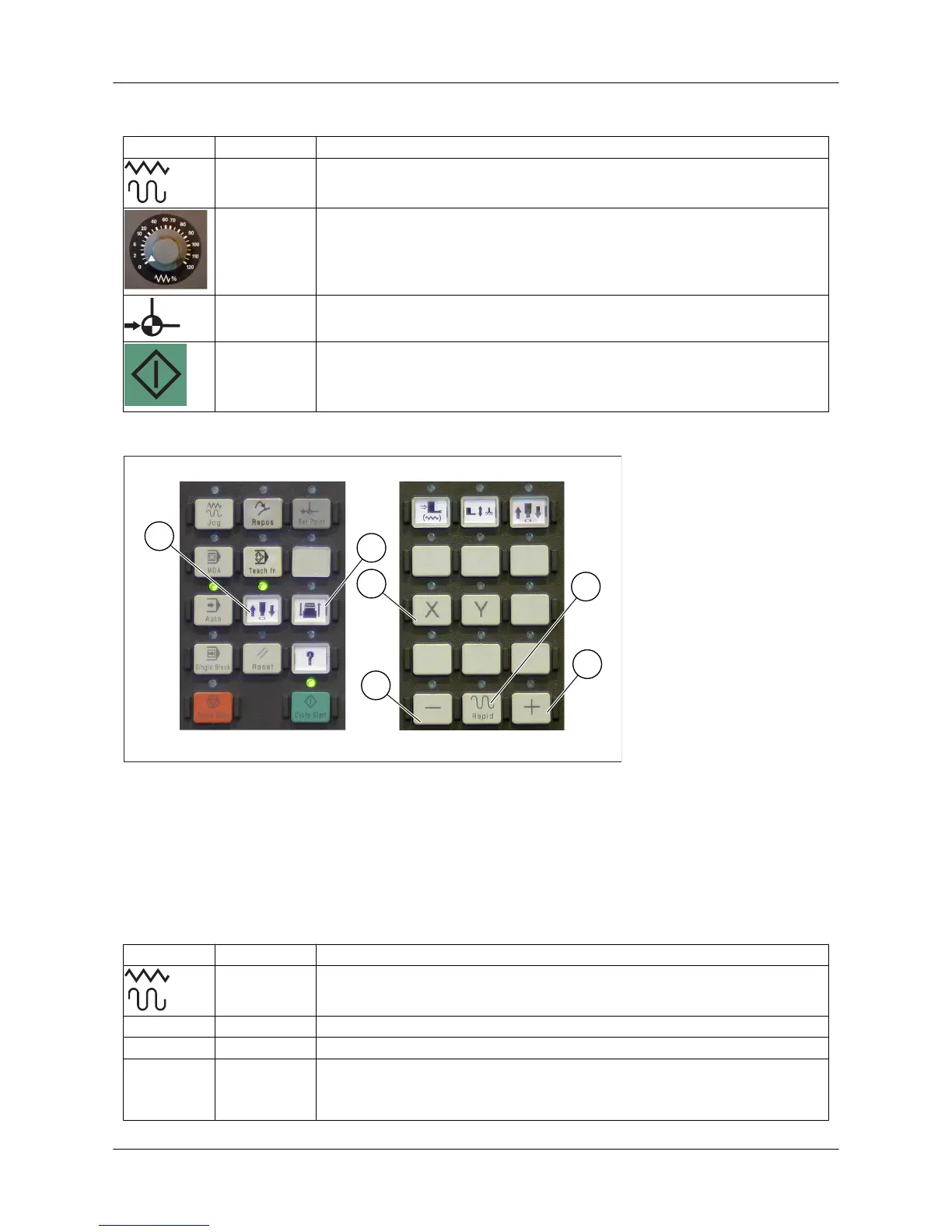
Figure: Axis selection
1. Selection of upper ram (RAM axis)
2. Selection of lower ram (FORM axis, option)
3. Axis selection (X/Y)
4. Direction button in the minus direction
5. Direction button in the plus direction
6. Rapid movement (Rapid)
Symbol Function Description
JOG Select manual mode.
X/Y AXIS Select axis.
+/- DIRECTION Select direction.
Rapid MOVEMENT Rapid movement
Axis movement in manual mode speeds up when the Rapid button and
a direction button are pressed at the same time.
User Guide - E5 Turret Punch Press
32 (46)



 To Next Page