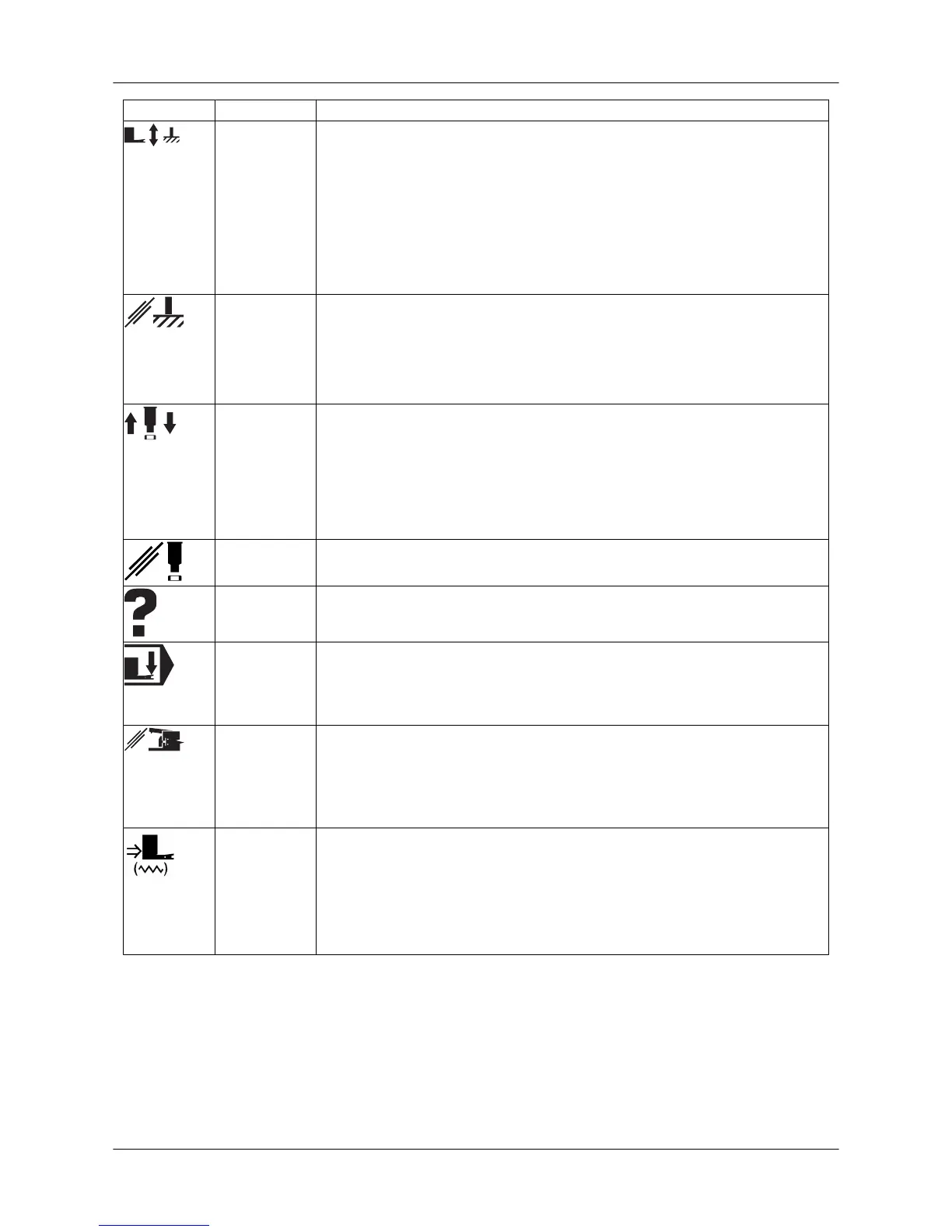
Symbol Function Description
Clamps, X-
pin and
sheet sup-
port rollers
Clamps and X-pin
• The clamps open and the selected X-pin (1-4) rises.
• When the clamps are open, all axis movements are disabled.
• When you press the button again, the clamps close and the X-pin re-
tracts.
• The function can be activated by the CLAMPS command in all modes.
• The sheet support rollers rise when the X-pin is up and the clamps are
open.
X-pin disab-
led
When the X-pin is disabled, the clamp opening button and the foot pedal
operate as follows:
• First keystroke: clamps open
• Second keystroke: X-pin rises
• Third keystroke: clamps close, X-pin moves down
Punching Punching stroke
• Single punching stroke
• In SG machines, a single shearing stroke is also possible.
• The function is operational only in JOG mode when the hydraulic sys-
tem is on.
(NOT in E machines)
Punching di-
sabled
Program run without punching strokes and right angle shearing.
Alarm reset
button
Alarm reset
• Alarms can also be reset via the RESET button.
Automatic
clamping
Automatic clamping
• The clamps close automatically when the sheet is pushed between the
clamps and the sheet detectors are activated.
• As soon as the clamps close, the X-pin retracts.
Sheet detec-
tion bypass
Bypass of sheet detectors
• This function is used for testing programs without a sheet and when
the sheet has come off the clamps.
• When sheet detection is activated, X- and Y-axis movements are pos-
sible only if all sheet detectors are activated.
Clamp set-
ting
Opening of the clamps' central locking
• The clamps are unlocked and can be moved to the desired position
on the X slide guide.
• When you press the button again, the clamps are re-locked on the
guide.
• The function is operational only in JOG mode.
User Guide - E5 Turret Punch Press
35 (46)



 To Next Page