7.3.9
RECOVERY
(herstelhartslag meting)-Functie
Explanation:
This
exercise item
is
equipped
with a recovery pulse
measurement
feature, so that you can
reconstruct
your
performance
status
or
a
performance improvement.
An
important
indicator for your
fitness is the speed of your body's recovery.
If
the training
pulse
decreases within one minute after
completing
training by
about
30
%,
you can assume that you are in good training
condition.
Uitleg:
Dit roeiapparaat is toegerust met een functie om de herstel
hartslag te meten zodat u inzicht krijgt in uw huidige prestaties
en in uw prestatie voortgang. Een belangrijke indicator voor uw
conditie is de snelheid waarmee uw lichaam herstelt. Als de
trainingshartslag na het beeindigen van de training binnen 1
minuut met circa 30% afneemt, kunt u veronderstellen dat u in
goede conditie bent.
De computer drukt uw fysieke herstel capaciteit uit aan de
hand van een herstel score (F1 tot en met F6). F1 is zeer
goed, F6 zeer slecht.
The training
computer
prints out your physical recovery
capacity
in the form of a recovery score (Mark Fl
-
F6). Fl means very
satisfactory,
F6
means very unsatisfactory.
Opmerking: om de RECOVERY functie te activeren is een
minimum van ten minste 30 seconden trainingsduur vereist. Echter,
om nuttige fitness scores te verkrijgen, moet u ten minste 15
minuten trainen. Dit is de tijd die nodig is om een stabiele
trainingshartslag te krijgen.
Note: In order for you to receive a meaningful fitness score,
however, you must train for at least l5 minutes.
This
time
period
is required so that you reach a stable training pulse, from which
you can
appropriately
recover in that
minute.
Werkwijze:
Druk aan het einde van de training de RECOVERY toets in en
stop hierna onmiddelijk met roeien. De computer telt af van
00:60 seconden tot 00:00.
Na 1 minuut verschijnt uw fitness score op het display (F1 - F6).
Operation:
During training with pulse control press the
RECOVERY
button
and immediately stop rowing.
All
computer
data are
immediately
stopped.
The time counts down from 00:60 to 00:00. Then your
fitness score
(Fl
-
F6)
appears on the display.
Calculatie:
Het VERSCHIL tussen de hartslag aan het eind van de training
en de hartslag 60sec na het indrukken van de RECOVERY toets
wordt gemeten.
Calculation:
The
DIFFERENCE
between
the pulse rate at the end of
training
and the pulse rate 60 seconds after pressing the
RECOVERY
button.
7.4
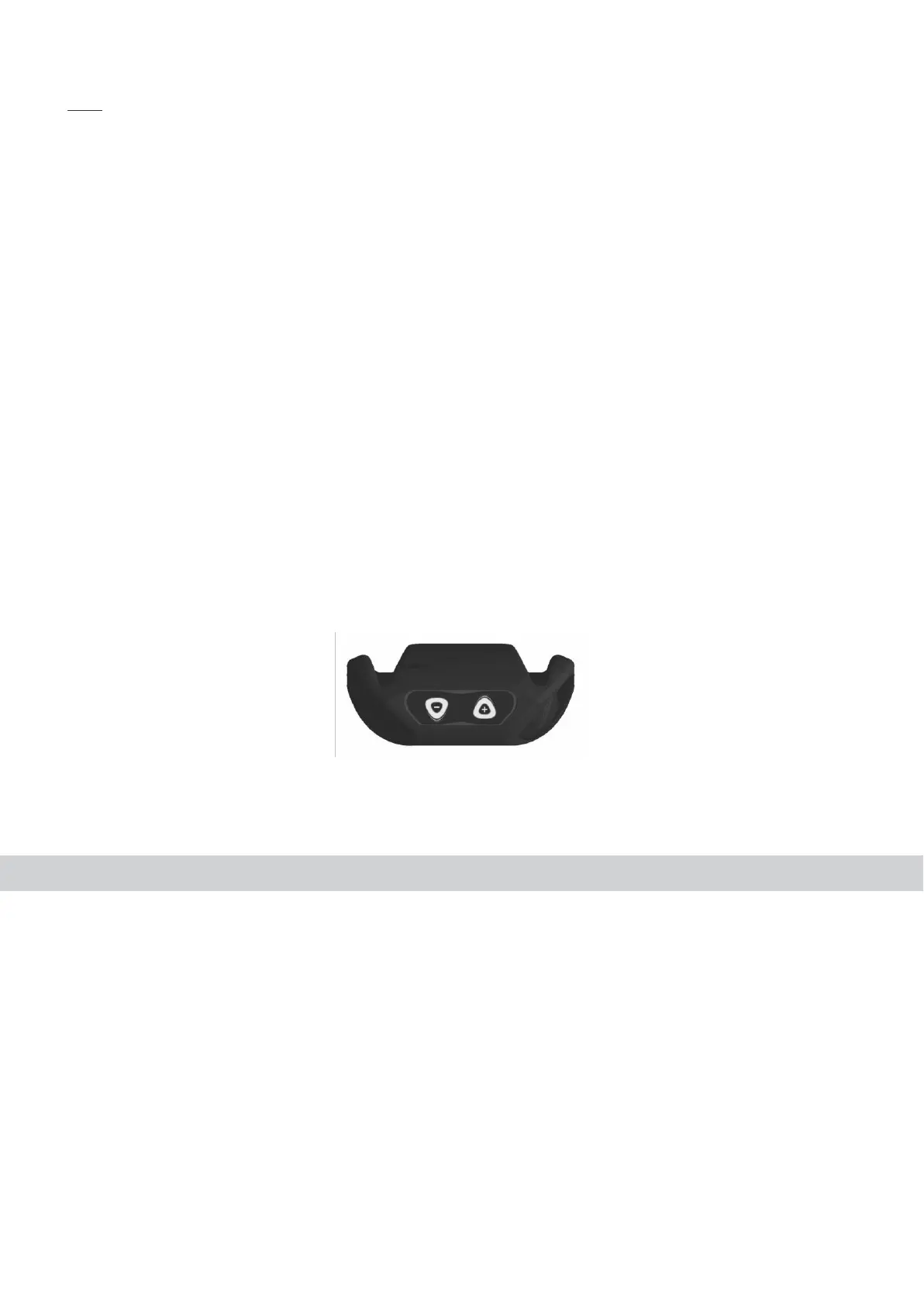
Weerstand instellen op de handgreep
7.4 Resistance control at the
handlebar
Met de +/- toetsen op de handgreep kunt u tijdens uw training
gemakkelijk de weerstand aanpassen.
You
can change during your exercise the resistance in a very
easy
and comfortable way by pressing the +I-
-buttons.
Stroomvoorziening (meegeleverd in verpakking
)
Steek de kabel van de adapter in de ingang (standvoet) en
de stekker in het stopcontact.
Stroomvoorziening
specificatie:
Input:
230
V, 50 Hz
Output: 6 V,
1000
mA
Gebruik alleen de stroomkabel die mee is geleverd. Als u de
stroomkabel van een andere fabrikant geburikt, verzekert u
zich er dan van dan deze bij overbelasting automatisch
uitgeschakeld wordt, dat deze tegen kortsluiting is
beschermd en dat deze electronisch bestuurd is. Als dit niet
het geval is kan dit resulteren in kortsluiting en schade aan
de computer.
Loskopping van de apparatuur van stroom (zowel
loskoppeling van het stopcontact, als loskoppeling van de
stroomingang op de apparatuur), resulteert in terugkeer naar
USER Selectie U0-U4 inputmodus.
Power Supply (included in the scope of delivery)
Connect the cable from the power supply to the
respective
socket on the
housing.
Power Supply Specification:
Input: 230
V,
50 Hz
Output: 9
V,
500 mA
Use only the power supply included in the scope of
delivery.
If
you use another
manufacturer's
power supply,
please
ensure that it automatically cuts-off in the event of
overload,
is short-circuit
protected
and is elec-tronically controlled. Non-
compliance may result in short-circuiting and
computer.damages
Disconnection of the power pack from the mains or of
the
power pack plug from the
equipment
results in a
return
to User Selection U0
-
U4 input
mode.






 To Next Page