will also stunt the growth of micro- organisms that will at a later stage turn into mildew, yeast and
bacteria.
Important!!
Vacuum packing is not the same as preservation and cannot prevent food from ageing. It will,
however, delay the process.
Vacuum packing is not a substitute for cooling or freezing. Refrigerated goods shall still be kept in
the refrigerator or in the freezer after vacuum packing.
If the temperature of the refrigerator is more than +4°C for a certain period of time, this will
advance the creation of dangerous micro-organisms; so the temperature should be kept below +4°C.
You can keep food in the freezer (preferably at -17°C or less). Even if not all micro-organisms are
killed, it will hinder the growth. !
!
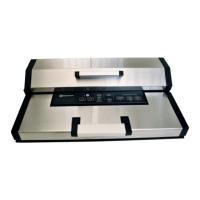
Parts of the appliance!
1. Vacuum & Seal / Cancel button!
Vacuum & Seal: for vacuum packning and sealing.!
Cancel: finishes an ongoing process.!
2. Vacuum!
For selection of two different vacuum pressures:!
Normal: for normal raw materials.!
Gentle: for soft and sensitive raw materials that require less vacuum pressure..!
3. Sealing Time!
Choose time for the vacuum sealing process (preset time is ”Dry”).!
Dry: for dry raw materials with no moist for short vacuum packing process. !
Moist: for wet bags or moist raw materials.!
Extended:for wet bags and raw materials including sauce, double seal.!
4. Canister button!
Only for vacuum packing in containers.!
5. Marinate button!
Only for vacuum packing in containers.!
6. Manual Seal button!
This button has two functions:!
- sealing of clingfilm.!
-during vacuum packing (Vacuum & seal) this button stops the pump immediately and then seals
the bag.!
7. Pulse Vacuum button!
Press the button to start vacuum packing, press again to finish. !
Repeat until the wanted result has been reached. Please note that this function is only applicable for
bags. Next, press ”Manual seal” to seal.!
8. Progress display!
Shows that the appliance is on and that the lid is closed and that the vacuum process is on. If the
display is flashing, wait until it stops before activating the process.!


 To Next Page
 Loading...