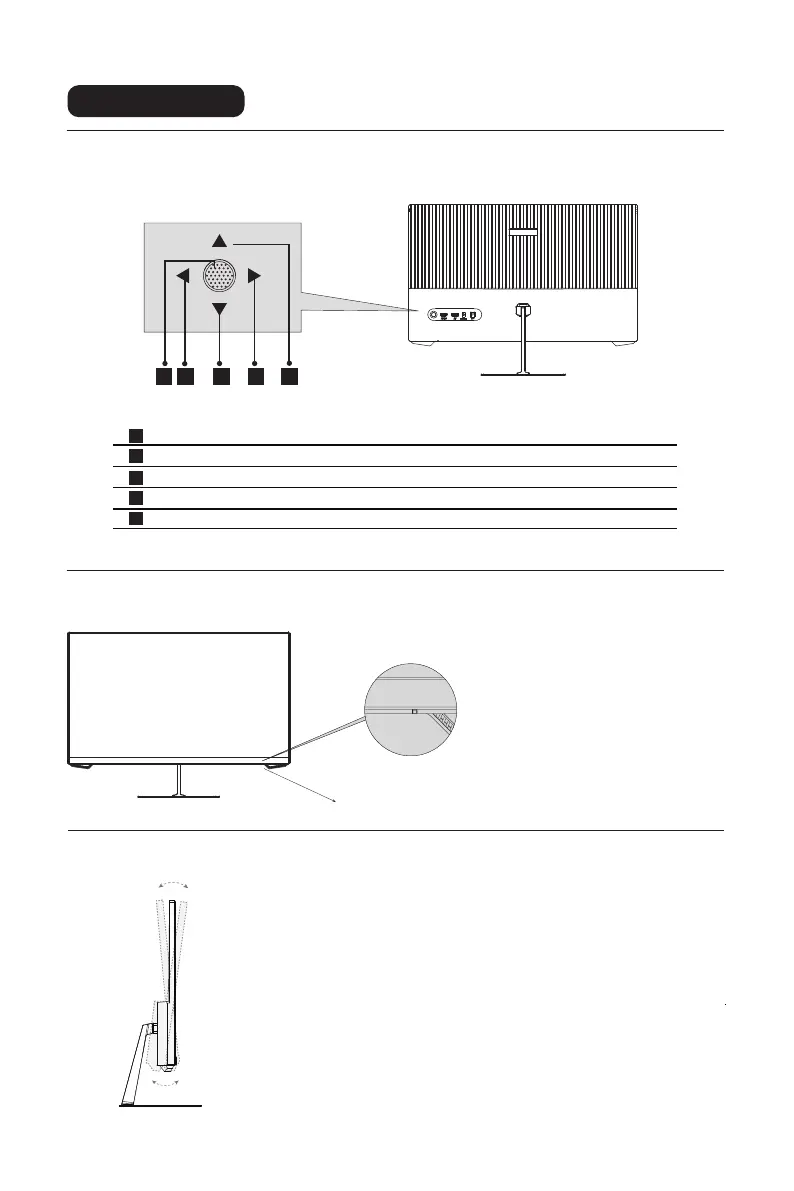
Indicator light:
Steady blue light indicates the power
is on and the monitor runs normally.
Red light indicates no horizontal or
vertical synchronous signal detected
or no video input signal, and that the
monitor is in standby status. Please
make sure your computer is turned
on and operates normally and check
that all video cables are fully plugged
in and/or connected to the monitor.
4
Explanation of indicators
Indicator Light
Adjusting the monitor
Tilting angle
-5.0°(±2.0°)- +15°(±2.0°)
Instructions for use
Description of buttons
3 2 4 51
1
2
3
4
5
Power button: Turn on/of the monitor.
Exit/Left button: Exit or return to the previous menu/quickly switch the Input Signal.
Down button: Move down in the menu/quickly enter the GamePlus.
Menu button: Enter sub-menus/quickly enter the main menu.
Up button: Move up in the menu.


 To Next Page