Welcome to your
FireBoard Pulse
This guide helps get you up and running.
Getting Started
Remove the Pulse from the Charger, peel the sticker from
the probe, replace the Pulse on the Charger. Let the Pulse
charge for at least 3 minutes as indicated by the blinking
red light on the side labeled ‘PROBE’.
If the light does not blink, plug in supplied USBC cable into
the Charger and repeat the previous steps. After charging
for 3 minutes, remove the Pulse from the Charger with the
FireBoard App open and add to your account.
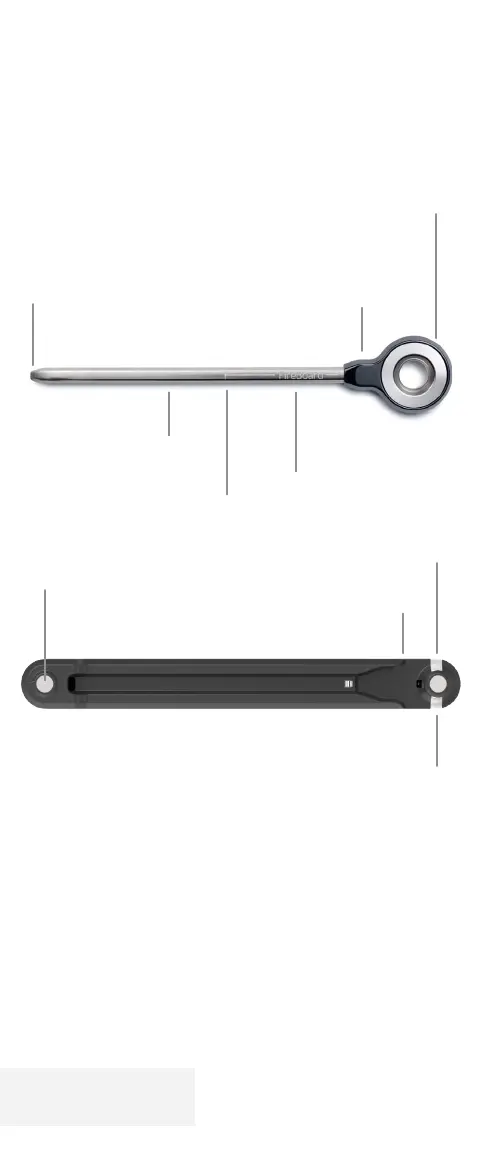
LED Charger Battery
Status Indicator
External Temperaure Sensor
Secondary sensor to track surface or
ambient temperatures
Hexagonal Chisel Tip
Flat chisel tip for easy insertion
Etched Depth Marker
LED Probe Battery Status Indicator
Zirconia Casing
USB-C Charger Port
Magnetic Stacking Contact
Stack multiple chargers to
charge using a single USB-C cable
Internal Temperature
Sensor
Minimal Recommended
Insertion Depth
Model: FBWP24
FCC ID: 2A29A-FBWP24
IC: 27842-FBWP24


 To Next Page