Playback On Your Computer
Plug the USB cable into your camera and then into your computer. Press the power button on
your camera. The camera will turn on and your computer will recognize the device. Go to “My
Computer” and click on the camera drive. Now you can access the videos inside of the folders.
You can move the videos to your computer or delete them. Please eject the camera before
turning off and unplugging from the computer. DO NOT REMOVE USB CABLE DURING DATA
TRANSFER OR FILES COULD BE LOST.
Format micro SD card regularly after transferring video files for normal operation.
For smooth playing of your vidoes, download VLC Media Player at:
https://www.videolan.org/vlc/index.html
IMPORTANT TIP FOR MAC USERS
When deleting files from your MicroSD card you must empty the trash before removing the Fire
Cam 4K from your computer. If you do not empty your trash the photos and videos files will not
be completely erased from your card.
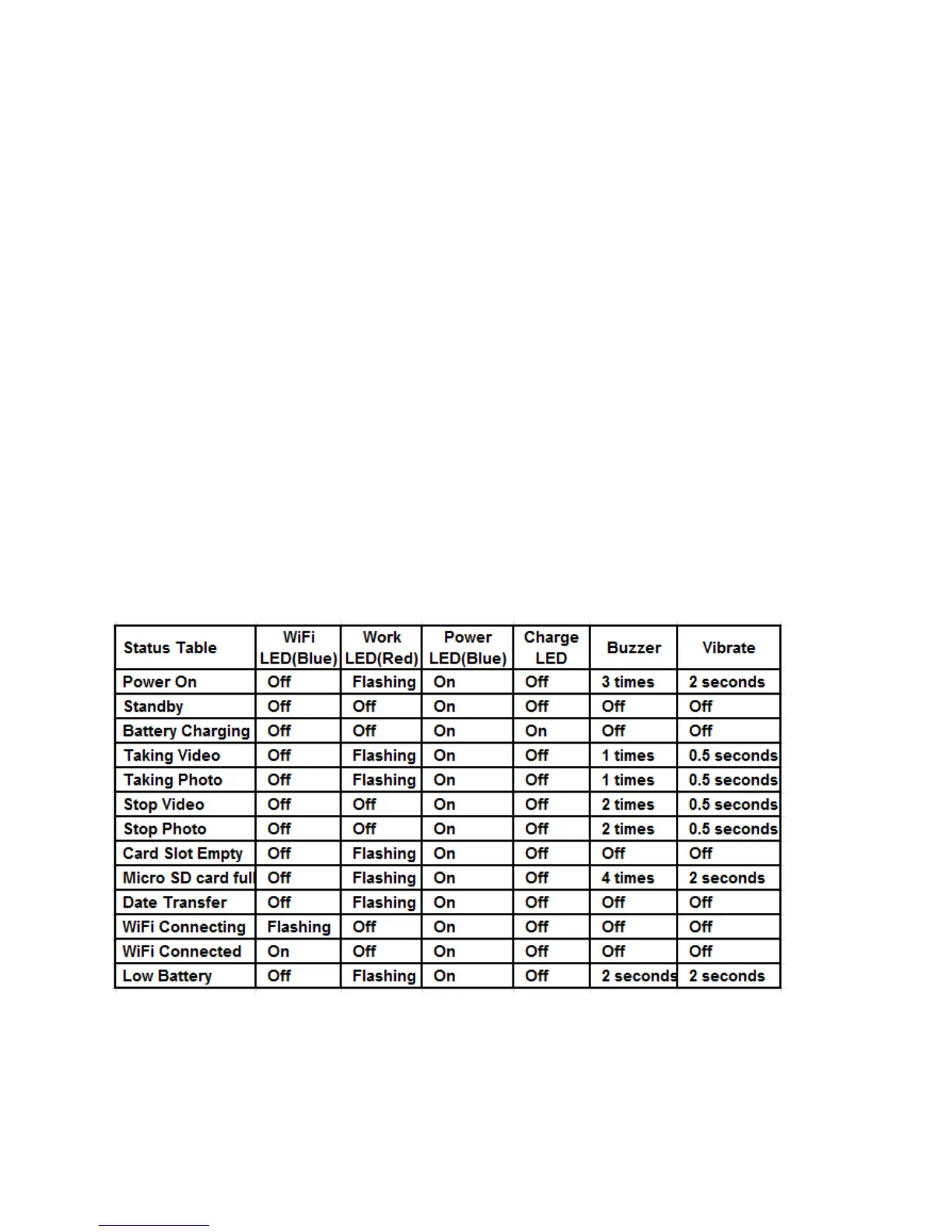
LED Status


 To Next Page