EasyManua.ls Logo

Firex FADCP - User Manual

Firex FADCP
8 pages
Print Icon
To Next Page IconTo Next Page
Loading...
1
110-1202B
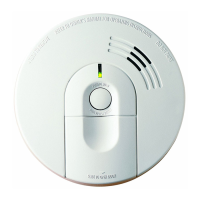
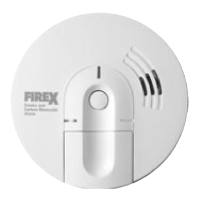
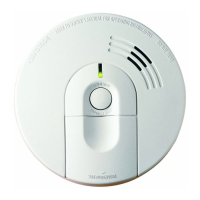
Smoke Alarm
SERIES 4490 PHOTOELECTRIC
SMOKE ALARM
MODEL FADCP (4490 Series): 120VAC WITH
9V BATTERY BACK-UP
PLEASE READ AND SAVE THIS ENTIRE MANUAL
Installer: Please leave this manual with the product.
Electrical rating
120VAC, 60Hz, 0.056amp
Model FADCP includes 9V battery back-up
Single and/or Multiple Station Smoke Alarm
About this Alarm:
This smoke alarm is designed to detect smoke. It is NOT designed to
detect fire. If this smoke alarm sounds its alarm horn, DO NOT
assume that it is a false alarm. The alarm horn requires your
immediate action.
The photoelectric type alarms are generally more effective at detecting
slow, smoldering fires which smolder for hours before bursting into flame.
Sources of these fires may include cigarettes burning in couches or bed-
ding. The ionization type alarms are generally more effective at detecting
fast, flaming fires which consume combustible materials rapidly and
spread quickly. Sources of these fires may include flammable liquids or
paper burning in a waste container. However, both types of alarms are
designed to provide adequate detection of both types of fires. If you
desire the benefits of both systems, you should install smoke alarms
that combine in one alarm both photoelectric and ionization sensing
technologies.
SPECIFICATIONS AND IMPORTANT PRODUCT
INFORMATION
Product Features
Ramp-up Horn: Allows you to begin the test sequence then move
away from the unit before the full alarm horn sounds.
Trigger Alarm Locator™ (TAL™): Allows the homeowner to identify
the initiating alarm within an interconnected system of alarms.
Smart Interconnect Test: In an interconnected system, this feature
will alarm the local unit first, then quiet the local unit while the remote
units alarm.
Quick Quiet™ False Alarm Control: Quiets nuisance alarms for up to
15 minutes.
Smart Quiet™ Low Battery 1: Allows the homeowners to silence the
low battery chirp for up to 10 hours, giving them time to go back to
sleep and/or purchase a fresh replacement battery.
Smart Quiet™ Low Battery 2: Indicates the battery no longer has
enough voltage to adequately protect in the event of a power outage.
The Smart Quiet™ feature will no longer silence the chirp.
THE BATTERY MUST BE REPLACED IMMEDIATELY.
Latching LED: Red LED flashes until reset for quick clear identification
of the initiating alarm in an interconnected system.
IMPORTANT SAFETY INFORMATION
Fire Safety Tips
These guidelines will assist you in the event of a fire. However, to reduce
the chance that fires will start, practice fire safety rules and prevent
hazardous situations.
• Develop family escape plans, discuss them with ALL household
members, and practice them regularly. The plans should include TWO
exits from each room, an escape route to the outside from each exit,
and a safe meeting place for everyone outside the building.
• Familiarize everyone with the sound of a smoke alarm and explain
what it means.
• Teach all household members NOT TO OPEN ANY DOOR IF THE
DOOR IS HOT, and to crawl along the floor to stay below dangerous
smoke, fumes, and gases.
Limitations of This Smoke Alarm
• There may be limiting circumstances where a household member may
not hear the alarm (e.g., outdoor or indoor noise, sound sleepers, drug
or alcohol usage, the hard of hearing, etc.). If you suspect that this
smoke alarm may not alert a household member, install and maintain
specialty smoke alarms. Current studies have shown smoke alarms may
not awaken all sleeping individuals. It is the responsibility of individuals

S
T
A
T
E
O
F
C
A
L
I
F
O
R
N
I
A
S
T
A
T
E
F
I
R
E
M
A
R
S
H
A
L
L
I
S
T
I
N
G
S
E
R
V
I
C
E

Questions and Answers

  • L
    Leslie RussellJul 31, 2025
    Why does my Firex FADCP Smoke Alarm beep once a minute?
    • B
      Brian PrattJul 31, 2025
      If your Firex Smoke Alarm beeps once a minute and the YELLOW light flashes, it means the battery needs replacing. Turn off the power and replace the battery. You can also push the Smart Button to temporarily quiet the low battery signal for 10 hours.
  • M
    mfranklinAug 4, 2025
    What to do if my Firex Smoke Alarm sounds but there is no fire?
    • J
      Julian JohnsonAug 4, 2025
      In any alarm situation, prioritize Emergency Safety Actions. If there's no actual hazard, test your Firex Smoke Alarm to ensure it's working correctly. Clean the alarm and ensure it's properly placed.
  • J
    Jeremy BartlettAug 10, 2025
    How to fix Firex Smoke Alarm if interconnected alarms don't sound during test?
    • J
      Jamie ClarkAug 10, 2025
      If interconnected smoke, heat, or combination smoke/CO alarms aren't sounding when you push the Smart Button to test the units, try these steps: * Press and hold the Smart Button longer until you hear the second set of two quick beeps to start the remote test. * Make sure the remote alarms are getting power and working right. * There might be a problem with the alarm interconnect circuit, so try replacing and retesting. * For DC (battery powered) interconnected alarms, take the alarm off the mounting bracket and check that the connector plug is secure. * If it's an interconnected series with both AC and AC/DC powered units, the wiring might be wrong; have a licensed electrician check it and retest all alarms in the series.
  • A
    Ashley Clark DVMAug 15, 2025
    Why do my Firex FADCP trigger CO alarms during a test?
    • J
      Janice BrownAug 15, 2025
      If interconnected CO alarms sound along with the smoke alarms when you push the Smart Button to test the units, it means older CO alarms without Smart Interconnect are sharing the same interconnect line and can't tell the difference between alarm signals for smoke or CO. Replace them with model COE (10000), COEA (10400), FPAMV (11000), or FADCM (12000).
  • S
    samantha68Aug 19, 2025
    What to do if Firex FADCP doesn't sound when tested?
    • R
      robertcraigAug 19, 2025
      If the Firex Smoke Alarm doesn't sound and the lights don't flash when you test it, remember to push and hold the Smart Button for at least 5 to 10 seconds. If it still doesn't work: 1. Make sure the AC power is on (GREEN light ON), a good battery is correctly inserted, and the battery door is closed tightly. 2. Turn off the power, remove the alarm from the mounting plate, and ensure the connector plug is securely attached. 3. Clean the alarm. 4. If the Trigger Alarm Locator (TAL) feature is on, wait 8 minutes for it to time out. 5. Restore AC power to the alarm.
  • B
    bnicholsAug 25, 2025
    How to troubleshoot Firex Smoke Alarm when the green light is off?
    • R
      Raymond RogersAug 26, 2025
      If the GREEN light on your Firex Smoke Alarm is not on: 1. The alarm might be running on battery power if the YELLOW light flashes once a minute. 2. Check the AC power supply at the fuse box or breaker panel. 3. The alarm wiring might be incorrectly connected; have a licensed electrician check it and retest the alarm.

Summary

Prohibited Installation Locations

Smoke Alarm Installation Procedure

Electrical Power Supply Requirements

Details AC/DC power, battery backup, wire gauge, and interconnect power specifications for installation.

Responding to Smoke Alarms

Immediate Actions and Evacuation

Provides crucial steps to take when the smoke alarm sounds, emphasizing immediate evacuation.

Temporarily Silencing Alarms

Smart Button Feature Functions

Details Trigger Alarm Locator, Latching LED, and Low Battery Alert silencing functions via the Smart Button.

Smoke and CO Alarm Troubleshooting

Power, Indicator, and Test Issues

Addresses problems with power, indicator lights, and alarm test failures, providing solutions.

Interconnect and Alert Pattern Problems

Covers issues with interconnected alarms, specific beep/chirp patterns, and fault signals.

Testing and Maintenance Procedures

Firex FADCP Specifications

General IconGeneral
BrandFirex
ModelFADCP
CategorySmoke Alarm
LanguageEnglish

Related product manuals