EasyManua.ls Logo

Fireye NEXUS NX6220 - User Manual

Fireye NEXUS NX6220
24 pages
Print Icon
To Next Page IconTo Next Page
Loading...
NXD-6301
October 15, 2019
NEXUS
NX6220 and
NX6330
12-Key
KEYPAD
DISPLAY
INTRODUCTION:
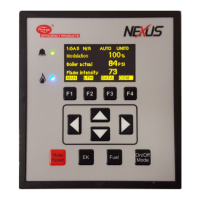
The Fireye NX6220 or NX6330 (with Ethernet) OLED (Organic LED) 12 key keypad
display provide an easy to read, bright operator interface for operation and
commissioning of Fireye NX6100 or PPC6000* series control. The addition of four multi-
function soft keys, make commissioning quicker and easier. Once in commissioning
mode, these keys group related options, such as all servomotor options, together for
convenience, minimizing the risk of skipping options that are related but in different
areas of the program.
Two models are available; NX6220 (basic display with USB port) and NX6330 (USB and
Ethernet port). Both displays include complete commissioning back up as well as three
user defined relays. English, French and Spanish languages are supported and can
easily be selected from a list of available languages stored within the display. Other
languages may be added from time to time, consult the factory for availability.
The NX6330 Display also includes a choice of MODbus TC/PIP or BACnet integration
into Building Automation Systems (BAS). See Fireye Bulletin MOD-6001 for the
appropriate register point lists.
The tactile membrane keypad provides a “click” feedback for positive key stroke entry.
The lithium ion battery maintains the commissioned backup, clock, calendar and event
log function in the event of power loss.
* When used with the Fireye PPC6000, the Fuel key will have no function as fuel
selection is performed externally to the PPC6000.
Question and Answer IconNeed help?

Do you have a question about the Fireye NEXUS NX6220 and is the answer not in the manual?

Summary

Introduction to Fireye NX Series Displays

Product Overview and Features

Provides an overview of the Fireye NX6220/NX6330 12-key keypad display and its key features.

OLED Display and Keypad Operation

Keypad and Display Interface

Describes the OLED display and tactile membrane keypad for operation and commissioning.

Key Functions Overview

Explains the function of the EK, Fuel, On/Off/Mode, and Reset keys on the keypad.

System Overview and Main Screen

Details the default information displayed during normal burner operation and its components.

Engineers Key and Fault Logging

Accessing and Navigating Engineers Key

Guide on how to enter the Engineers Key screen and navigate through system information.

Fault Log Details

Explains how to access and interpret the fault log, including navigation and detail views.

Fuel and Mode Selection

Procedure for Selecting Fuel Profiles

Outlines the steps to switch between different fuel profiles using the Fuel key.

Burner Operation Mode Switching

Describes how to switch between burner operation modes and turn the burner ON or OFF.

Data and Profile Management

Accessing Operating Data and Backups

Explains how to use the Data screen to view operating data, profiles, and backup status.

Profile Review Mode Navigation

Details how to access and navigate the Profile Review Mode to check setpoints for each profile.

Hours Run Mode Display

Shows how to access the Hours Run Mode to view the operating time for all fuel profiles.

Commissioning and Setup Procedures

Profile Adjustment Functions

Explains how to adjust option parameters and profile setpoints using the Profile Adjust Screen.

Accessing Setup Menu Options

Guide to the Setup screen for configuring language, time, Ethernet, and unit address.

Ethernet Setup Mode (DHCP)

Details the Ethernet setup for automatic configuration using DHCP.

Ethernet Setup Mode (Manual)

Details the Ethernet setup for manual configuration with specific IP values.

Entering Commission Ratio Mode

Step-by-step guide to enter Commission Ratio mode, including burner shutdown and passcode entry.

Managing Commission Modes

Explains switching between Commission/Adjust Ratio, Option Set, and Run modes.

Using the Option Set Mode

Describes how to set up and adjust various option parameters using the Option Set mode.

USB Backup and Restore Operations

Saving a Backup to USB

Instructions for saving the controller configuration to a USB drive.

Viewing USB Backup Contents

Explains the file naming convention and how to view backup files on a PC.

Restoring a Backup from USB

Guide on how to load a previously saved backup from a USB drive to the controller.

Technical Specifications and Mounting

Electrical and Mechanical Specifications

Lists interface type, supply current, temperature, dimensions, weight, and relay details.

Mounting Details and Cut-Out Dimensions

Provides diagrams and dimensions for mounting the NX6220 and NX6330 displays.

Electrical Connections and Network

Display and NX;PPC Terminal Connections

Details wiring for display terminals, NX/PPC terminals, and relay outputs.

Ethernet and USB Network Connection

Illustrates Ethernet and USB connections for network integration and router setup.

Product Notices and Warranty

Product Warranty and Limitations

Outlines the Fireye product warranty, limitations, and disclaimers for combined systems.

Fireye NEXUS NX6220 Specifications

General IconGeneral
Frequency50/60 Hz
TypeFlame Monitor
Flame SensorIR
Voltage240 VAC
ApprovalsFM, ATEX, IECEx
DisplayLCD
CommunicationEthernet
PortsEthernet

Related product manuals