S
a
f
e
t
y I
n
f
o
r
m
a
t
i
o
n
Please take these safety p
r
ecautions
i
nto consideration under the
f
ollo
w
ing conditions :
U
nder normal circu
m
s
tances, Reservation
M
ode is cancelled
w
hen a doo
r
or hatchback opens. P
l
ea
s
e veri
f
y that the opening
o
f
any door or hatchback cance
l
s
Reservat
i
on
M
ode.
I
f any o
f
the doors o
r
hatchback
a
r
e not monitored by the CompuStar because o
f
imp
r
oper in
s
tallation o
r
a faulty dome
light s
w
itch, do not use the the CompuStar and take your vehicle immed
i
ately to the
deale
r
f
or
r
epai
r
.
D
o not set Re
s
ervation
M
ode i
f
the
w
indo
w
(s) a
r
e open or i
f
there
i
s
anyone inside the veh
i
c
l
e, this
i
ncludes animals. Remote sta
r
t installation in a manua
l
t
r
an
s
m
ission vehicle
w
ith a convertible top is not
r
eco
m
mended.
Page 4
I m p o r t a n t !
1. Servicing the vehicle
W
hen servicing your automobile
(
i.e. changing the oil,
w
ashing your car
)
, the
Compustar sy
s
tem should be in
V
alet
M
ode.
T
here is a sa
f
ety shutdo
w
n s
w
i
tch under
the hood that deactivates the re
m
ote starte
r
f
unction
i
f the hood is open.
H
o
w
ever, i
f
the s
w
itch has been damaged or the s
w
itch has been in
s
talled imp
r
operly,
the vehicle may start
w
hen the button
i
s
pressed for 2 second
s
, even i
f
the hood is
open.
2. Loaning your vehicle to others
W
heneve
r
you loan your vehicle to an
i
ndividual
w
ho is not
f
amil
i
ar
w
ith Compustar,
you
m
ay
w
ant to put the vehic
l
e in
V
alet mode.
T
his
w
il
l
prevent the borro
w
e
r
f
rom
accidentally activating the Co
m
pustar auto-secu
r
ity system.
3. For manual transmission vehicles
I
f the
C
ompustar is installed
i
n a manual transmission vehic
l
e, ext
r
a p
r
ecaution
s
are
requi
r
ed because the Compustar does not monito
r
the gear sh
i
fte
r
:
Page 5
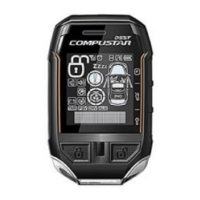
Remote Button Functions
1
2
3
5
6
7
8
9
1 0
1 1
1 2
1 3
1 4
Button
Press
Function
0.5 sec
Horn - on/off
0.5 sec
Valet Mode - on/off
0.5 sec
Passive Locking - on/off
0.5 sec
0.5 sec
Timer Start Mode - on/off
Turbo Mode - on/off
2 sec
Programming Menu 1- Installer Only
2 sec
Programming Menu 2- Installer Only
Note : " "
Represents pressing the button for 2 seconds.
"
( )
"
Represents simultaneously pressing the buttons.
"
( )
"
Represents simultaneously pressing the buttons for 2 second
s .
4
Lock
. If held for 3.5 seconds, it will panic the system.
0.5 sec
0.5 sec
0.5 sec
0.5 sec
Unlock
2 sec
Auto -start Function - on/off
Auxiliary Option 2
Auxiliary Option 1
2 sec
Trunk Release
3.5 sec
Panic, Press to shut off.
R
e
m
o
t
e
L
ea
r
n
R
ou
t
i
n
e
The CompuStar system will allow up to three remotes to be programmed to one
vehicle. Please perform the following procedure to add or reprogram additional
remotes.


 To Next Page