The device described in the manual is the Firstech DASII (Digital Adjustable Sensor gen II), a multi-sensor solution designed for vehicle security and remote start systems. It integrates several sensor functionalities into a single unit, providing comprehensive monitoring for various events.
Function Description:
The DASII is a sophisticated sensor system that combines multiple detection capabilities:
- Accelerometer: This built-in feature monitors sudden forward or backward movement, specifically designed for use during the remote start process in manual transmission vehicles. It's important to note that this accelerometer function is not active in automatic transmission mode.
- Dual Stage Impact Sensor: This sensor detects impacts to the vehicle, likely providing different levels of alert based on the severity of the impact (e.g., pre-warn and full alarm).
- Auto Adjusting Tilt Sensor: This sensor detects changes in the vehicle's tilt, which could indicate towing or jacking of the vehicle. Its "auto adjusting" nature suggests it can adapt to the vehicle's normal resting position.
- Glass Break Sensor: This sensor detects the sound frequency associated with breaking glass, providing an alert if a window is shattered.
The DASII is designed to be integrated with Firstech's remote start and security systems, specifically mentioned in conjunction with "CM" (Control Module) units like the DC3 CM. It allows users to program and adjust the sensitivity levels of each individual sensor to suit their specific needs and vehicle environment.
Important Technical Specifications (derived from programming menu):
The manual provides a detailed programming menu that outlines the adjustable levels for each sensor:
- Shock Level (Prewarn): Offers 10 levels of sensitivity adjustment. A setting of '0' indicates the sensor is OFF. The display shows options for "High sensitivity," "Default," and "Low sensitivity."
- Window Break Sensing Condition: Offers 2 levels of adjustment. These conditions likely determine how the glass break sensor operates, with options for "Sound Only" or "Sound and Vibration."
- Window Break Sound Sensitivity: Offers 6 levels of sensitivity adjustment for the glass break sensor. A setting of '0' indicates the sensor is OFF. The display shows options for "Low sensitivity," "Default," and "High sensitivity."
- Tilt: Offers 4 levels of sensitivity adjustment. A setting of '0' indicates the sensor is OFF. The display shows options for "3.0°," "Default," and "High sensitivity."
- Movement: Offers 3 levels of sensitivity adjustment. A setting of '0' indicates the sensor is OFF. The display shows options for "5 inch," "Default," and "3 inch."
The device features an LED display (e.g., "1:8" on the cover, and single digit displays like "8.", "2.", "3.", "4.", "5." in the programming menu) for indicating selected sensors and sensitivity levels. It also uses Red and Green LEDs for status indication during programming (e.g., "Red LED ON," "Red & Green LED ON," "Green LED ON," "Red LED Flash," "Green LED Flash").
Usage Features:
The DASII is designed for user-friendly programming and adjustment:
- Programming Button: A single programming button is used to navigate through sensor selections and adjust sensitivity levels.
- Remote Control Integration: Programming is initiated by sending an "Unlock" command twice using any Firstech or OEM remote capable of controlling the CM through a data module.
- Display Initialization: Upon initiation, the DASII display powers up and remains active for at least 5 minutes or until the ignition is turned off, providing ample time for adjustments.
- Confirmation and Saving: Holding the programming button for 2 seconds confirms a sensor selection and enters sensitivity adjustment mode, or saves the current sensitivity setting. If no button is pressed within 5 seconds after setting, the LED flashes twice to save the setting and exit that sensor's programming.
- OFF Setting: For most sensors, a sensitivity setting of '0' effectively turns the sensor off, providing flexibility for users who may not need all sensor functions.
- Pre-Installation Notes: The manual emphasizes the importance of proper mounting on a solid-semi-solid surface centrally located in the vehicle for optimal performance. It also advises fully testing each sensor with all windows and doors closed before vehicle delivery.
- DC3 CM Specific Programming: For systems utilizing the DC3 CM, the manual recommends setting sensor levels to "H" (highest setting) initially, and then using the sensitivity dial (OFF=>1-10) on the DC3 itself for finer, continuous adjustments during testing. This suggests a more integrated and dynamic adjustment process with the DC3 CM.
- Optional Shock Sensor Adjustment Procedures (NON DC3 CM): This section details an alternative method for adjusting the shock sensor sensitivity, involving a series of lock/unlock commands and observing parking light flashes or horn honks/chirps to confirm sensitivity levels. This method allows for adjusting "Warm Away Zone 1" and "Instant Trigger Zone 2" independently.
Maintenance Features:
The manual primarily focuses on installation and programming, with less emphasis on ongoing maintenance. However, the ability to adjust sensor sensitivity can be considered a maintenance feature, allowing users to fine-tune the system's responsiveness over time or as environmental conditions change.
- Troubleshooting/Support: The manual provides technical support contacts for authorized dealers (phone and email) and directs users to
https://install.myfirstech.com for wiring diagrams and additional information. Consumers are advised to contact client services directly.
- Warnings: Important warnings are included regarding proper installation, particularly concerning wiring routing to avoid driving hazards, and disclaimers about manufacturer responsibility for damages caused by improper user modifications.
In summary, the Firstech DASII is a versatile multi-sensor unit designed to enhance vehicle security and remote start functionality, offering a range of adjustable detection capabilities for impacts, tilt, glass breakage, and movement, with user-friendly programming options.

 Need help?
 General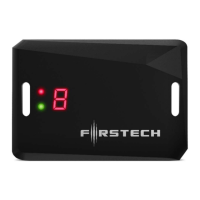

 To Next Page