
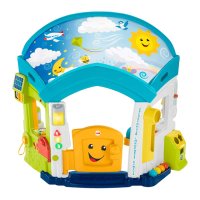
 Need help?
Do you have a question about the Fisher-Price Laugh & Learn Smart Learning Home and is the answer not in the manual?
 General
| Batteries Included | Yes |
|---|---|
| Material Type | Plastic |
| Color | Multicolor |
| Type | Interactive Learning Toy |
| Recommended Age | 6-36 months |
| Batteries Required | Yes |
| Features | lights, sounds, music |
| Interactive Elements | and more |
| Educational Focus | Numbers, shapes, colors, greetings, and more |
Details adult assembly needs, required tools, time estimate, and battery specifications for operation.
Includes cleaning instructions, screw usage guidance, product interaction notes, and environmental considerations.
Provides QR code for assembly questions and troubleshooting assistance.
Visual identification of all parts included in the product assembly.
This package contains small parts. For adult assembly only.
Details screw types (M3.5 x 19 mm) and quantities, including an extra screw.
Instructions for sliding the switch to ON (low/high volume) or OFF, and resetting electronics.
Guide for choosing the preferred language: English, Spanish, French, or Mandarin.
Baby enjoys fun sounds, music, songs, and introductory words/phrases.
Hear sounds, phrases, and songs with colors, numbers, greetings, and days of the week.
Listen to engaging songs and phrases that inspire imaginative play.
Illustrates interactions like mail time, power control, shape recognition, and doorbell.
Explains greetings, music cycling, and interactions with weather, ABCs, counting, and colors.


 To Next Page